CRM Integration not working anymore

Status
Not open for further replies.

Preycon

SOHO User
Joined
Sep 12, 2020
Messages
9
Reaction score
2
I had an integration working with Pipedrive before the upgrade to V18 and still works until the point in Call Journaling where I need to do a POST with JSON. This works on the CRM template generator and logs the call but when running an actual call on the system I get this message on the 3cxSystemService.log:

2021/08/19 13:33:32.118|5657|0046|Verb|Processing scenario 'ReportCall-LogCall'.
2021/08/19 13:33:32.118|5657|0046|Verb|Creating new HttpClient for Basic authentication
2021/08/19 13:33:32.122|5657|0046|Erro|Exception during call reporting: System.FormatException: Input string was not in a correct format.
at System.Number.ThrowOverflowOrFormatException(ParsingStatus status, TypeCode type)
at CrmIntegration.ScenarioProcessorBase.CreateJsonFromPostValues(RequestItem requestItem, IValueManager customManager)
at CrmIntegration.ScenarioProcessorBase.ProcessRequest(ScenarioRequest request, IValueManager customManager, HttpClient client, CancellationToken token)
at CrmIntegration.ScenarioProcessorBase.ProcessScenario(ProtocolScenario scenario, IValueManager customManager, CancellationToken token)
at CrmIntegration.ScenarioProcessorBase.ProcessMatching(ProtocolScenario scenario, MatchingPath matching, ResponseMatcher responseMatcher, IValueManager customManager, HashSet`1 distinctMatchings, CancellationToken token)
at CrmIntegration.ScenarioProcessorBase.ProcessFoundMatchings(ProtocolScenario scenario, IValueManager customManager, List`1 matchings, ResponseMatcher responseMatcher, CancellationToken token)
at CrmIntegration.ScenarioProcessorBase.ProcessScenario(ProtocolScenario scenario, IValueManager customManager, CancellationToken token)
at CrmIntegration.ScenarioProcessorBase.Execute(ProtocolScenario scenario, CancellationToken token)
at CrmIntegration.CrmProcessor.ExecuteScenarioByName(String scenarioName, IEnumerable`1 parameters, Boolean useNoAuthProvider, CancellationToken token)
at CrmIntegration.CrmProcessor.ExecuteScenarioWithRetries(String scenarioId, Dictionary`2 parameters, CancellationToken token)
at CrmIntegration.CrmProcessor.ReportCall(CallEndedEvent callEndedEvent, CancellationToken token)

Now, I already checked all my variables and I can't find what is this String that is not formatted correctly - Is there any change on the new version of 3CX that changes how these are sent? I don't see a way to check the actual body sent from the system but if I try sending this to the CRM API via Insomnia I don't get that error back

{"user_id":10673437,"to_phone_number":"521234567890","deal_id":10447,"outcome":"connected","start_time":"2021-08-19T18:29:19.6464384Z","end_time":"2021-08-19T18:34:19.6464663Z"}

Here is the code for that scenario, I would appreciate the help.

Code:
<Scenario Id="ReportCall-LogCall" Type="REST">

      <Request SkipIf="[ReportCallEnabled]!=True" Url="https://api.pipedrive.com/v1/callLogs?api_token=[APIkey]" MessagePasses="0" RequestContentType="application/json" RequestEncoding="Json" RequestType="Post" ResponseType="Json">

        <PostValues Key="">

          <Value Key="user_id" Passes="1" Type="Integer">[CRMUserID]</Value>

          <Value Key="to_phone_number" Passes="1" Type="String">[Number]</Value>

          <Value Key="deal_id" Passes="1" Type="Integer">[Contact::DealId]</Value>

          <Value Key="outcome" Passes="1" Type="String">"connected"</Value>

          <Value Key="start_time" Passes="1" Type="String">[[CallStartTimeUTC].ToUniversalTime().ToString("o")]</Value>

          <Value Key="end_time" Passes="1" Type="String">[[CallEndTimeUTC].ToUniversalTime().ToString("o")]</Value>

        </PostValues>

      </Request>

      <Outputs AllowEmpty="false" />

    </Scenario>
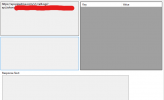
 
Ok, answering myself, I discovered there is a new CRM Template Generator and in the new version I get that error. I'm guessing there is a change on how I have to set the body on the request since this part is empty:


1629400577702.png
 
The "Contact::" variables are no longer available during call journaling (to remove some requests from the cycle.) It is now saved only as EntityId and EntityType (which are free text) and uses that for call journaling.

I recommend recreating your template using the new version to make it easier.
 
  • Like
Reactions: edossantos
The "Contact::" variables are no longer available during call journaling (to remove some requests from the cycle.) It is now saved only as EntityId and EntityType (which are free text) and uses that for call journaling.

I recommend recreating your template using the new version to make it easier.
Awesome, that saved me tons of time. Thanks!!
 
  • Like
Reactions: edossantos
I'm still stuck with this. For some reason when I pass to the call journaling scenario my [Number] variable ignored MaxLength and goes complete. Due to the system adding the international number, it doesn't finds the contact I'm looking for in the CRM.

On the contact lookup scenario all is cool, I can find my contact - so the issue here would be to pass at least the Id of that contact to the next scenario with EntityType, but is not working. This is my Lookup Scenario:

HTML:
    <Scenario Id="" Type="REST">
      <Request Url="https://api.pipedrive.com/v1/persons/search?term=[Number]&amp;fields=phone&amp;start=0&amp;api_token=[APIkey]" MessagePasses="0" RequestEncoding="UrlEncoded" RequestType="Get" ResponseType="Json" />
      <Rules>
        <Rule Type="Any" Ethalon="">data.items.item.id</Rule>
      </Rules>
      <Variables>
        <Variable Name="EntityId" Path="data.items.item.id">
          <Filter />
        </Variable>
        <Variable Name="FirstName" Path="data.items.item.name">
          <Filter />
        </Variable>
        <Variable Name="LastName" Path="data.items.item.name">
          <Filter />
        </Variable>
        <Variable Name="PhoneBusiness" Path="data.items.item.phones">
          <Filter />
        </Variable>
        <Variable Name="PhoneBusiness2" Path="data.items.item.phones">
          <Filter />
        </Variable>
        <Variable Name="PhoneMobile" Path="data.items.item.phones">
          <Filter />
        </Variable>
        <Variable Name="PhoneMobile2" Path="data.items.item.phones">
          <Filter />
        </Variable>
        <Variable Name="CustomValue" Path="data.items.item.owner.id">
          <Filter />
        </Variable>
      </Variables>
      <Outputs AllowEmpty="true">
        <Output Type="FirstName" Passes="1" Value="[FirstName]" />
        <Output Type="LastName" Passes="1" Value="[LastName]" />
        <Output Type="CompanyName" Passes="1" Value="[CompanyName]" />
        <Output Type="Email" Passes="1" Value="[Email]" />
        <Output Type="PhoneBusiness" Passes="1" Value="[PhoneBusiness]" />
        <Output Type="PhoneBusiness2" Passes="1" Value="[PhoneBusiness2]" />
        <Output Type="PhoneMobile" Passes="1" Value="[PhoneMobile]" />
        <Output Type="PhoneMobile2" Passes="1" Value="[PhoneMobile2]" />
        <Output Type="CustomValue" Passes="1" Value="[CustomValue]" />
        <Output Type="ContactUrl" Passes="1" Value="https://lol.pipedrive.com/person/[ContactID]" />
        <Output Type="EntityId" Passes="1" Value="[EntityId]" />
        <Output Type="EntityType" Passes="1" Value="Contacts" />
      </Outputs>
    </Scenario>

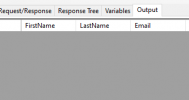
On the template editor I find that running this contact lookup returns no output, I'm not sure if thats the problem and how to fix it.

1629924234285.png

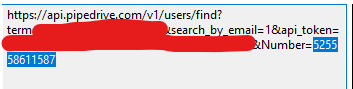
When going into reportcall the [EntityId] variable is empty, I'm using this to also get the Id of the user in the CRM, as I need that variable to log it later, I'm throwing [EntityId] as a param here just to test if it has something:

HTML:
<Scenario Id="ReportCall" Type="REST">
      <Request SkipIf="" Url="https://api.pipedrive.com/v1/users/find?term=[AgentEmail]&amp;search_by_email=1&amp;api_token=[APIkey]&amp;Entity=[EntityId]" MessagePasses="0" RequestContentType="application/json" RequestEncoding="Json" RequestType="Get" ResponseType="Json" />
      <Rules>
        <Rule Type="Any" Ethalon="[UserId]">data.id</Rule>
      </Rules>
      <Variables>
        <Variable Name="UserId" Path="data.id">
          <Filter />
        </Variable>
      </Variables>
      <Outputs Next="" AllowEmpty="true" />
      </Scenario>


I already tested it with hard coding and its working, its just that EntityId variable that is empty.

Also I tried to just subStringData my [Number] variable but I couldn't make it work
 
Are you running 3CX v18? The EntityId output is something that has been added in v18, so if you're still in v16 this will not work.
 
Are you running 3CX v18? The EntityId output is something that has been added in v18, so if you're still in v16 this will not work.
Yep, V18. In v16 I had this fixed with [Contact::Variable] :)
 
Sorry, you're right.

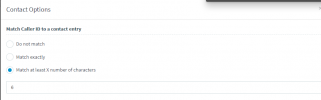
If you're not storing phone numbers with E164 format in the CRM (including country code), try changing the settings from the 3CX Console > Advanced > Contacts > Options > Match X characters, so only the last N digits are sent to the CRM. This will also affect the search in the 3CX phonebook, so if the number is not as full as it is received by the SIP Trunk, this might be an issue.
 
Sorry, you're right.

If you're not storing phone numbers with E164 format in the CRM (including country code), try changing the settings from the 3CX Console > Advanced > Contacts > Options > Match X characters, so only the last N digits are sent to the CRM. This will also affect the search in the 3CX phonebook, so if the number is not as full as it is received by the SIP Trunk, this might be an issue.
1629925658946.png

It's already with just 6 numbers - this works on the lookup scenario since only those 6 numbers are sent to the CRM as intended, the issue comes on Report Call scenario when the variable [Number] turns again into 12 numbers.

1629925683139.png

1629925667175.png
 
Last edited:
Maybe you can try with:
[[Number].Substring(6)]
 
Also, it would be interesting to confirm if the EntityId is being added to the contact in the 3CX phonebook. To do this, you can create a backup or the support information ZIP, then unzip this file and check the XML with the 3CX configuration. There you will find your contact, and you will be able to see if the EntityId is present or not. You can send me this ZIP in a private message if you want, so I take a look for you.
 
  • Like
Reactions: Evolute IT
Status
Not open for further replies.

Latest Posts

Forum statistics

Threads
112,323
Messages
591,896
Members
165,474
Latest member
costionofrei