Custom Cert configuration

Status
Not open for further replies.

Brianofp4

Premier Customer
Joined
Feb 19, 2019
Messages
25
Reaction score
4
Hi, our 3cx hosted in windows server 2016 just updated to version 18 update 8 (build 939). last year I was able to renew the SSL using these method
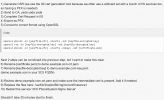
1696924175538.png
But when I am trying it now it doesnt renew my certificate when trying in the web browser, there are no errors in logs also after restarting the nginx, any suggestions?
 
As a first step i would suggest that you contact the SSL authority and provide you with a public certificate and private key (PEM format). Then you also need to ensure that the files are using the correct permissions.
 
  • Like
Reactions: Brianofp4
Is the old certificate still showing? If so, is it possible you changed the wrong files?

Note: I am the author of your quoted instructions. I can assure you these still work on v18 build 939.
 
Is the old certificate still showing? If so, is it possible you changed the wrong files?

Note: I am the author of your quoted instructions. I can assure you these still work on v18 build 939.
thanks for the reply, Yes it is still showing,is there any way to isolate nginx if it is working?
 
My recommendation to you is that you, from a fresh terminal session, copy/edit/or cat the file: /var/lib/3cxpbx/Bin/nginx/conf/Instance1/demo.example.com-crt.pem (replace the name as needed) and edit it to ensure you uploaded the correct file.

example: cat /var/lib/3cxpbx/Bin/nginx/conf/Instance1/demo.example.com-crt.pem

You can use a tool like https://www.sslshopper.com/certificate-decoder.html to ensure it's what you think it is. Either you uploaded the wrong file, wrong file path, are on the wrong server, OR you have some sort of reverse proxy in front of 3CX with it's own cert.

Do not upload the key file anywhere, just the crt file is safe to upload as it is the public cert
 
  • Like
Reactions: nub
My recommendation to you is that you, from a fresh terminal session, copy/edit/or cat the file: /var/lib/3cxpbx/Bin/nginx/conf/Instance1/demo.example.com-crt.pem (replace the name as needed) and edit it to ensure you uploaded the correct file.

example: cat /var/lib/3cxpbx/Bin/nginx/conf/Instance1/demo.example.com-crt.pem

You can use a tool like https://www.sslshopper.com/certificate-decoder.html to ensure it's what you think it is. Either you uploaded the wrong file, wrong file path, are on the wrong server, OR you have some sort of reverse proxy in front of 3CX with it's own cert.

Do not upload the key file anywhere, just the crt file is safe to upload as it is the public cert
thank you, i will try your recommendation. i will give you an update tomorrow. :)
 
Hi , another question please, what will happen to my 3cxweb console if I turn off the nginx service???
 
You will not be able to access the management console.
 
  • Like
Reactions: Brianofp4
You will not be able to access the management console.
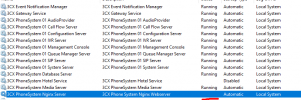
do you think the nginx service has an issue? because I already stopped the service but I can still access the management console, using incognito and private browsing in edge.
1696996257977.png
 
Yes, it seems that is not starting. This indicates issue with the certificate. Check also your Window Event to see if there is any error
 
Yes, it seems that is not starting. This indicates issue with the certificate. Check also your Window Event to see if there is any error
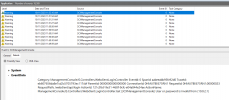
these are all the logs while the nginx is turned off1696996486042.png
 
This is information regarding the management console failed login.
Try to start the nginx and check for errors.
 
do you think the nginx service has an issue? because I already stopped the service but I can still access the management console, using incognito and private browsing in edge.
View attachment 37723
This is why I think you are on the wrong server.

Trace it backwards. What FQDN/IP are you accessing? That goes to what firewall/NAT device? From there, where does the NAT device send the HTTPS port?
 
This is why I think you are on the wrong server.

Trace it backwards. What FQDN/IP are you accessing? That goes to what firewall/NAT device? From there, where does the NAT device send the HTTPS port?
@SweetAction, we only have one server for 3cx so im very sure im on the right server ;), and it is also my 3rd time to renew its SSL. we dont use reverse proxy for it also, do you think a server restart will help?
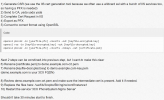
 
Hi brianofp4

When you replace a certificate for a custom FQDN you must also ensure that you also upload and change to the corresponding private key that matches the new certificate.

Failing this part will result in the webserver not starting.
 
  • Like
Reactions: Brianofp4
Hi brianofp4

When you replace a certificate for a custom FQDN you must also ensure that you also upload and change to the corresponding private key that matches the new certificate.

Failing this part will result in the webserver not starting.
Thanks @Charles_3CX, any pointers how to do it in a window server?
 
Thanks @Charles_3CX, any pointers how to do it in a window server?
The certificate and private key need to be .pem format for both Windows and Linux. There are no differences there.

What part do you require information with?
 
The certificate and private key need to be .pem format for both Windows and Linux. There are no differences there.

What part do you require information with?
what I only did is renew our wildcard certificate.
follow these steps
1697009473953.png
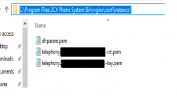
placed the certificate here
1697009519082.png
and restart nginx service, but it seems nothing happens after the restart
 
Same way you replaced the certificate, also do for the new private key to replace the current one.

Check the Nginx.conf and ensure the certificate entry point to the correct location where the certificate and private key reside.
 
Status
Not open for further replies.

Forum statistics

Threads
111,923
Messages
589,751
Members
164,796
Latest member
Dame24