


- Joined
- Sep 23, 2021
- Messages
- 9
- Reaction score
- 1
I have the enterprise license (currently on the free offer of 6 months of Enterprise, and intend to upgrade once testing is finalized). The summary shows Version 18, Enterprise, Valid for 6 months.
There doesn't seem to be a place to enter the FQDN or certificate. I intend to use collab.mydomain.io - which will be easier on a number of levels even though it creates more system and certificate management.
When attempting to use PBXExpress (self host in your cloud) or self-hosted (On-Premise), I'm forced to select a domain name, and "My own" isn't an option.
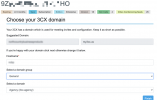
I've found other forum postings, but they just point to needing the higher license or that you should just use the hosted domain. I've also looked at documentation, which doesn't match - so I'm either not in the right place or it has changed.
How can I use my own domain name, preferably using PBXExpress, but I'll take anything.
There doesn't seem to be a place to enter the FQDN or certificate. I intend to use collab.mydomain.io - which will be easier on a number of levels even though it creates more system and certificate management.
When attempting to use PBXExpress (self host in your cloud) or self-hosted (On-Premise), I'm forced to select a domain name, and "My own" isn't an option.
I've found other forum postings, but they just point to needing the higher license or that you should just use the hosted domain. I've also looked at documentation, which doesn't match - so I'm either not in the right place or it has changed.
How can I use my own domain name, preferably using PBXExpress, but I'll take anything.


