Custom On Hold Music Choppy

Status
Not open for further replies.

ITSteve

Forum User
Joined
Sep 13, 2017
Messages
46
Reaction score
4
The boss (the big boss) wants to change the on hold music. No problem I tell him... 2 days later, still struggling to get something that works.

Initially I tried using Audacity to record the tune he wanted from an online source. It went fine, and I was able to make it the correct format for 3CX and upload it. But it sounds choppy when listening to it when calling in and being placed on hold. It sounds fine playing from the computer.

Next I downloaded a few free 'on hold' wav files from the internet, and they did the same thing.

I am testing from a cell phone. If I use the same cell phone, and the 3CX app to call in, it sounds a little better, but not great.

I have looked at the default on hold wav file in Audacity and it seems the same as the other files as far as settings and loudness.

Any suggestions would be appreciated.

Steve
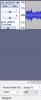
 
Initially I tried using Audacity to record the tune he wanted from an online source. It went fine, and I was able to make it the correct format for 3CX and upload it. But it sounds choppy when listening to it when calling in and being placed on hold. It sounds fine playing from the computer.

I have found Audacity that you have to change the "Project Rate (Hz)" at the bottom left to 8000. If you change it elsewhere to 8000 Hz (8KHz) it won't sound right. Is that were you adjusted the Hz?
 
Yes. And that seems to have taken, as when I open the .wav file it shows 8000:
upload_2018-8-1_15-38-14.png
 
Does the built in default email greeting sound choppy as well? Or only your uploaded files?
 
To expound on craigreilly's question. If you know wireshark well, try capturing the outbound audio. If it's leaving the PBX choppy, check CPU, memory, and disk utilization. If it's showing in wireshark with complete audio, it can be a bandwidth issue or supports reinvites and supports replaces turned on for the trunk.
 
This is my first post trying to help someone :) - I only have a little experience with 3CX but I do know a bit about sound engineering and there are a few gotchas to look out for when making a suitable wav file for 3CX in Audacity.

  1. Your project should be set at Audacity's default NOT 8Khz / 8000Hz as advised above - the conversion to 8Khz should be done at the point you export the audio. If you don't do it this way it will work but the end result will be of lower quality - it's always best to do the dithering down right at the end of the process so any changes you make to the audio are done while the file is at maximum quality.
  2. If using a stereo track make sure you use "Tracks>Mix>Mix Stereo down to mono". Simply merging the left and right tracks or deleting left or right will produce unsatisfactory results including weird, warbly artifacts as bits of the audio cancel each other out.
  3. You will almost certainly need to reduce the volume of the track significantly. At a normalised (i.e. max) level it will be way too loud for the people on hold compared to normal speech. You can use "Effect>Amplify" for this. It might take a few attempts to get the right volume but you will just annoy callers if you deafen them - we've all been there, having to hold the phone away from your ear because the on call music is painfully loud!
  4. If you're slightly obsessive you could use some EQ to cut out the frequencies that 8Hz audio can't really handle, but TBH this is probably overkill.
  5. Music is tough on VOIP CODECS. They weren't designed for that much audio information so you may start to see problems in environments where you only just have sufficient bandwidth or you have high levels of jitter.
  6. Make sure you import using the admin web portal for 3CX to ensure that the file has exactly the correct specifications, don't just copy the file to the folder as, if it is not correct, 3CX will try and convert it on the fly. This is quite a processor intensive thing to do and may be too demanding for the low power hardware required for a small 3CX install.
  7. Make sure you listen back to your wav on the PC you produced it on before uploading to 3CX - garbage in garbage out...

I hope that helps.
 
The default on hold music sounds better, but I can't say it is great.

I don't have much experience with wireshark, but I can take a look and see.

How do I set the export to 8khz without changing the Project Rate?

Thanks.
 
How do I set the export to 8khz without changing the Project Rate?

Apologies, checking that back I'm not right - I was thinking of another audio package and mixing it up with the default project settings in Audacity. Ignore that bit (and apologies to the poster who's correct advice it was). Don't mess with the default settings, but you do need to change the project rate at some point.

There is a guide here if it helps: https://www.3cx.com/docs/converting-wav-file/

The rest of it stands though.
 
I have switched the on hold selection to the other 2 canned selections that came with 3cx - beethoven-30sec.wav, and SummerJourney1.wav. They both sound bad - volume rolls in and out, popping/hissing, just like the others I have tried to create. I will set up wireshark and see what I can find out. (hopefully I can figure it out). Thanks.
 
Looks like wireshark will take a little time to set up - does it need to be running on the 3cx server, or can I monitor from a workstation?

More info: When I call from a 3cx app on a cell phone connected to the office wifi, to another extension in the office, the hold music sounds ok. If I turn off wifi, make the same call, the music sounds OK. It is when I make a call from my cell phone using the cell phone (not the 3cx app) to an extension in the office, that the music sounds bad. Does that help isolate the problem area?

Thanks.
 
I would wonder about checking your CODEC priorities but I think this requires someone a bit more knowledgeable than me.
 
Status
Not open for further replies.

Latest Posts

Forum statistics

Threads
111,891
Messages
589,585
Members
164,756
Latest member
maurin.roffler