


- Joined
- Jul 30, 2011
- Messages
- 6
- Reaction score
- 0
Hi,
I am wondering if anyone has successfully gotten a D-LINK DFL-300 Firewall to work with 3CX.
We have 3CX version 10 with a Sangoma A200 gateway.
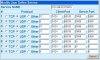
Everything internally works fine. We are having trouble with External extensions. There is no sound. These phones are Grandstream GXP1450 phones that we provisioned in the office and then taken off site. We changed the private IPs to the Public IPs. This to me is a problem with the ports on our firewall but I have checked and double checked as well as had another engineer look and do not see a problem.
The external phone dials, rings 2 times and appears to go to voice mail for the extension it called. We also have the same problem with our external Bria softphone users.
Here is the server log.
13:05:17.562 Currently active calls - 1: [6]
13:05:10.359 [CM503007]: Call(6): Device joined: sip:[email protected]:40600;rinstance=62c55bcabdc42122
13:05:10.359 [CM503007]: Call(6): Device joined: sip:[email protected]:5060;user=phone
13:05:10.359 [MS210005] C:6.1:Answer provided. Connection(proxy mode):192.168.XX.XX:7024(7025)
13:05:10.359 [MS210001] C:6.3:Answer received. RTP connection[unsecure]: 127.0.0.1:40618(40619)
13:05:10.359 Remote SDP is set for legC:6.3
13:05:10.343 [CM505001]: Ext.999: Device info: Device Identified: [Man: 3CX Ltd.;Mod: Voice Mail Menu;Rev: General] Capabilities:[reinvite, replaces, able-no-sdp, recvonly] UserAgent: [3CX Voice Mail Menu] PBX contact: [sip:[email protected]:5060]
13:05:10.343 [CM503002]: Call(6): Alerting sip:[email protected]:40600;rinstance=62c55bcabdc42122
13:05:10.234 [CM503003]: Call(6): Call to sip:[email protected] has failed; Cause: 487 Request Cancelled; from IP:192.168.XX.XXX:5060
13:05:10.234 [CM503025]: Call(6): Calling Ext:Ext.999@[Dev:sip:[email protected]:40600;rinstance=62c55bcabdc42122]
13:05:10.234 [MS210004] C:6.3:Offer provided. Connection(proxy mode): 127.0.0.1:7028(7029)
13:05:10.171 [CM503005]: Call(6): Forwarding: Ext:Ext.999@[Dev:sip:[email protected]:40600;rinstance=62c55bcabdc42122]
13:05:00.265 [CM505001]: Ext.408: Device info: Device Identified: [Man: Polycom;Mod: SoundPoint IP Series;Rev: General] Capabilities:[reinvite, replaces, unable-no-sdp, no-recvonly] UserAgent: [PolycomSoundPointIP-SPIP_331-UA/3.3.1.0933] PBX contact: [sip:[email protected]:5060]
13:05:00.265 [CM503002]: Call(6): Alerting sip:[email protected]:5060
13:05:00.156 [CM503025]: Call(6): Calling Ext:Ext.408@[Dev:sip:[email protected]:5060]
13:05:00.156 [MS210006] C:6.2:Offer provided. Connection(by pass mode): 192.168.X.XXX:9004(9005)
13:05:00.109 [CM503004]: Call(6): Route 1: Ext:Ext.408@[Dev:sip:[email protected]:5060]
13:05:00.109 [MS210000] C:6.1:Offer received. RTP connection: 192.168.X.XXX:9004(9005)
13:05:00.109 [CM503010]: Making route(s) to <sip:[email protected];user=phone>
13:05:00.109 Remote SDP is set for legC:6.1
13:05:00.109 [CM505001]: Ext.707: Device info: Device Identified: [Man: Grandstream;Mod: GXP Series;Rev: General] Capabilities:[reinvite, replaces, able-no-sdp, recvonly] UserAgent: [Grandstream GXP1450 1.0.1.66] PBX contact: [sip:[email protected]:5060]
13:05:00.109 [CM503001]: Call(6): Incoming call from Ext.707 to <sip:[email protected];user=phone>
13:05:00.093 [CM500002]: Info on incoming INVITE:
INVITE sip:[email protected];user=phone SIP/2.0
Via: SIP/2.0/UDP 192.168.X.XXX:5060;branch=z9hG4bK760801006;rport=5060;received=67.186.XXX.XXX
Max-Forwards: 70
Contact: "IXXX SXXX"<sip:[email protected]:5060;user=phone>
To: <sip:[email protected];user=phone>
From: "Imran Siddiqui"<sip:[email protected];user=phone>;tag=1011917716
Call-ID: [email protected]
CSeq: 21 INVITE
Accept: application/sdp, application/dtmf-relay
Allow: INVITE, ACK, OPTIONS, CANCEL, BYE, SUBSCRIBE, NOTIFY, INFO, REFER, UPDATE, MESSAGE
Proxy-Authorization: Digest username="707",realm="3CXPhoneSystem",nonce="414d535c0444d8cb01:f2457f77057aa5a7ed9b08b60e0abde6",uri="sip:[email protected];user=phone",response="eae043b96dc410d4cb16adf053edf459",algorithm=MD5
Supported: replaces, path, timer
User-Agent: Grandstream GXP1450 1.0.1.66
Privacy: none
P-Preferred-Identity: "IXXX SXXX" <sip:[email protected];user=phone>
Content-Length: 0
I am wondering if anyone has successfully gotten a D-LINK DFL-300 Firewall to work with 3CX.
We have 3CX version 10 with a Sangoma A200 gateway.
Everything internally works fine. We are having trouble with External extensions. There is no sound. These phones are Grandstream GXP1450 phones that we provisioned in the office and then taken off site. We changed the private IPs to the Public IPs. This to me is a problem with the ports on our firewall but I have checked and double checked as well as had another engineer look and do not see a problem.
The external phone dials, rings 2 times and appears to go to voice mail for the extension it called. We also have the same problem with our external Bria softphone users.
Here is the server log.
13:05:17.562 Currently active calls - 1: [6]
13:05:10.359 [CM503007]: Call(6): Device joined: sip:[email protected]:40600;rinstance=62c55bcabdc42122
13:05:10.359 [CM503007]: Call(6): Device joined: sip:[email protected]:5060;user=phone
13:05:10.359 [MS210005] C:6.1:Answer provided. Connection(proxy mode):192.168.XX.XX:7024(7025)
13:05:10.359 [MS210001] C:6.3:Answer received. RTP connection[unsecure]: 127.0.0.1:40618(40619)
13:05:10.359 Remote SDP is set for legC:6.3
13:05:10.343 [CM505001]: Ext.999: Device info: Device Identified: [Man: 3CX Ltd.;Mod: Voice Mail Menu;Rev: General] Capabilities:[reinvite, replaces, able-no-sdp, recvonly] UserAgent: [3CX Voice Mail Menu] PBX contact: [sip:[email protected]:5060]
13:05:10.343 [CM503002]: Call(6): Alerting sip:[email protected]:40600;rinstance=62c55bcabdc42122
13:05:10.234 [CM503003]: Call(6): Call to sip:[email protected] has failed; Cause: 487 Request Cancelled; from IP:192.168.XX.XXX:5060
13:05:10.234 [CM503025]: Call(6): Calling Ext:Ext.999@[Dev:sip:[email protected]:40600;rinstance=62c55bcabdc42122]
13:05:10.234 [MS210004] C:6.3:Offer provided. Connection(proxy mode): 127.0.0.1:7028(7029)
13:05:10.171 [CM503005]: Call(6): Forwarding: Ext:Ext.999@[Dev:sip:[email protected]:40600;rinstance=62c55bcabdc42122]
13:05:00.265 [CM505001]: Ext.408: Device info: Device Identified: [Man: Polycom;Mod: SoundPoint IP Series;Rev: General] Capabilities:[reinvite, replaces, unable-no-sdp, no-recvonly] UserAgent: [PolycomSoundPointIP-SPIP_331-UA/3.3.1.0933] PBX contact: [sip:[email protected]:5060]
13:05:00.265 [CM503002]: Call(6): Alerting sip:[email protected]:5060
13:05:00.156 [CM503025]: Call(6): Calling Ext:Ext.408@[Dev:sip:[email protected]:5060]
13:05:00.156 [MS210006] C:6.2:Offer provided. Connection(by pass mode): 192.168.X.XXX:9004(9005)
13:05:00.109 [CM503004]: Call(6): Route 1: Ext:Ext.408@[Dev:sip:[email protected]:5060]
13:05:00.109 [MS210000] C:6.1:Offer received. RTP connection: 192.168.X.XXX:9004(9005)
13:05:00.109 [CM503010]: Making route(s) to <sip:[email protected];user=phone>
13:05:00.109 Remote SDP is set for legC:6.1
13:05:00.109 [CM505001]: Ext.707: Device info: Device Identified: [Man: Grandstream;Mod: GXP Series;Rev: General] Capabilities:[reinvite, replaces, able-no-sdp, recvonly] UserAgent: [Grandstream GXP1450 1.0.1.66] PBX contact: [sip:[email protected]:5060]
13:05:00.109 [CM503001]: Call(6): Incoming call from Ext.707 to <sip:[email protected];user=phone>
13:05:00.093 [CM500002]: Info on incoming INVITE:
INVITE sip:[email protected];user=phone SIP/2.0
Via: SIP/2.0/UDP 192.168.X.XXX:5060;branch=z9hG4bK760801006;rport=5060;received=67.186.XXX.XXX
Max-Forwards: 70
Contact: "IXXX SXXX"<sip:[email protected]:5060;user=phone>
To: <sip:[email protected];user=phone>
From: "Imran Siddiqui"<sip:[email protected];user=phone>;tag=1011917716
Call-ID: [email protected]
CSeq: 21 INVITE
Accept: application/sdp, application/dtmf-relay
Allow: INVITE, ACK, OPTIONS, CANCEL, BYE, SUBSCRIBE, NOTIFY, INFO, REFER, UPDATE, MESSAGE
Proxy-Authorization: Digest username="707",realm="3CXPhoneSystem",nonce="414d535c0444d8cb01:f2457f77057aa5a7ed9b08b60e0abde6",uri="sip:[email protected];user=phone",response="eae043b96dc410d4cb16adf053edf459",algorithm=MD5
Supported: replaces, path, timer
User-Agent: Grandstream GXP1450 1.0.1.66
Privacy: none
P-Preferred-Identity: "IXXX SXXX" <sip:[email protected];user=phone>
Content-Length: 0

 ort mapping is sent to STUN server 96.9.132.83:3478 over Transport 192.168.48.70:5060


