• We do not provide troubleshooting help for unsupported phones. Please try with a supported phone.
  • V20 Update 10 Alpha 2 Learn more

Date and time incorrect on desk phones after update to 18.0 U5

Status
Not open for further replies.

CFMtech

Customer
Basic Certified
Joined
Apr 16, 2019
Messages
38
Reaction score
2
  • 3CX Version, Professional Annual 18.0 U5 (build 418)
  • Server OS Windows Server 2016
  • Is the 3CX Server Hosted and where? On-premise
  • IP Phone Make/Model/Firmware version, Grandstream GXP2130's
  • Provisioning Method: Local
  • Trunk Provider or VoIP Gateway Make/Model, Flowroute, Telnyx
  • Has the Firewall Checker passed: YES
  • Are custom Phone Templates being used: No


Hello all,

I am wondering if anyone else is experiencing this/has any suggestions. We were recently running 18.0 U3 and all was working as expected, over the weekend we updated to update 5 to ensure we didn't have any certificate issues come the end of the month. Well now we're receiving tickets that any desk phone that is rebooted (Grandstream GXP2130's) shows incorrect dates and times. Phones that have NOT been rebooted show the correct date/time. The date is 12-31-1969, and the time will always display as 4:01pm regardless of what time the phone was rebooted. It is not simply offset by a certain number of hours like you would see if it was reading the incorrect time zone. Phones have full network functionality otherwise and all functions appear to work. Static IP or DHCP gives the same results.

The PBX has the correct date, time, and time zone configured. Our AD sites are using 0.pool.ntp.org and everything appears to be able to communicate with the pool. The web client DOES show the correct date/time, just the desk phones do not.

Any suggestions are much appreciated.


Thank you
 
Last edited:
Define "incorrect"...I find an even multiple of 1 hour is usually a time zone issue.
 
Sorry should have been more clear there.
date: 12-31-1969
Time: seems to always start at 4:01pm regardless of what actual time it is. By this I mean, its not offset 3hrs or anything, its just always 4:01pm.

I'll go back and edit the original post to include the specific date/time we're seeing
 
That would likely be Unix epoch (time "zero," 1/1/1970) with a -8 (PST) time zone, I'd guess? We don't have any Grandstream so I don't have much more to offer but maybe that helps. Current firmware on the phones?
 
That's correct. -8 offset for PST.

ALL phones (220) are GXP2130's currently running firmware 1.0.11.35, I dont show any newer firmware available for them from the mgmt console.

Thanks for taking the time!
 
Hello,

It sounds a bit like the phones have rebooted, were not able to contact the NTP, and reverted to the default time.

You would have to run a pcap on your LAN port, and inspect the traffic to and from the phone to see what happens NTP-wise.

This is not likely related to 3CX, factory reset one of the phones to confirm that it still happens.
 
  • Like
Reactions: leejor
Hello,

It sounds a bit like the phones have rebooted, were not able to contact the NTP, and reverted to the default time.

You would have to run a pcap on your LAN port, and inspect the traffic to and from the phone to see what happens NTP-wise.

This is not likely related to 3CX, factory reset one of the phones to confirm that it still happens.


Hello John,

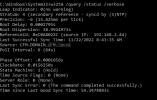
Yes, factory defaulted phones AND brand new out of the box phones refuse to pick up the correct date and time. However I have verified from our 3CX server that it is able to reach our domain controller which is the primary NTP server for the company. Here is the output of running the query w32tm /query /status /verbse directly on the PBX

2022-11-22 09_06_34-192.168.2.49 - Remote Desktop Connection.png

The PBX is successfully communicating with the NTP server and has no errors.

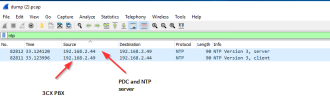
I have rebooted one of the affected phones and performed a wireshark capture from the 3cx mgmt console while the phone was booting. It appears to be communicating with the same NTP server correctly as well, however I will be honest, I dont know EXACTLY what I am looking for here:

2022-11-22 09_07_49-192.168.2.49 - Remote Desktop Connection.png

All other devices on the network are pulling the correct time. As a test, we provisioned a new dell wyse thin client and pointed it at the same primary domain controller that is acting as our NTP server and it correctly pulled the date and time.

Can you tell me if there is anything missing/out of place from the above?

Thank you much!
 
Is it possible to (manually) provision a phone with an off-site (public) NTP server, to see if the same issue occurs? Perhaps there is something, with your internal NTP server, that is not compatible, or, they are not actually reaching it.
 
Is it possible to (manually) provision a phone with an off-site (public) NTP server, to see if the same issue occurs? Perhaps there is something, with your internal NTP server, that is not compatible, or, they are not actually reaching it.

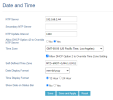
Hi Leejor, thanks for the suggestion. If I go into the phone UI via the mgmt console and navigate through the preferences tree to Settings > Preferences > Date and time and manually enter the exact same IP address of our PDC and NTP server listed above, it WILL show the correct time after the NTP update interval has been reached.

2022-11-22 10_22_01-192.168.2.49 - Remote Desktop Connection.png

HOWEVER, upon reboot this setting reverts to what I assume is the phone or template default ntp server of pool.ntp.org.

I am using the default template, which I believe is grandstream.ph.xml if I go into the template editor and search for NTP I see the following:

Code:
 <!--############################################################################# -->
    <!--#  Settings/Preferences / Date and Time -->
    <!--############################################################################# -->
    <!-- NTP Server -->
    <!-- String -->
    <P30>%%param::time_ntp_server%%</P30>

If I go into the "parameters" section and look for that "time_ntp_server" paramter it DOES list pool.ntp.org, which I want to add is accessible from our network. Do I simply need to replace that entry with our on-prem NTP server?

Thanks again everyone!
 
  • Like
Reactions: CFMtech
Hello John,

Yes, factory defaulted phones AND brand new out of the box phones refuse to pick up the correct date and time. However I have verified from our 3CX server that it is able to reach our domain controller which is the primary NTP server for the company. Here is the output of running the query w32tm /query /status /verbse directly on the PBX

View attachment 32903

The PBX is successfully communicating with the NTP server and has no errors.

I have rebooted one of the affected phones and performed a wireshark capture from the 3cx mgmt console while the phone was booting. It appears to be communicating with the same NTP server correctly as well, however I will be honest, I dont know EXACTLY what I am looking for here:

View attachment 32904

All other devices on the network are pulling the correct time. As a test, we provisioned a new dell wyse thin client and pointed it at the same primary domain controller that is acting as our NTP server and it correctly pulled the date and time.

Can you tell me if there is anything missing/out of place from the above?

Thank you much!

Hi,

Why were you checking the 3CX server though, when it's the phones who are the ones that are failing to pick up the correct time?

3CX is not a time server, the phones contact the NTP independently, and if they fail to do so they will be unable to sync time.

And you did factory reset the phone (meaning it is now unaware of 3CX's existence) and it still showed the wrong time.

You should focus on what in your network could be blocking NTP (usually port 123).

You do not need to change anything in your 3CX server to achieve this, I suggest leaving it as is.

Find a way to mirror a port on your switch, then factory reset a phone and see what happens when it tries to contact an NTP.
 
Status
Not open for further replies.

Forum statistics

Threads
112,147
Messages
590,961
Members
165,167
Latest member
Finatra.us