date picker v20 - beware

Status
Not open for further replies.

treynolen

Gold Partner
Advanced Certified
Joined
Feb 14, 2019
Messages
42
Reaction score
2
I don't know a better name than "date picker", so there you go. But I just about closed a company for a month because on v20 when you are picking a range of dates, if you click on the date on the calendar in the right hand side, it moves that month to the left hand side. I was going to setup an office holiday for Jul 4th and 5th. When I clicked on Thursday the 4th, the calendar for July immediately popped to the other side, so when I went to click the 5th (right next to the 4th and a quick mouse click), the 5th had suddenly become August 2!

I'd really like to see this get tweaked...I know I've probably already messed someone up with this and will just be awaiting the support call.
1719429769982.png
 
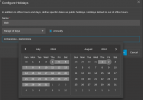
At the moment we are in June so pressing the 4th of July it is expected to change and set the July on the left. This is also expected since you select a Range of Dates(as far as i remember any other software does the same).
Now you pressed on the 4th, all good but as you can see moving the mouse it also highlight the dates until you selected the desired. I tried to replicate this but nothing, maybe try from another browser?
 
I've done it in PWA on Windows and Linux and with the Chrome browser on Windows and Linux and with Firefox on Windows and Linux. What browser are you using?
 
I have tried only in Chrome and Edge without problem.
 
I've prepared a video to show you the behavior. This was in the PWA (Chrome based) in Windows, but I can do the video in other browsers and on other platforms if needed. You do have to have the application or browser set wide enough so that the calendars display side-by-side rather than one over the other to see this behavior.
 

Attachments

I cannot replicate this on my side, check my video to see that all is working properly.
 

Attachments

You are picking the START date on the left side. In your example, the START date would have to be in August and then the August month will quickly move over to the left side making you inadvertently pick somthing in September.

Replicate your example, but try closing the office from August 10 to August 11. You will see that August 11 is quickly replaced with a date in September instead of being adjacent to the 10th like you expect.
 
I don't find this as a problem as when the date is moving to the left it gives you more options since you select a Range of Days.
 
You don't work very quickly then...Everyone I've showed it to was like "wow, I'm glad you showed that to me" because it is super easy to close an office for a month. Show it around to others and get a few thoughts.
 
Also, take note that v18 and earlier did not have this behavior, so it breaks expectations of functionality.
 
Last edited:
Status
Not open for further replies.

Latest Posts

Forum statistics

Threads
111,951
Messages
589,886
Members
164,843
Latest member
sambannoura