


- Joined
- Jul 6, 2017
- Messages
- 6
- Reaction score
- 1
I have spent the last few days trying to get (VERY) old polycom phones to connect back up to 3CX after upgrading from 12.5 to 15.5 (with a stop at 14 along the way).
The phones are mid 2000 vintage Sound Point IP 501s. IF the BootRom on the phone is 4 or better, things work as advertised up to the point of phone/extension settings. That is to say you can put the 3.1.8 application in the provisioning folder and the phones will update and re-attach as long as no other modification to the extension data is modified (auth ID or password).
You may say why would you be changing any of those things anyway... Well in order to get the phones to use the 3.1.x template (not the legacy template) you must delete the phone, create a new phone with the same MAC address but with the 3.1.x template.
IF you have been running 3CX for a billion years and have phones that have 4 digit passwords, you won't be able to save the changes until you update the password. And this is where the fun starts. You change the password and save the extension. Reboot the phone. The phone does not reconnect and your activity log shows registration denied error "Reason: Credentials don't match, check that authorization-ID and password match the ones in extension settings"
07/09/2017 10:56:08 AM - [CM102001]: Authentication failed for AuthFail Recv Req REGISTER from 10.2.30.209:5060 tid=2f3338312F9FCAC8 [email protected]: REGISTER sip:10.2.30.2:5060 SIP/2.0 Via: SIP/2.0/UDP 10.2.30.209;branch=z9hG4bK2f3338312F9FCAC8 Max-Forwards: 70 Contact: <sip:[email protected]>;methods="INVITE, ACK, BYE, CANCEL, OPTIONS, INFO, MESSAGE, SUBSCRIBE, NOTIFY, PRACK, UPDATE, REFER" To: <sip:[email protected]> From: "NAME HERE" <sip:[email protected]>;tag=A560AFD2-822073EB Call-ID: [email protected] CSeq: 2 REGISTER Expires: 900 Accept-Language: en Proxy-Authorization: Digest username="2134",realm="3CXPhoneSystem",nonce="414d535c0f72d50817:0c169b4757f750c7ad0b5f36cb7e4e6a",uri="sip:10.2.30.2:5060",response="553488bd7f70083f55c339e06a52a665",algorithm=MD5 User-Agent: PolycomSoundPointIP-SPIP_501-UA/3.1.8.0070 Content-Length: 0 ; Reason: Credentials don't match, check that authorization-ID and password match the ones in extension settings
You open the provisioning directory on the server to find the <MAC>-phone.cfg file has not been changed to reflect the new password. BUT according to this information:
https://www.3cx.com/blog/docs/v15-finding-provisioning-files/
3CX does not generate those files anymore for security reasons. The server is supposed to generate the response as it is asked for by a phone SO you delete the .cfg files and restart the phone. still NO JOY.
Now we get out the trusty wireshark to see what is actually happening.
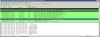
Highlighted: the request for my config. Two lines later 404 file not found. (but you said it generates these on the fly...)
SO go get those .cfg files you threw away, find the one for the phone you are working on (or copy one and make it the phone you need). Open it up and update your password. and put it back in your 3cx server's provisioning folder: <systemDrive>\ProgramData\3cx\Instance1\Data\Http\Interface\provisioning\<yourfolder>
Reboot the phone and the phone will reconnect.
SO not sure what is going on with the new provisioning without saving the files to the provisioning folder, but it doesn't work as documented. I suspect the "reprovision" button in the phones menu is supposed to generate the new data but if the phone isn't connected in the first place, there is no way to click the button.
Now if I could just get my users to adopt the softphone......
The phones are mid 2000 vintage Sound Point IP 501s. IF the BootRom on the phone is 4 or better, things work as advertised up to the point of phone/extension settings. That is to say you can put the 3.1.8 application in the provisioning folder and the phones will update and re-attach as long as no other modification to the extension data is modified (auth ID or password).
You may say why would you be changing any of those things anyway... Well in order to get the phones to use the 3.1.x template (not the legacy template) you must delete the phone, create a new phone with the same MAC address but with the 3.1.x template.
IF you have been running 3CX for a billion years and have phones that have 4 digit passwords, you won't be able to save the changes until you update the password. And this is where the fun starts. You change the password and save the extension. Reboot the phone. The phone does not reconnect and your activity log shows registration denied error "Reason: Credentials don't match, check that authorization-ID and password match the ones in extension settings"
07/09/2017 10:56:08 AM - [CM102001]: Authentication failed for AuthFail Recv Req REGISTER from 10.2.30.209:5060 tid=2f3338312F9FCAC8 [email protected]: REGISTER sip:10.2.30.2:5060 SIP/2.0 Via: SIP/2.0/UDP 10.2.30.209;branch=z9hG4bK2f3338312F9FCAC8 Max-Forwards: 70 Contact: <sip:[email protected]>;methods="INVITE, ACK, BYE, CANCEL, OPTIONS, INFO, MESSAGE, SUBSCRIBE, NOTIFY, PRACK, UPDATE, REFER" To: <sip:[email protected]> From: "NAME HERE" <sip:[email protected]>;tag=A560AFD2-822073EB Call-ID: [email protected] CSeq: 2 REGISTER Expires: 900 Accept-Language: en Proxy-Authorization: Digest username="2134",realm="3CXPhoneSystem",nonce="414d535c0f72d50817:0c169b4757f750c7ad0b5f36cb7e4e6a",uri="sip:10.2.30.2:5060",response="553488bd7f70083f55c339e06a52a665",algorithm=MD5 User-Agent: PolycomSoundPointIP-SPIP_501-UA/3.1.8.0070 Content-Length: 0 ; Reason: Credentials don't match, check that authorization-ID and password match the ones in extension settings
You open the provisioning directory on the server to find the <MAC>-phone.cfg file has not been changed to reflect the new password. BUT according to this information:
https://www.3cx.com/blog/docs/v15-finding-provisioning-files/
3CX does not generate those files anymore for security reasons. The server is supposed to generate the response as it is asked for by a phone SO you delete the .cfg files and restart the phone. still NO JOY.
Now we get out the trusty wireshark to see what is actually happening.
Highlighted: the request for my config. Two lines later 404 file not found. (but you said it generates these on the fly...)
SO go get those .cfg files you threw away, find the one for the phone you are working on (or copy one and make it the phone you need). Open it up and update your password. and put it back in your 3cx server's provisioning folder: <systemDrive>\ProgramData\3cx\Instance1\Data\Http\Interface\provisioning\<yourfolder>
Reboot the phone and the phone will reconnect.
SO not sure what is going on with the new provisioning without saving the files to the provisioning folder, but it doesn't work as documented. I suspect the "reprovision" button in the phones menu is supposed to generate the new data but if the phone isn't connected in the first place, there is no way to click the button.
Now if I could just get my users to adopt the softphone......


