Delayed Dialling on Hosted with some Handsets

Status
Not open for further replies.

wavetel1

Silver Partner
Advanced Certified
Joined
May 13, 2016
Messages
17
Reaction score
4
I have a issue with some phones with delayed outgoing dialling. Handsets are Fanvil X5U with some X210 models. I have 1 SBC setup to handle the X210s and the rest of the phones are handled by 5 Router phones which are X5U v2 . There are 31 handsets in total on the system.
My concern is that I may not have enough Router phones configured to handle the BLFs on all phones but getting exact info on this is not easy when I planned the job/system.

Once a conversation is established it works fine but the delay (up to 10 seconds Ive observed) on outgoing calls is pretty disconcerting.
I have read some dated posts on the forum that talk about this sort of issue but they are specific to On Prems systems and issues with Port forwards and UTMs . I should not need any port forwards with a Hosted system running Router Phones surely ?

Any advice on where to start looking ? Tony
 
No, no port forwards for router phone /SBC. Limit of 10 per router phone.

Both models/all phones have the issue?

Is it a dialing timeout? If you use a web client to control/disk the phone does it happen?
 
Hello @wavetel1

As mentioned by @SteveITS the limit for router phones is 10 phones per router phone.

Can you please clarify if the delay appears also from the phones connected to your SBC or is it present to the ones connected to your router phones?
Does this happen also from WebClient/mobile App?
Also can you please let us know what router phones are you using?
 
  • Like
Reactions: TheodorosG_3CX
Thanks for the prompt replies.

Ive been on site to gather accurate info on your questions.

If I make a call (internal) using a BLF key usually then the phone rings straight away. On answering the call there is a 3-5 second delay on call establishment. During this time I am listening to Ring as though it has not yet been answered.
Once conversation is established there are no delays.

The Delay occurs on internal calls.
There does not appear to be delay between phones that are on the SBC which are all the X210 Fanvils.
There is delay on calling out with the WebClient but not as bad on my observations.

I have 1SBC with 5 agents showing behind it X210's
5 total X5U Router phones each with 5 agents behind them except 1 with 6 agents.

Another issue shows up on occasion where one of the router phones just drops calls mid call . This is a particularly busy phone.
Iam thinking of introducing more router phones and moving the agents off this particular one. I would rather do this based on something solid rather than just stab at it aimlessly.

The Firewall is a CISCO (new) looked after by the customer.

Looking at introducing more router phones looks messy in that I have to completely delete the user and recreate it and then provision it as a router phone. In doing this all the BLF keys on all other phones (supervising this one) will be deleted.
Tell me I am wrong.
Anyway lets focus on the delay issue before we get carried away with that last point.

Thanks for the help. I think that covers your questions.

Tony
 
In doing this all the BLF keys on all other phones (supervising this one) will be deleted.
Tell me I am wrong.
The BLFs are stored per extension (whether it has a phone assigned or not).
So deleting and adding phones to an extension will not clear the BLFs.
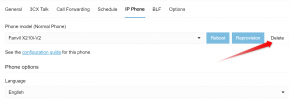
You do not need to delete the entire extension, simply delete the phone from the extension itself if you need to remove it (always using the webclient Admin)
1690810103811.png

Note:If you are deleting a router phone, first edit the extensions that rely on it as their router, and point them to a new router phone (or SBC). Once they are all moved you can then delete the router phone they used to connect through safely and repurpose it as needed.
 
Hello @wavetel1

As mentioned by @SteveITS the limit for router phones is 10 phones per router phone.

Can you please clarify if the delay appears also from the phones connected to your SBC or is it present to the ones connected to your router phones?
Does this happen also from WebClient/mobile App?
Also can you please let us know what router phones are you using?
Dimitris

It seems that this is related to the Router phones. Some more information.

If I place a incoming call the phones in the ring group all ring ok. If I pick up a ringing phone then it establishes the call ok.
If I place a incoming call and dial *20* on a phone that is not in the ring group to pick it up then the incoming call stops ringing on the ring group phones. On the phone I rang in on I am still listening to ring and it seems that nobody has answered yet. at this point.
On the phone that I dialed the pickup code from it appears to be still establishing a session (conversation) and after about 15 seconds indeed it does establish the conversation properly. During this 15 seconds it appears that the call is unanswered from the callers perspective but in fact it is still in limbo establishing the call on the phone I picked it up on.

Ive done this same test by dialing the pickup code on a router phone and it appears that there is no delay in this case.

So Iam guessing the call establishment happens via the Router phones if the phone involved is behind a router phone and once its established its handed over and negotiated directly between the endpoints from then on. Thats what appears to be happening but why the delay ? I have rebooted the POE switch running the phones and also the SBC on site.

I have also introduced 3 more router phones and moved across 3 phones away from the router phone that seems to handle a lot of traffic. This is still a router phone with no other phones behind it. At this point it does not seem to have helped.

Over the weekend during quiet peroids I noticed repeated where all the router phones and the SBC reported in as lost trunks followed by reestablishment shortly after. This was happening 2-3 times a day.
On Tuesday during business hours it also happened and all phones went out of service on site for around 5 mins.
At this time they still had internet connectivity on site.

What else can I test or establish with this issue ? I appear to be heading down a path where all phones may end up being router phones . I hope to go back to site today and test some more scenarios as the customer is getting sick of this.

Tony
 
all the router phones and the SBC reported in as lost trunks followed by reestablishment shortly after. This was happening 2-3 times a day.
On Tuesday during business hours it also happened and all phones went out of service on site for around 5 mins.
At this time they still had internet connectivity on site.
An SBC/router phone will trigger an "up" alert whenever it reconnects. "Down" alerts only trigger after several minutes. "Up" alerts by themselves mean there was a short drop. If the customer says they have connectivity then I would guess either 1) the drops are short enough their web browser retries so (and/or) they don't notice, or 2) the connectivity issue is only between that location and the 3CX server...such as a temporary ISP or backbone routing issue. The latter is harder to find...I suggest pinging the server from that location for an hour or two and see if there is any packet loss.
 
Steve thanks for your reply regards the UP and Down messages. Iam seeing definite Down messages and the Up messages which sounds a bit more drastic. I have seen the occasional set of Up messages in isolation as well.
The Ping test presents a problem in that I dont get any reply. Its a 3CX hosting and I can see its DigitalOcean servers in Sydney but theres no response to Pings.

On friday I found some evidence that there may be a local switching issue. The worst phone (with this problem) by this time was sufferring up to 20 seconds of delay until a PickUp call was connecting. I found that this phone was connected to an older POE switch that was not supplied by us and the users PC was also fed off the back of this phone.
Its a Router phone. So I started removing other phones from behind it leaving it on its own as a router phone.

The delays still persisted. So then I investigated just how it was connected and found the above.
I shifted it across to the newer POE switch that we supplied and all the delays just disappeared.
If nothing else there is a switching or routing issue via this switch. Its not managed by us unfortunately.

I will keep on investigating any other issues looking down the Local switching avenue now more so .

Thanks Tony
 
This looks promising. I updated the firmware on all 30+ phones a couple of days ago. It showed up in the Management console just after you mentioned it on here. Time will tell but the "memory leak" comment fits. In time the issues seem to escalate with the delays get worse.
Thanks Steve.
 
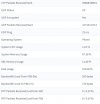
Ive also noticed that Disk usage is always 100% on the router phones Stats. Is this normal ? Its not the case with a proper SBC .
 

Attachments

  • routerph.jpg
    routerph.jpg
    87.8 KB · Views: 8
Last edited:
Ive also noticed that Disk usage is always 100% on the router phones Stats. Is this normal ? Its not the case with a proper SBC .
Yes you can safely ignore the 100% on router phones.
 
Well this all seems to have settled down since the Firmware upgrades on the Fanvil X5U and X210 phones . I see the BLF keys are more reliable now with updates being prompt .
We have replaced the switch and also the router just in the last couple of days also but I think it was more the Firmware on the Fanvils that did it over a month ago now.

Thanks all and the pickup on the firmware fixes was great .
 
Status
Not open for further replies.

Forum statistics

Threads
111,974
Messages
590,081
Members
164,899
Latest member
mazet