Delayed Incoming and Outgoing calls

Status
Not open for further replies.

comp4all

Free User
Joined
Nov 29, 2019
Messages
35
Reaction score
2
Hi,

I'm having an issue with one of my customers.
Their incoming and outgoing calls are delayed between 5-10 seconds.
from time to time the phone(Remote Stun) is registered but no incoming calls and it takes quite a few goo restarts to recover.
They have the following configuration:
The building provides internet to the office so we are on their Router and we are connected with a router of our own.
We have configured NAT so the router will work.

Any idea why we get delayed and from time to time we cannot get incoming calls?

TIA
 
Hi,

I'm having an issue with one of my customers.
Their incoming and outgoing calls are delayed between 5-10 seconds.
from time to time the phone(Remote Stun) is registered but no incoming calls and it takes quite a few goo restarts to recover.
They have the following configuration:
The building provides internet to the office so we are on their Router and we are connected with a router of our own.
We have configured NAT so the router will work.

Any idea why we get delayed and from time to time we cannot get incoming calls?

TIA

Which phone you're using on the remote site?
 
Sorry.
I forgot that,
They have Yealink T21P_E2, but I also tried with Grandstrean GXP2130.
 
Sorry.
I forgot that,
They have Yealink T21P_E2, but I also tried with Grandstrean GXP2130.
What about phone that has not been provisioned via stun which is on local site? still same delay? And call to extension to extension also have same delay on remote site?
 
they are a small office with 1 phone at the moment.
I tested the same extension with a softphone and it works without issues.
 
they are a small office with 1 phone at the moment.
I tested the same extension with a softphone and it works without issues.
for the remote phone, which fqdn are you using? customs one or 3cx fqdn?
 
I use [custome].my3cx.ca
so it is a 3cx fqdn then. In this case. did you use the yealink template by default? or you have changed some config ? for example you have set your provisioning to stun direct , thats is fine.

by default the port the yealink extension on 3cx MC is 5060, > change this to 5068
Local RTP Audio Ports Start : 14000 change this to 14010
Local RTP Audio Ports End : 14019 change this to 14021

do not perform any port forwarding on remote site, do it and reprovision it and check if the issue resolve.
I would advise to reset the phone on remote site then reprovision it with the changes i have just mentioned.
 
I did configure port forwarding in the router. Also, I disabled the SIP ALG.
I forwarded the rang 5000 - 15000 so everything will go through.
Why do you think changing this on the 3cx will make a difference?
 
I did configure port forwarding in the router. Also, I disabled the SIP ALG.
I forwarded the rang 5000 - 15000 so everything will go through.
Why do you think changing this on the 3cx will make a difference?
you have done port forwarding on remote site??
 
For any phone that is provisioned via Direct stun, there is nothing to forward on the remote site. it will only be a plug and play. i would advise to set the router at remote site to be as it was by default. Port forwarding only need to be done on server side where 3cx is installed.

once you returned it back as it was. reset the phone and reprovision it with the increment port i have given earlier. it should work!
 
My 3cx is on Google cloud.
The strange thing is that the softphone works fine, and when the ip phone is holding the extension it's getting delayed.
 
My 3cx is on Google cloud.
The strange thing is that the softphone works fine, and when the ip phone is holding the extension it's getting delayed.
Its 90% because of the port forwaded you have done on remote site. remove the port forwading and enable SIP ALG if it was enabled by default.. and re provision your phone,. as i said, do not do any port forwarding on remote side.. try it and you will see.
 
OK.
before moving them to the 3cx system they had Vonage.
And I left the configuration the same.
the port forwarding was on and the SIP ALG is off by default.

Do you still think I should change the configuration?
 
OK.
before moving them to the 3cx system they had Vonage.
And I left the configuration the same.
the port forwarding was on and the SIP ALG is off by default.

Do you still think I should change the configuration?
just remove all port forwarding on the router which is mapped for the IP Phone IP and other ports 3CX use. The Direct stun is to bypass nat restriction . So just remove all config for previous phone and set your router as it was by defaut without port forwarding. once done, reboot router.
Next reset the phone by pressing the ok button for approx 6 - 8 second until you see rebooting.

and reprovision it from 3CX
 
OK I'll try and update.
Thank you
 
Hi,

We need to make a few corrections here, STUN is not merely "plug and play" and cannot bypass NAT restrictions. There is nothing in our provisioning on supported devices that allows that and your problems are 99% due to failed NAT traversal and/or SIP ALG.

You should not rely on the router to take care of everything for you automatically, this usually leads to no audio, calls not coming in, or delays like you noticed with your customer.

  • SIP ALG = Must be OFF
  • Port Forwarding = must be enabled on the customers router for each and every STUN phone individually.
  • PBX Delivers Audio = Must be enabled on each STUN extension under Options
  • Disallow use of extension outside the LAN = must be unticked or the phone will not register
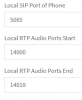
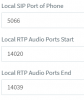
Each phone at the customer's office must be assigned a unique SIP port, and a unique range of audio ports. here are two examples:

Phone 1
14101
Phone 2
14102

These ports must now be forwarded at the customer's remote office where the phones are, for the private IP each phone has. You can reserve their IP on the router's DHCP settings so they will always receive the same private IP and keep the forwards pointing at the correct device always.

Once the above is done, reset and reprovision the phones automatically (they will ask for extension number and voicemail pin after restart). Now it's time to test them and make sure they work as intended.

Note that even though my instructions above are the correct way to provision STUN, you may still face issues because your customer's router is behind the building's main router so you have double NAT for the traffic to pass through which is a challenge you may not be able to overcome by yourself. In this case, your own port forwards may not help at all if their router is interfering with yours.

The solution that may save you from all this trouble is the 3CX SBC. It has been designed to traverse through difficult NAT conditions like the one you are probably in right now. It uses the same tunnel technology that our softphone uses (which makes it work even when the deskphone fails).

So consider your options here, and if you want the easy and most reliable solution, consider setting up an SBC on a small PC or a Raspberry Pi3B+
 
Hi,

We need to make a few corrections here, STUN is not merely "plug and play" and cannot bypass NAT restrictions. There is nothing in our provisioning on supported devices that allows that and your problems are 99% due to failed NAT traversal and/or SIP ALG.

You should not rely on the router to take care of everything for you automatically, this usually leads to no audio, calls not coming in, or delays like you noticed with your customer.

  • SIP ALG = Must be OFF
  • Port Forwarding = must be enabled on the customers router for each and every STUN phone individually.
  • PBX Delivers Audio = Must be enabled on each STUN extension under Options
  • Disallow use of extension outside the LAN = must be unticked or the phone will not register
Each phone at the customer's office must be assigned a unique SIP port, and a unique range of audio ports. here are two examples:

Phone 1
View attachment 14101
Phone 2
View attachment 14102

These ports must now be forwarded at the customer's remote office where the phones are, for the private IP each phone has. You can reserve their IP on the router's DHCP settings so they will always receive the same private IP and keep the forwards pointing at the correct device always.

Once the above is done, reset and reprovision the phones automatically (they will ask for extension number and voicemail pin after restart). Now it's time to test them and make sure they work as intended.

Note that even though my instructions above are the correct way to provision STUN, you may still face issues because your customer's router is behind the building's main router so you have double NAT for the traffic to pass through which is a challenge you may not be able to overcome by yourself. In this case, your own port forwards may not help at all if their router is interfering with yours.

The solution that may save you from all this trouble is the 3CX SBC. It has been designed to traverse through difficult NAT conditions like the one you are probably in right now. It uses the same tunnel technology that our softphone uses (which makes it work even when the deskphone fails).

So consider your options here, and if you want the easy and most reliable solution, consider setting up an SBC on a small PC or a Raspberry Pi3B+
Thank you for the detailed answer.
So it's basically another computer that resides locally in the customer's network?
 
Status
Not open for further replies.

Members Online Now

Forum statistics

Threads
111,835
Messages
589,291
Members
164,668
Latest member
Infinity Network