Deleting extension doesn't remove BLF entry on other extensions!

ebrowne_sts

Platinum Partner
Joined
Jul 22, 2020
Messages
98
Reaction score
43
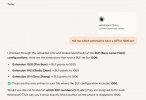
Hey, we are having an issue where deleting an extension doesn't also delete its BLF entries on other extensions. I ran into this issue before on another 3CX but didn't report it assuming it would be fixed eventually. The logs are littered with the below error because of it:
1764613275713.png
Is there a reason deleting the extension doesn't also remove it from all places its referenced like in version 18. I now have to go to every extension that has deleted extensions as BLFs and remove one by one.
Is there a plan to fix this behavior in an upcoming update?
 
  • Like
Reactions: bitn2
Yes, this is really annoying to find out which extension is still using the BLF from the deleted extension. It would be helpfull to see at least the extension who is still using the BLF.
 
  • Like
Reactions: ebrowne_sts
Say, a report of all BLFs?

User, BLF1, Speed Dial, 230
User, BLF2, BLF, 100
 
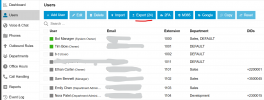
Very slightly indirect but:

1764771172030.png
 
  • Like
Reactions: SteveITS
To check this export is more complicated than checking the extensions... Thats not really a solution.
 
It's ctr+f in excel or just

1764773533406.png
 
  • Like
Reactions: RoryJ and fxbastler
  • Like
Reactions: KyriacosS_3CX
It really is the kind of task where AI fits in perfectly. And it also gave me nice summary of all configured BLFs on each extension and more, quite useful for managing any busy system.
 
Now chatgpt knows DID, OutboundCallerID, internal numbers, names, email addresses, departments, roles, mobile number, webmeeting name, vmb pin ...
Feed me Seymor!
 
Hello,

I have seen this question multiple times now, and found some 'dead' BLF keys as well on a 3CX system recently.
To make my work easy, wrote some Python3 script to find 'dead' BLF keys, that are not valid anymore because some extension has been deleted, but not the BLF keys on phones that reference to the removed extension.
This will than result in the mentioned 'non-extention' errors.

You can use this Python script to find these 'dead' BLF keys.
Before use of this script enter/edit the correct login details (3 lines).

The script will list the 'dead' BLF key's if any found, or just that all is good.
Save the code as file: blf_check.py
Start it with: python3 blf_check.py

If it does help, please leave a like


Python:
import requests
import json
import sys
import re
from xml.etree import ElementTree as ET


# Fill these 3 lines with real login details
serverFQDN = "{FQDN}:{port}"
userName = "{owner}"
passWord = "{password}"


#---------------------------------------------------------------------------------------------
# Functions
#---------------------------------------------------------------------------------------------
# Function to check if BLF keys all valid
#def find_missing_ids(Ext: int, blfs: str, phones: list) -> bool:
def find_missing_ids(Ext: int, blfs: str, phones: list):
    # Wrap the BLF elements in a root element for proper XML parsing
    xml_data = f'<root>{blfs}</root>'
    root = ET.fromstring(xml_data)
    found = False
    for blf in root.findall('BLF'):
        # Extract attributes
        blf_id = blf.get('ID')
        blf_type = blf.get('BLFType')
        blf_type_id = blf.get('BLFTypeID')
        blf_no = blf.get('BLFNo')
        extension = blf.text
        # Check conditions: BLFType="BLF", BLFTypeID="0", and Extension not in array of Phones
        if (blf_type == "BLF" and blf_type_id == "0"):
            if (extension not in phones):
                print(f"Extension: {Ext} - Key {blf_no}, Ext {extension}")
                found = True
    return found

#---------------------------------------------------------------------------------------------
# Main Script
#---------------------------------------------------------------------------------------------
# Authenticate on 3CX server with Username and Password to get an Access Token
# POST /webclient/api/Login/GetAccessToken
url = "https://" + serverFQDN + "/webclient/api/Login/GetAccessToken"
headers = {"Content-Type": "application/json; charset=utf-8"}
data = {"SecurityCode":"", "Username":userName, "Password":passWord}
response = requests.post(url, headers=headers, json=data)
access_token = response.json() ['Token']['access_token']
if response.status_code == 200:
    #print ("We received an API Access Token")
    print ()
else:
    print ("ERROR: ", response.status_code)
    print ("Request API Access Token, does NOT work")
    sys.exit()
#print ("access_token ", access_token)
# Nah, it's all good


# Get full list of Extensions on the 3CX system
# GET /xapi/v1/Users
url = "https://" + serverFQDN + "/xapi/v1/Users"
headers = {"Content-Type": "application/json; charset=utf-8", 'Authorization': 'Bearer ' + access_token}
data = {}
# Here we go...
response = requests.get(url, headers=headers, json=data)
Anyfound= False
if response.status_code == 200:
    response_data = response.json()
    phones = [item['Number'] for item in response_data.get('value', [])]
    blfsx  = [item['Blfs']   for item in response_data.get('value', [])]
    for i in range(len(phones)):
        blf_content = blfsx[i]
        blf_matches = re.findall(r'<BLF[^>]*>.*?</BLF>', blf_content)
        blfsz = ''.join(blf_matches) if blf_matches else ""
        blfs = blfsz.replace('<BLFS>', '')
        Thisfound = find_missing_ids(phones[i], blfs, phones)
        if (Thisfound):
            Anyfound = True

else:
    print ("ERROR: ", response.status_code)
    print ("API request does NOT work")
    sys.exit()

if (not Anyfound):
    print("All good")
print ()
# Okay, it's done!

#---------------------------------------------------------------------------------------------
#---------------------------------------------------------------------------------------------


Example result:
Extension: 1001 - Key 3, Ext 1018
or
All good
 
Last edited:
  • Like
Reactions: KyriacosS_3CX
ah, those creepy python, nowhere installed, no system tool like bash or perl or powershell on windows :(

but if it works for someone - why not *like
 
  • Haha
Reactions: paulodagraca
Hello,

If you do prefere a script in powershell on Windows, than just use this script:
You do not have to be on the 3CX server, you can run this on your own pc/laptop.

You can use this powershell script to find these 'dead' BLF keys.
Before use of this script enter/edit the correct login details (3 lines).

The script will list the 'dead' BLF key's if any found, or just that all is good.
Save the code as file: blf_check.ps1
Start powershell and run this command: ./blf_check.ps1

If it does help, please leave 2 likes

Code:
# Fill these 3 lines with real login details
$serverFQDN = "{FQDN}:{port}"
$userName = "{owner}"
$passWord = "{password}"


#---------------------------------------------------------------------------------------------
# Functions
#---------------------------------------------------------------------------------------------
function Find-MissingIds {
    param(
        [string]$Ext,
        [string]$blfs,
        [array]$phones
    )
  
    $found = $false
  
    # Wrap the BLF elements in a root element for proper XML parsing
    $xmlData = "<root>$blfs</root>"
  
    $xml = [xml]$xmlData
      
    foreach ($blf in $xml.root.BLF) {
        # Extract attributes
        $blfId = $blf.ID
        $blfType = $blf.BLFType
        $blfTypeId = $blf.BLFTypeID
        $blfNo = $blf.BLFNo
        $extension = $blf.'#text'
      
        # Check conditions: BLFType="BLF", BLFTypeID="0", and Extension not in array of Phones
        if ($blfType -eq "BLF" -and $blfTypeId -eq "0") {
            if ($extension -notin $phones) {
                Write-Host "Extension: $Ext - Key $blfNo, Ext $extension"
                $found = $true
            }
        }
    }
  
    return $found
}


#---------------------------------------------------------------------------------------------
# Main Script
#---------------------------------------------------------------------------------------------

# Disable SSL certificate validation (adjust as needed for your environment)
[System.Net.ServicePointManager]::ServerCertificateValidationCallback = { $true }

# Authenticate on 3CX server with Username and Password to get an Access Token
# POST /webclient/api/Login/GetAccessToken
$url = "https://$serverFQDN/webclient/api/Login/GetAccessToken"
$headers = @{
    "Content-Type" = "application/json; charset=utf-8"
}
$body = @{
    SecurityCode = ""
    Username = $userName
    Password = $passWord
} | ConvertTo-Json

try {
    $response = Invoke-RestMethod -Uri $url -Method Post -Headers $headers -Body $body -ErrorAction Stop

    $accessToken = $response.Token.access_token
    #Write-Host $accessToken

    if ($accessToken -eq "") {
        Write-Host "ERROR: Failed to get access token"
        exit 1
    }
}
catch {
    Write-Host "ERROR: $($_.Exception.Response.StatusCode.Value__)"
    Write-Host "Request API Access Token does NOT work"
    exit 1
}


# Get full list of Extensions on the 3CX system
# GET /xapi/v1/Users
$url = "https://$serverFQDN/xapi/v1/Users"
$headers = @{
    "Content-Type" = "application/json; charset=utf-8"
    "Authorization" = "Bearer $accessToken"
}

$response = Invoke-RestMethod -Uri $url -Method Get -Headers $headers -ErrorAction Stop
$anyFound = $false

# Extract phone numbers and BLFs
$phones = @()
$blfsArray = @()

Write-Host ""
if ($response.value) {
    foreach ($item in $response.value) {
        $phones += $item.Number
        $blfsArray += $item.Blfs
    }
}

for ($i = 0; $i -lt $phones.Count; $i++) {
    $blfContent = $blfsArray[$i]
  
    # Extract BLF tags using regex
    $blfMatches = [regex]::Matches($blfContent, '<BLF[^>]*>.*?</BLF>')
  
    if ($blfMatches.Success) {
        $blfsz = ""
        foreach ($match in $blfMatches) {
            $blfsz += $match.Value
        }
        $blfs = $blfsz -replace '<BLFS>', ''
    }
    else {
        $blfs = ""
    }

    $thisFound = Find-MissingIds -Ext $phones[$i] -blfs $blfs -phones $phones
  
    if ($thisFound) {
        $anyFound = $true
    }
}

if (-not $anyFound) {
    Write-Host "All good"
}
Write-Host ""
# Okay, it's done!

#---------------------------------------------------------------------------------------------
#---------------------------------------------------------------------------------------------

Example result:
Extension: 1001 - Key 3, Ext 1018
or
All good
 
Last edited:
Hello,

If you do prefere a script in powershell on Windows, than just use this script:
You do not have to be on the 3CX server, you can run this on your own pc/laptop.

You can use this powershell script to find these 'dead' BLF keys.
Before use of this script enter/edit the correct login details (3 lines).

The script will list the 'dead' BLF key's if any found, or just that all is good.
Save the code as file: blf_check.ps1
Start powershell and run this command: ./blf_check.ps1

If it does help, please leave 2 likes

Code:
# Fill these 3 lines with real login details
$serverFQDN = "{FQDN}:{port}"
$userName = "{owner}"
$passWord = "{password}"


#---------------------------------------------------------------------------------------------

# Functions
#---------------------------------------------------------------------------------------------
function Find-MissingIds {
    param(
        [string]$Ext,
        [string]$blfs,
        [array]$phones
    )
 
    $found = $false
 
    # Wrap the BLF elements in a root element for proper XML parsing
    $xmlData = "<root>$blfs</root>"
 
    $xml = [xml]$xmlData
     
    foreach ($blf in $xml.root.BLF) {
        # Extract attributes
        $blfId = $blf.ID
        $blfType = $blf.BLFType
        $blfTypeId = $blf.BLFTypeID
        $blfNo = $blf.BLFNo
        $extension = $blf.'#text'
     
        # Check conditions: BLFType="BLF", BLFTypeID="0", and Extension not in array of Phones
        if ($blfType -eq "BLF" -and $blfTypeId -eq "0") {
            if ($extension -notin $phones) {
                Write-Host "Extension: $Ext - Key $blfNo, Ext $extension"
                $found = $true
            }
        }
    }
 
    return $found
}


#---------------------------------------------------------------------------------------------
# Main Script
#---------------------------------------------------------------------------------------------

# Disable SSL certificate validation (adjust as needed for your environment)
[System.Net.ServicePointManager]::ServerCertificateValidationCallback = { $true }

# Authenticate on 3CX server with Username and Password to get an Access Token
# POST /webclient/api/Login/GetAccessToken
$url = "https://$serverFQDN/webclient/api/Login/GetAccessToken"
$headers = @{
    "Content-Type" = "application/json; charset=utf-8"
}
$body = @{
    SecurityCode = ""
    Username = $userName
    Password = $passWord
} | ConvertTo-Json

try {
    $response = Invoke-RestMethod -Uri $url -Method Post -Headers $headers -Body $body -ErrorAction Stop

    $accessToken = $response.Token.access_token
    #Write-Host $accessToken

    if ($accessToken -eq "") {
        Write-Host "ERROR: Failed to get access token"
        exit 1
    }
}
catch {
    Write-Host "ERROR: $($_.Exception.Response.StatusCode.Value__)"
    Write-Host "Request API Access Token does NOT work"
    exit 1
}


# Get full list of Extensions on the 3CX system
# GET /xapi/v1/Users
$url = "https://$serverFQDN/xapi/v1/Users"
$headers = @{
    "Content-Type" = "application/json; charset=utf-8"
    "Authorization" = "Bearer $accessToken"
}

$response = Invoke-RestMethod -Uri $url -Method Get -Headers $headers -ErrorAction Stop
$anyFound = $false

# Extract phone numbers and BLFs
$phones = @()
$blfsArray = @()

Write-Host ""
if ($response.value) {
    foreach ($item in $response.value) {
        $phones += $item.Number
        $blfsArray += $item.Blfs
    }
}

for ($i = 0; $i -lt $phones.Count; $i++) {
    $blfContent = $blfsArray[$i]
 
    # Extract BLF tags using regex
    $blfMatches = [regex]::Matches($blfContent, '<BLF[^>]*>.*?</BLF>')
 
    if ($blfMatches.Success) {
        $blfsz = ""
        foreach ($match in $blfMatches) {
            $blfsz += $match.Value
        }
        $blfs = $blfsz -replace '<BLFS>', ''
    }
    else {
        $blfs = ""
    }

    $thisFound = Find-MissingIds -Ext $phones[$i] -blfs $blfs -phones $phones
 
    if ($thisFound) {
        $anyFound = $true
    }
}

if (-not $anyFound) {
    Write-Host "All good"
}
Write-Host ""
# Okay, it's done!

#---------------------------------------------------------------------------------------------
#---------------------------------------------------------------------------------------------
Example result:
Extension: 1001 - Key 3, Ext 1018
or
All good
Does MFA need to be disabled on the system owner extension for this to work? I am getting:
ERROR: 401
Request API Access Token does NOT work
 
Hello,

Yes, you need to disable MFA.
Or create another account, just for the api.

Paulo
 
Hello,

Yes, you need to disable MFA.
Or create another account, just for the api.

Paulo
I created another account but still got the same error. I've never been successful running scripts remotely for 3CX lol. Not sure if, I'm not doing something I need to. Do I have to do anything on the API page (under Integrations)?
 
Hello,

Please check the server fqdn and the port !!

Just as Example myserver.3cx.com:5001

No https or anything and always use the port!

Paulo
 
Hello,

Please check the server fqdn and the port !!

Just as Example myserver.3cx.com:5001

No https or anything and always use the port!

Paulo
Same error.

$serverFQDN = "ro**********.fl.3cx.us:443"
$userName = 9***
$passWord = "$r************"

tried with ports 443 and 5001 (both ports open on cloud side) but same 401 error.
If I don't put fqdn between quotes, it complains that it's not a valid cmdlet
 
Hello,

If you put exactly these details in the browser, can you login normally?

Paulo
 
Hello,

If you put exactly these details in the browser, can you login normally?

Paulo
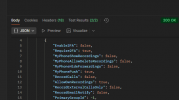
Yes, and I was able to use the same fqdn and credentials in Postman (with the help of Copilot) to authenticate and get users in JSON format as well.
1765830024222.png
 

Forum statistics

Threads
112,285
Messages
591,704
Members
165,406
Latest member
ARKC