Department address book

RobColver

Customer
Basic Certified
Joined
Sep 9, 2022
Messages
81
Reaction score
18
V20 update 7 is now with us which is great. Unfortunately it doesn't appear to include department address books for the multi-company version.

Is there any guidance on when this will likely appear? I have a number of projects that are held up due to the lack of this feature.
 
  • Like
Reactions: PBX128
V20 update 7 is now with us which is great. Unfortunately it doesn't appear to include department address books for the multi-company version.

Is there any guidance on when this will likely appear? I have a number of projects that are held up due to the lack of this feature.
I have the same issue here. I got clients asking me why they should co-locate when they cannot have access to their address book for the company to see incoming calls with names. Even if there is no CRM, at least seperate address bbooks can go a long way to compensate for migrating. Same principle as having a phone with 2 different profiles these days. Hoping the team will take note and define a roadmap.
 
3CX says: v20u8
 
So that confirms it was included, however I see no way to hide/edit existing contacts. It seems like the only way to have this per department is to delete and readd them, is that right?
 
So that confirms it was included, however I see no way to hide/edit existing contacts. It seems like the only way to have this per department is to delete and readd them, is that right?
export / import.... its pretty easy
 
  • Like
Reactions: NikosK_3CX
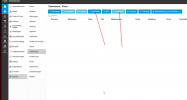
I don't see an option in the UI to export from the contacts, there is only an import option.
 
1772800503112.png
 
  • Like
Reactions: Brian Gabriel
Hi All,

trying to get the directory to show the different departments (Schools in my case)
I have exported the users from School1. then went to phone book and imported school1 users. but it errors saying Specify at least one phone number: Mobile, Home or Business

I only want them to be the EXT numbers,

What am I doing wrong?

Whats the best practice for having the exts I want to see in each school?

Thank you.
 
Hi, @PropsereWomble , Can you please explain a little bit more? Or perhaps star a new thread?

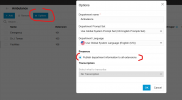
You have 1 PBX with multiple departments and you want the departments to be able to see the members of each other? Within Department Options you can enable shared presence:

1773382931723.png
 
Hi There Kyria,

We have 1 pbx that's set up in multi tenant mode, with SBC's at each site.
Each school is a separate department.
How can I ensure that the school 1 can see school 1 extensions and school 2 can only see school 1 extensions.

My department looks like:
1773386066043.png
 
Ah, multitenant? No they cannot see each other - that is the whole point of it - each Department is a completely separate entity and can only reach each other using their external DIDs.

It might be possible to set up null Trunks and assign the other Departments extensions with a prefix, but this is not a tested scenario.
 
  • Like
Reactions: Evolute IT
apologies Kyria I don't want them to see each other.

What I do want is the each school be able to see their own list of extensions,
is that possible?
 
Still not getting you - Within one School/Department, they do no see the list of other extensions?

Do the users have See Presence enabled?
1773389961567.png

Perhaps if you share some screenshots of what their Team view is now? Or details on what device etc this is not working?
 
  • Like
Reactions: Evolute IT

Latest Posts

Forum statistics

Threads
112,283
Messages
591,694
Members
165,405
Latest member
ARKC