





Smarter call handling, Agentic AI & compliance-ready transcription.
Update 8 marks a major step forward in how 3CX applies AI to real-world call handling — with a strong focus on control, compliance and predictable costs.
This release significantly expands AI-powered routing, screening and assistant roles across the platform, while introducing on-premise and private cloud transcription for organizations that cannot - or choose not to - rely on public cloud services for sensitive voice data.
Alongside these AI enhancements, Update 8 delivers much anticipated administrative improvements such as department-based Microsoft 365 user sync, shared voicemail for queues and ring groups, and improved separation for multi-tenant deployments.
This update also introduces important changes to transcription and licensing that administrators should review before upgrading.
On-Premise & Private Cloud Transcription
On-premise and private cloud transcription is designed for organizations that require full control over their data, predictable costs and compliance with regulatory requirements.
By keeping transcription workloads local, organizations can:
- Avoid uploading sensitive conversations to public cloud platforms
- Significantly reduce transcription costs at scale
- Meet compliance requirements common in healthcare, finance and public services
All calls can be transcribed without exposing voice data to external providers - while maintaining predictable pricing and built-in compliance.
Both the 3CX cloud-based and locally installed Transcription Engines have received multiple improvements, with further enhancements planned for Update 9. Call recordings are now captured in stereo facilitating improved speaker separation, timing analysis and diarization. This results in higher transcription accuracy and more reliable output across real-world call scenarios.
If you’re deploying a new 3CX PBX it will be enabled by default. If you’re already using 3CX you will need to enable it.
Agentic AI: Autonomous & Adaptive Decision-Making
Agentic AI enables autonomous, goal-oriented agents to manage complex, multi-step workflows without constant human supervision.
In practical terms, this allows AI agents to independently screen calls, apply business logic, retrieve relevant knowledge and make routing decisions in real time.
Key benefits include increased operational efficiency, 24/7 productivity, rapid adaptation to new data, improved decision-making through context-aware reasoning and scalable automation that reduces operational costs. To accelerate innovation in this area, AI capabilities will follow a dedicated release cycle, allowing improvements to be delivered even faster.
AI Capabilities in Update 8
Update 8 significantly extends 3CX AI capabilities across the platform, introducing intelligent call screening, routing and assistant roles.
- AI Call Screening is now available across Windows, Android, iOS and the Web Client. The experience is standardized across platforms while respecting the privacy and technical constraints of each operating system.
- AI Receptionist delivers improved routing reliability for everyday use. Routing destinations support a range of options including Extensions and Queues. Administrators can configure single- or multi-language responses, extend caller identification across company and department phonebooks, CRM systems, Google Workspace and Microsoft 365, and apply department-aware routing logic.
- AI Personal Assistant (PA) screens and manages calls on behalf of an executive. The PA enforces availability rules, extends trusted caller lists, collects messages and routes calls directly to the executive when appropriate.
- Knowledge Sources for AI Agents allow AI agents to retrieve company-specific information during calls and chats. Administrators can build knowledge bases from the Admin Console and assign them to AI agents to deliver accurate and relevant responses.
Together, these capabilities introduce AI-driven automation to 3CX that reduces operator workload while maintaining predictable, controlled call handling.
OpenAI Model Changes
OpenAI is retiring several older models, including GPT-4o, GPT-4.1, GPT-4.1 mini and o4-mini effective 13th February.
As part of this change, we have updated our default OpenAI model selection. gpt-5-mini is now the default, offering a better balance between cost and output quality for typical PBX workloads. Admins can still change model selection if required.
For more information on supported models, cost differences and recommended usage, refer to our cost and usage guide.
Boss-Secretary Call Handling
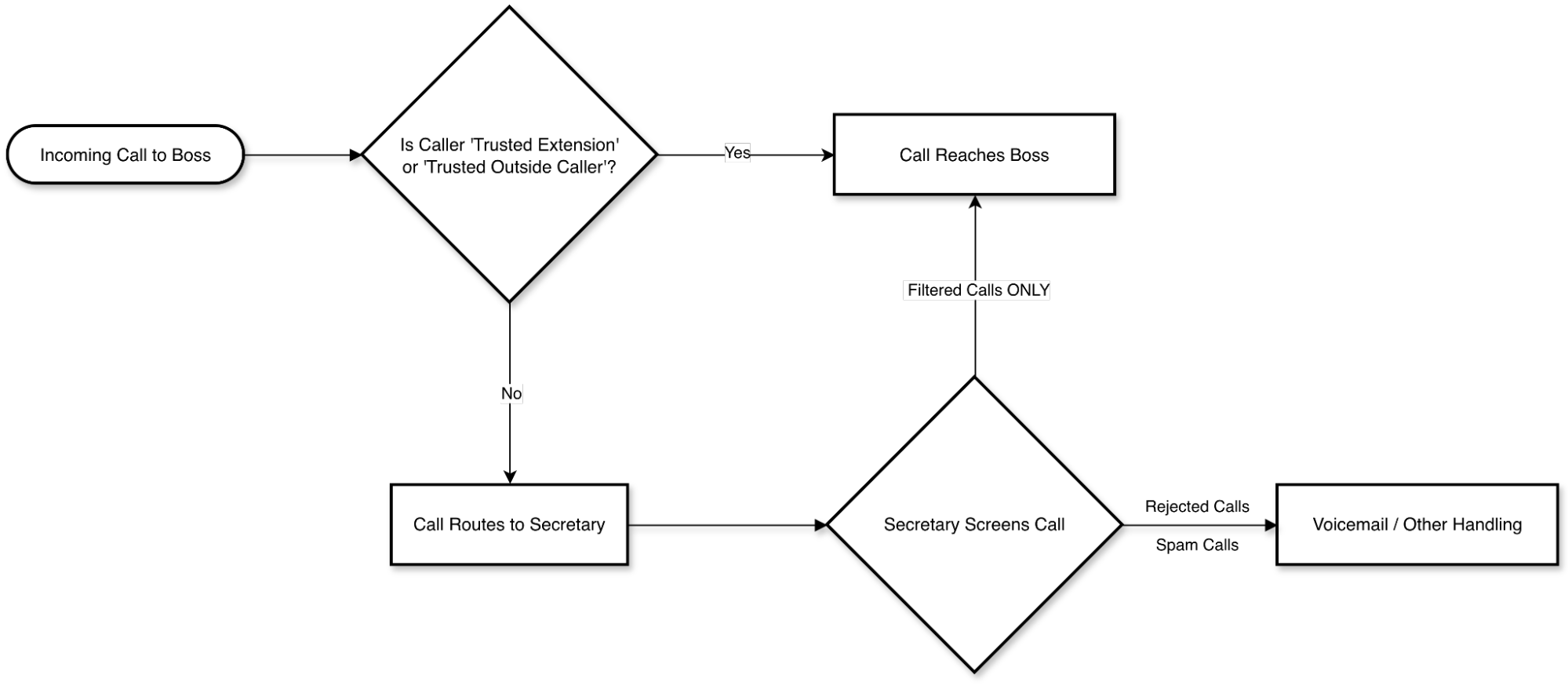
Available for the PRO edition and above (minimum 8SC), Boss-Secretary (non-AI) call handling rules remain a powerful time-saving tool for busy executives.
Executives can designate one or more secretaries to screen incoming calls, block spam and allow direct access only from trusted internal extensions or approved external callers. These rules take priority over all standard call-forwarding exceptions.
If a caller is not trusted, the call routes to the secretary, who can then make an ad-hoc decision — forwarding the call to a sales queue, routing it to voicemail or handling it in any other appropriate way.
Sync AD & Microsoft 365 Departments in 3CX
Administrators managing multi-department environments can now sync Microsoft 365 users directly into specific 3CX departments from day one. Ongoing department membership changes are applied automatically, eliminating manual updates and simplifying onboarding and long-term management.
Shared Voicemail for Queues and Ring Groups
Shared voicemail for queues and ring groups has been completely redesigned.
Previously, the attachment-and-delete workflow limited visibility and made collective voicemail management difficult. The new Shared Voicemail Box introduces three flexible delivery options, including keep-and-copy and attachment-and-delete modes. Voicemails can also be delivered to mailing lists or additional recipients as required.
Voicemails now appear as standard shared messages, allowing teams to track, manage and respond to messages more effectively. A third delivery option allows voicemail attachments to be sent to external recipients without storing messages in the system — ideal for mailing lists or external workflows.
Department and Multi-Tenant Phonebook
The phonebook now supports Company, Department and Personal directories, with full support for multi-tenant deployments. Administrators benefit from clearer separation and control, while users only see directories relevant to them.
In multi-tenant systems, the department phonebook functions as the company phonebook per tenant and is used consistently across all supported clients for contact matching.
Import and bulk-delete actions respect user roles, department membership and multi-company mode, ensuring safer and more consistent contact management.
3CX-Approved Firmware Auto-Deployment
Administrators no longer need to manually track firmware versions. This new option automatically updates phones to the latest 3CX-approved firmware.
The feature is currently disabled by default, allowing administrators to enable it when ready. It will become the default behavior in future releases.
SIP Trunk Checker
When using a VoIP provider not listed in the supported providers list, the SIP Trunk Checker offers guided feedback to simplify configuration.
Integrated directly into the Admin Console, the SIP Trunk Checker helps identify and resolve interoperability issues caused by non-standard provider behavior through guided inbound and outbound call testing.
What Admins Should Review Before Upgrading
Update 8 introduces changes to transcription, licensing, provisioning and AI services that administrators should review prior to upgrading.
3CX Transcription & Licensing Changes
With Update 8, transcription features are aligned with how organizations use AI at scale:
- PRO focuses on core telephony and collaboration features.
- ENT/AI continues to deliver advanced call handling and integrations, with voicemail transcription included.
- ENT+ (Enterprise Plus) is introduced for customers who require professional-grade transcription, compliance and predictable AI workloads (available for 8SC, 16SC and 24SC systems). More on this in a separate blog.
3CX Cloud Transcription for Update 7 and earlier will be discontinued approximately one month after Update 8 Final, ensuring a clean transition to the new transcription architecture.
Systems requiring transcription must upgrade to Update 8 with ENT+ or move to ENT/AI to use onboard transcription. Further details will follow in a dedicated blog.
Update 8 can also automatically handle upcoming model retirements from Google, by migrating affected AI services. OpenAI based AI services need to be manually switched, after you authorize the new models for your API key.
View the complete changelog here.
Get Started With Update 8 Final
To try out these new features, read the above Important Notes for Admins, and then upgrade to V20 Update 8 Final.
- Log in to the Admin Console.
- Navigate to System > Updates.
- Select Update 8 and click Download.
For a new, on-premise installation:
- 3CX Windows Installer.
- 3CX Windows Installation Guide.
- Download the 3CX ISO.
- 3CX Linux Installation Guide.
Start a new cloud deployment here.
Join the Discussion
Join the V20 discussion in our dedicated Partner or Customer Forums. Follow us on X and LinkedIn to stay-up-to date on latest news and feature releases.







