DesktopApp 18.8.508 : No popup on incoming calls

Status
Not open for further replies.

Manuskysurfeur

Forum User
Joined
Oct 21, 2020
Messages
21
Reaction score
8
Hello,

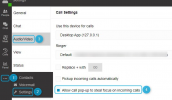
Since the upgrade to DesktopApp 18.8.508, "Allow popup on incoming calls" is disabled by default.
Is it possible to enable it by default like before ?

We deploy DesktopApp using Intune, I am able to modify the MSI package if I know where I can change this parameter ^^

Thanks for your help,

Regards,
 
Hi @Manuskysurfeur,

I'm afraid that there isn't an easy way to do this, or for that matter a way that may work at all. What I've found is that all the configuration files exist in this folder: C:\Users\[USER]\AppData\Roaming\3CXDesktopApp\Local Storage\leveldb

Can't really say more than that I'm afraid.
 
Hello,

Can 3CX release a new version with the same settings as before ASAP ?
It's unbelievable to change settings like this....

At my compagny, 2000 users is using DesktopApp. If we change this settings, our support will be overwhelmed with user requests
 
Hi @Manuskysurfeur,

I'm afraid that in order to have this changed, you'll need to submit a feature request to the Ideas Forum. In order to do this, you'd need to get in contact with a 3CX Partner (Gold and above) to post the feature request on your behalf.
 
I'm having the same problem here with our customers.
 
I'm having the same problem here with our customers.
As per above, the option is by default disabled but will stay enabled and persists even through reboots after enabling it once. There are no plans of changing the default value.
 
As per above, the option is by default disabled but will stay enabled and persists even through reboots after enabling it once. There are no plans of changing the default value.

Hello Chris,

Could we know why the default behavior changed?

Thanks in advance,

KR,
 
Could we know why the default behavior changed?
I can't say the was a change in behavior per se, rather and additional setting specifically the "allow call pop-up to steal focus on incoming calls" which just so happens to be off by default. Turning it on should have the Desktop app behave as it used to with the only difference being that the dialer now also steals focus when an incoming call occurs:
1647944653327.png
 
  • Like
Reactions: Evolute IT
I can't say the was a change in behavior per se, rather and additional setting specifically the "allow call pop-up to steal focus on incoming calls" which just so happens to be off by default. Turning it on should have the Desktop app behave as it used to with the only difference being that the dialer now also steals focus when an incoming call occurs:
The dialler stealing focus is a major change from previous behaviour - now if a user is in the middle of typing they can end up accidentally answering a call by hitting enter at the wrong time!

What our clients want (and what we sold them on) was the dialler popping up to show that there was an incoming call, and let them see who the caller/queue is before they answer without having to locate a taskbar icon. Are you now saying that there is no way to reinstate this behaviour?
 
The dialler stealing focus is a major change from previous behaviour - now if a user is in the middle of typing they can end up accidentally answering a call by hitting enter at the wrong time!

What our clients want (and what we sold them on) was the dialler popping up to show that there was an incoming call, and let them see who the caller/queue is before they answer without having to locate a taskbar icon. Are you now saying that there is no way to reinstate this behaviour?
Have you enabled "Keep dialer on top" on the tray icon? It will pop the dialer on top of everything on incoming calls but not focus it.
 
That is an option for some users but it does take up real estate and not everyone is blessed with acres of screen space and multiple monitors, so the popup feature was very helpful to them
 
That is an option for some users but it does take up real estate and not everyone is blessed with acres of screen space and multiple monitors, so the popup feature was very helpful to them
This is what I am talking about. The dialer is the little popup to control the call.
 
Are you now saying that there is no way to reinstate this behaviour?
No that exact behavior no I'm afraid not.

It's:

1. Disable "Allow call pop-up..": Dialer doesn't pop to the front and steal focus on incoming calls.
2. Enable "Allow call pop-up..": Dialer pops to the front and also steals focus on incoming calls.
3. Enable "Keep Dialer on top": Dialer always on top - will steal focus on incoming calls depending on 1 & 2 selection.
 
  • Like
Reactions: Evolute IT
I also dont understand what this behaviour changed, it was working perfectly before. It looks like the PWA has taken an advantage over the app now which doesnt make much sense.
 
I see, well the PWA is essentially the webclient running as a chrome app so you can of course use that instead if it suits your needs.
 
  • Like
Reactions: Evolute IT
Status
Not open for further replies.

Forum statistics

Threads
111,974
Messages
590,081
Members
164,899
Latest member
mazet