Dial By Name Not Working "File Not Found"

Status
Not open for further replies.

Emmanuel Santos

SOHO User
Joined
Oct 7, 2022
Messages
4
Reaction score
1
Hello, I recently noticed out Dial by name not working and states a "File not Found" error when the option is selected in the Auto Attendant.
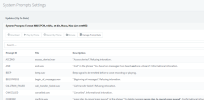
I updated the System Prompts and confirmed that the prompts are set to standard english and have restarted all services just in case but the issue persists.
1665178557563.png
Any advice? Thank you!
 
Go to settings / system prompts and update for your selected languages and it will fix this.
 
  • Like
Reactions: Charles_3CX
Have any of your users 'opted-in' for dial by name?
 
  • Like
Reactions: Charles_3CX
Go to settings / system prompts and update for your selected languages and it will fix this.
Hello, thanks for the reply! I've already updated the system prompts and the issue persists:
1666640309572.png
 
Have any of your users 'opted-in' for dial by name?
Thanks for the reply!
Hmm.. is this an option somewhere? I was under the assumption that we needed to configure the self-prompt under voicemail and it would be set up afterwards, in which case many of our users have done the self-prompt.
 
Thanks for the reply!
Hmm.. is this an option somewhere? I was under the assumption that we needed to configure the self-prompt under voicemail and it would be set up afterwards, in which case many of our users have done the self-prompt.
Read the manual.
 
  • Like
Reactions: Evolute IT
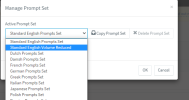
Looks like it was an issue with the System Prompt, which i had incorrectly set to one that has appeared to be duplicated from the original?
1666641182399.png
Setting it back to the Standard English Prompts resolved the issue.

Thanks
 
  • Like
Reactions: TheodorosG_3CX
Status
Not open for further replies.

Forum statistics

Threads
111,974
Messages
590,081
Members
164,899
Latest member
mazet