Solved DIDs and outbound

Status
Not open for further replies.

cyberbitz

Free User
Joined
Oct 29, 2021
Messages
6
Reaction score
2
I have two phone DID numbers with nvoip.com.br How can I select via dial which one for example 9 + number for one DID (Goiania) and 8 + number (Sao Paulo) for the other DID location?

Thanks
 
Hi @cyberbitz,

You can add separate outbound rules, for example one with the prefix 9, and select the SIP Trunk and strip 1 digit. In the outbound CallerID, place your DID number for that rule.
 
  • Like
Reactions: Evolute IT
Thanks, so for example:

SIP1
Main Trunk No: 123456789 set to 23456789
Then Configure Outbound Caller ID to: 123456789

SIP2
Main Trunk No: 987654321 set to 87654321
Then Configure Outbound Caller ID to: 987654321
 
Hi @cyberbitz,

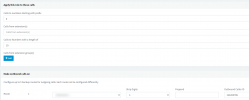
Better to have it something like this:

1635518266325.png
 
Thanks for the visual, helped. Thats awesome.
 
  • Like
Reactions: VasilisV_3CX
No problem @cyberbitz, feel free to open a new thread if you require any further assistance.
 
Status
Not open for further replies.

Latest Posts

Forum statistics

Threads
112,325
Messages
591,898
Members
165,478
Latest member
postmaster@studiolegaleda