Difficulty provisioning Yealink T30

ASHM-Fabio

Premier Customer
Joined
Jun 6, 2022
Messages
7
Reaction score
1
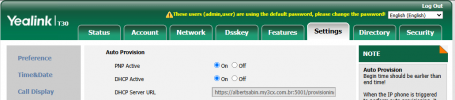
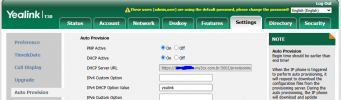
Hello, I'm trying to provision a Yealink T30 (without POE) but I'm having difficulties, I noticed that the template file doesn't show T30, only T30P. I tried to configure DHCP option 66, but when the phone restarts it doesn't get the configuration file.


1749501082631.png
 

Attachments

  • 1749500711614.png
    1749500711614.png
    236.3 KB · Views: 8
  • 1749501007704.png
    1749501007704.png
    51.4 KB · Views: 4
Last edited by a moderator:
Hi,

We only support the T30P model.

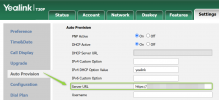
But you can try to reset the phone, and paste the config URL in manually in the correct field shown below - not in the one you were using.

1749542176049.png

This could potentially make it work even though the model is not supported, since they appear to be identical models minus the PoE in this specific case.
 
  • Like
Reactions: ASHM-Fabio
Hi,

We only support the T30P model.

But you can try to reset the phone, and paste the config URL in manually in the correct field shown below - not in the one you were using.

View attachment 48201

This could potentially make it work even though the model is not supported, since they appear to be identical models minus the PoE in this specific case.
Thanks for the reply, JohnS.
I performed the suggested configuration and unfortunately it was unsuccessful, the phone cannot obtain the configuration file.
 
  • Sad
Reactions: JohnS_3CX
Hi Fabio,

I performed the suggested configuration and unfortunately it was unsuccessful, the phone cannot obtain the configuration file.

Perhaps the issue is elsewhere then. The phone should still be able to download the file even if it is the "wrong" model. The fact that it cannot obtain it shows that the phone cannot reach the PBX, or perhaps cannot resolve the IP so the problem must be something else.

You can make a custom template if you wish with the Copy button, and simply change any instance of "T30P" to "T30" and try provisioning it with the custom template. Keep in mind that this is still not supported, but at least you can see if it helps.

I'm afraid I cannot be of any more help on this, but hope that the above points you in the right direction.
 
Okay, I tested provisioning with a Fanvil X1S (supported) and it worked perfectly, including with DHCP option 66. I'll do one more test with a custom file.
 
Solved with the help of a forum member!

Log in to the phone's web interface and go to the menu: Security -> Trusted Certificates -> Accept Only Trusted Certificates => disable this option!

Now reboot the phone.

Log in to the phone again and provision:
Settings -> Auto Provisioning => Press the button (at the bottom) "Auto Provision Now".

In my environment, after reboot, provisioning was already done automatically using DHCP.
 
  • Like
Reactions: paulodagraca
Edit the name of the T30 user and press save. Did the phone automatically reprovision with the new name?
 
;)
 
Edit the name of the T30 user and press save. Did the phone automatically reprovision with the new name?
I didn't need to create a new template for the T30.
 
I'm not referring to the template. Edit the extension that the T30 is assigned under. If you change the name, does it also reflect on the T30 LCD screen? This is to check whether the device can reprovision or whether you only provisioned it once but it will never reprovision again.
 
I'm not referring to the template. Edit the extension that the T30 is assigned under. If you change the name, does it also reflect on the T30 LCD screen? This is to check whether the device can reprovision or whether you only provisioned it once but it will never reprovision again.
Yes! I did some testing and reprovisioning works perfectly. However, since I'm using DHCP provisioning, I have to log into the phone and reboot it, or, if not, turn off the POE on the Switch port and turn it back on.
 

Members Online Now

Forum statistics

Threads
111,831
Messages
589,277
Members
164,660
Latest member
RJenkinsROCK