Digital Ocean, self hosted

Status
Not open for further replies.

gtcldn

Premier Customer
Joined
Feb 12, 2022
Messages
27
Reaction score
3
Hi there,

I am trying to get my 3cx from on-premise onto digital ocean.
I have api token, i have a ssh key, have followed the guide 3cx has over and over but i cannot get it to work.

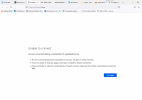
I keep getting this.


Now i had another 3cx that was on prem for another company and i was able to get that switched over with no problems. Both the company that was successful and the company i'm trying to get to cloud are both behind a pfsense.
I didn't make any changes to pfsense for the 1st company to work.
But i can NOT figure out why i keep getting this error for the 2nd company.
I want it hosted on digital ocean for more security as i consistently keep getting ip blacklisted (like everyday)
 

Attachments

  • image (1).png
    image (1).png
    122.3 KB · Views: 33
You should use 3CX hosted. Really no reason to self host and then post here with how to do it?
 
The web page of your mgmt console isnt how you want to diagnose this failed migration.

You should be moving over via the customer portal, any errors will show here.

Otherwise, take a backup, fire up a droplet, install from ISO and restore.
 
You should use 3CX hosted. Really no reason to self host and then post here with how to do it
The web page of your mgmt console isnt how you want to diagnose this failed migration.

You should be moving over via the customer portal, any errors will show here.

Otherwise, take a backup, fire up a droplet, install from ISO and restore.
Hi there, I have done the moving over customer portal and on that end, it doesn't give any errors. It takes me to the page where it shows the login into and links. I click on the link to access the management and the above picture is what i get everyime. So i go back to installing it on the server and then i can access the console with out any errors
 
You should use 3CX hosted. Really no reason to self host and then post here with how to do it?

You should use 3CX hosted. Really no reason to self host and then post here with how to do it?
I know how to do it.
But when i switch it over to cloud, i cannot access the management console. Which why i posted to see if anyone else has had this issue.
 
I know how to do it.
But when i switch it over to cloud, i cannot access the management console. Which why i posted to see if anyone else has had this issue.
What about uploading the 3CX Linux ISO to DigitalOcean and deploying a server with it. Next restore from backup.

Edit: I guess they don't directly support ISO files, but do support custom images. https://www.digitalocean.com/blog/custom-images
 
This looks like a DNS issue to me.
 
I had created a dns zone and added host to it with ip address and it still wasn't working. One thing i did notice was that when i was on prem i could access it via FQDN but not via IP THEN when i moved it to cloud i was finally able to access it via IP but not FQDN. which was fine via ip, now what ran into was not being able to install sbc cause of ssl certification for which i created a new thread for.
 
Status
Not open for further replies.

Forum statistics

Threads
111,974
Messages
590,081
Members
164,899
Latest member
mazet