Digital Receptionist Trigger Issue after Migrating from v18 to v20 (Mobile Number Not Available)

QNEPH-Benedict

Customer
Joined
Feb 19, 2024
Messages
5
Reaction score
1
Hello,

After migrating our PBX from 3CX v18 to v20, we noticed an issue with our Digital Receptionist setup.
  • Scenario:
    • We have a dedicated Digital Receptionist that should trigger when callers dial one of our company’s mobile numbers.
    • These mobile numbers are configured for outbound use only and do not support inbound calls.
    • In v18, whenever someone dialed one of these numbers, the Digital Receptionist (recording: Mobile Number not available) was played.
  • Problem after v20 migration:
    • Now in v20, the Digital Receptionist no longer triggers for this case.
    • Instead, the call rangs only, so the callers assumed that we're not answering the calls
  • Question:
    • Has there been a change in how v20 handles IVR routing or inbound rules for numbers flagged as outbound-only?
    • Is there a new recommended way in v20 to play a message / IVR when an inbound call is attempted on an outbound-only mobile number?
GSM Gateway - Yeastar TG800
We're using 5 Sim Cards for 5 outgoing calls simultaneously

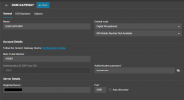
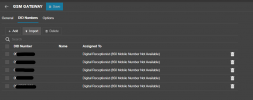
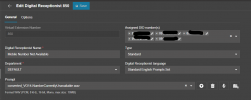
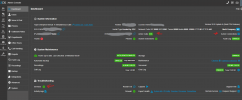
I have attached some screenshots for your reference

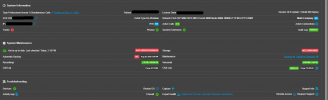
EVENTLOG - Event ID 12889 - Called using my personal mobile number to one of our Mobile Numbers, It just rang 2 times then the call ended.

 

Attachments

  • 3CX_EVENTLOG_v20.png
    3CX_EVENTLOG_v20.png
    8.2 KB · Views: 4
  • 3CX_GSM_GATEWAY_v20.png
    3CX_GSM_GATEWAY_v20.png
    33.8 KB · Views: 4
  • 3CX_GSM_GATEWAY_v20_DID.png
    3CX_GSM_GATEWAY_v20_DID.png
    33.9 KB · Views: 4
  • 3CX_IVR_850.png
    3CX_IVR_850.png
    38.5 KB · Views: 4
Hi,

If all DIDs from this gateway should go to this IVR, just having it as the default destination for it should be enough.

System logs, in default if possible, would show what's coming in and why it does not get routed as expected more clearly.
 
I perform some test again and in Call Reports it shows like this. on Call Handling I added the 100001 in the list of Assigned DID Numbers for IVR 850
 

Attachments

  • 1756971675022.png
    1756971675022.png
    11.1 KB · Views: 3
Are the services all up and running properly? No other calls taking up lines?

1756972198372.png
 
Yes, All of the services are working as well. Just to add up, do you think this one is a factor as well? At first I didn't bother the red led since from my end we can conduct an outbound call using the GSM Gateway. But it seems the issue is the 3CX can communicate with the GSM Gateway but the GSM Gateway can't communicate back to 3CX?

Is that the reason why the IVR is not prompting? *Edited*
 

Attachments

  • 1756972785166.png
    1756972785166.png
    61 KB · Views: 5
  • 1756972839375.png
    1756972839375.png
    21.2 KB · Views: 5
Hi,

That might indeed be an issue if something between the two is not as it should be.

You should try and see in logs on the gateway and the PBX what is failing between them. Perhaps restarting the Gateway might get a clean registration going.
 
Hi,

That might indeed be an issue if something between the two is not as it should be.

You should try and see in logs on the gateway and the PBX what is failing between them. Perhaps restarting the Gateway might get a clean registration going.
Noted. Will try to check on the Gateway logs as well, but on 3CX I usually get the Event ID 12889. Will try to restart the Gateway as well.

Will provide an update once more information available.

Thanks!
 
  • Like
Reactions: KyriacosS_3CX
If the setup here is just this forward to one simple IVR - perhaps rebuilding this part from scratch under v20 will get rid of any incompatible elements that carried forward. As an option.
 
Hi guys,

Update: After rebooting the GSM Gateway (Yeastar TG800), rebooting the 3CX Server and Re-Authenticating the connection of GSM Gateway and 3CX system. The Digital Receptionist IVR 850 still doesn't work. One thing I haven't tried is to add a new gateway on 3CX. The connection between 3CX and GSM Gateway device is okay as I was able to perform the outbound call too.
 
Build a new IVR and point to that, perhaps something is wrong with that. Use a build in audio file for the first test, perhaps the file is the problem, then you can re-upload yours.
 

Forum statistics

Threads
111,956
Messages
589,927
Members
164,858
Latest member
MichaelRussell3