• We do not provide troubleshooting help for unsupported phones. Please try with a supported phone.
  • V20 Update 10 Alpha Learn more

Disabled "Configure Your Phone" screen dialogue -

Zaffarn

Trial User
Joined
Jul 5, 2016
Messages
21
Reaction score
2
Hi

We have 16SC Pro edition, with 3cx hosting, I am trying add Grandstream GXP phones, that used to work fine with previous installation of 3CX, however now, when I create an extension or add the phone to an existing extension, i get disable dialogue "Configure Your Phone", after selecting the phone make/Model and MAC address. I tried to select different Make/Model, I get same problem. Screenshot Attached.

I have tried it with brandnew Fanvil X3U, both these are supported phones, but I still get same disabled Dialogue.

P.s. We only have 4 phones, lot less than 10 phones as recommended by 3CX for SBC

Any idea why this is happening.
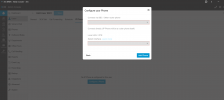
3CX.PNG
 
Last edited:
Hi,

Could you provide some extra details? SBC type/version etc? Perhaps refreshing licence or restarting the services to "clear" anything stuck in the system. If you are using an SBC, check under Phones->PNP Phones. You might be able to pick it up from there.

Best,
K.
 
Is there any SBC configured on your network in a department visible to this user?

There has to be a visible SBC for this phone to use it.
 
  • Like
Reactions: KyriacosS_3CX
Hi

No we dont have SBC configure, to be honest, based on the guide as we have less than 10 phones in total, we never needed the SBC, and after reinstalling the 3cx, It allowed me to create 4 ip-phones but not more than that. Seems there is some restriction.

I tried restarting the service, but no luck.
 
You need an SBC to connect to a remote 3CX system.
 
Phones that were connected from before via STUN were ported over in the V20 upgrade, any new phones should be added via an SBC.
 
OK, I will install an SBC, can we have just one SBC on cloud (azure etc) for all sites, or do we need a separate SBC for each site ?
 
Thanks Kyria,

I will order a small router phone and see how that goes.
 
  • Like
Reactions: KyriacosS_3CX
Thanks Kyria,

I will order a small router phone and see how that goes

Hi Kyria

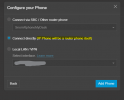
I have now ordered fanvil x4u router phone, but I am not able to select "Connect direct to Phone" that option seems to be disabled for me. I have restarted the OS, but still no luck, any idea how I do that.
 
Is it connected as a router phone in the Voice&Chat section? Or shown as a PNP phone in Phones?

Also it should be added to an extension to get proper SBC provisioning.

And of course, make sure it has the latest 3CX firmware.
 
Is it connected as a router phone in the Voice&Chat section? Or shown as a PNP phone in Phones?

Also it should be added to an extension to get proper SBC provisioning.

And of course, make sure it has the latest 3CX firmware.
Its showing in the "Phones" tab on the main page, not in the "PNP Phones" subtab nor in the "Voice&Chat" tab, does it need to be connected via the Voice&Chat, if so, how do I do that

Yes It is added to an extension

Yes it does have latest firmware of 2.12.20
 
Hi,

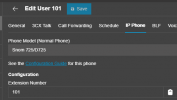
First step - in the Extensions IP Phone settings, it it listed as a Router Phone or a normal phone:
1748854362461.png

If Router Phone, there is probably an issue with the Department the phone was added under, in that your current login is not part of that Department, so you can't see it as an SBC. Log in as system owner or department manager and it should be an option for adding new phones via it (of that department) - if this fails, go to below.

If no, then it was probably not added properly and will need to be deleted and reprovisioned - making sure it's in the correct department or available globally, for which you need to be a System Owner level user to set up.
 
Hi,

First step - in the Extensions IP Phone settings, it it listed as a Router Phone or a normal phone:
View attachment 48091

If Router Phone, there is probably an issue with the Department the phone was added under, in that your current login is not part of that Department, so you can't see it as an SBC. Log in as system owner or department manager and it should be an option for adding new phones via it (of that department) - if this fails, go to below.

If no, then it was probably not added properly and will need to be deleted and reprovisioned - making sure it's in the correct department or available globally, for which you need to be a System Owner level user to set up.

Hi Kyria

Thanks for the quick rely, its showing as "Local Phone" (Screenshot attached)


1748854833991.png


I am the system owner for all the departments as well as the whole system, and when I add the phones/extensions I use my own login.

When I add new phone, it didn't give me option to set this as router phone. Can you help, I will delete this and re-add perhaps that may be the issue. Previously when I added this phone, it only gave me option to set this as local phone, connecting to server via FQDN or IP address of the server, but no where is there an option to say this is "Router Phone"
 
Hi,

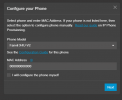
After you enter the basics (in Users->Edit User xxxx-> IP Phone-->Configure a Phone):
1748855131167.png

You should be getting this, that sets it as a router phone.

1748855183977.png
 
Hi,

After you enter the basics (in Users->Edit User xxxx-> IP Phone-->Configure a Phone):
View attachment 48095

You should be getting this, that sets it as a router phone.

View attachment 48096

Hi Kryia,

Thanks for the reply, I checked this and noticed that I had selected "Fanvil X4U" not "Fanvil X4U-V2", I then deleted the phone and recreated it selecting the correct version. The phone now shows successfully connected on the extension, but "Router Phone - SBC" connection shows "Red" on the "Voice&Chat" tab

Any idea why this is happening
 
Might need some time, usually not long - also do check that you do not have some firewall in the middle blocking the relevan SBC port. Sometimes a restart of the phone after it got properly provisioned is needed, although most phone do that themselves.
 
Still same, checked ports, all OK, phone is connecting to Server, but not showing as SBC - Router Phone. I checked the logs, and I am seeing the following error in the events log

30040
Date02/06/2025 12:26
DetailsProvisioning file /provisioning/s88ks7s4g4nznh6/0C383E6D4385.cfg requested by 193.178.55.251 could not be generated
 

Members Online Now

No members online now.

Forum statistics

Threads
111,831
Messages
589,277
Members
164,660
Latest member
RJenkinsROCK