Solved Disconnecting issues with BITel (BITel)

Status
Not open for further replies.

apitsos

SOHO User
Basic Certified
Joined
Mar 27, 2020
Messages
184
Reaction score
52
Hi there!

I have a problem with a SIP provider in Germany, called "BITel". BITel provides a SBC (box) on premises with a local IP. We connect directly our 3CX to that box, using the local IP and the credentials provided. The connection is establishing successfully but after an incoming call the SIP Trunk is getting disconnected. I need to go in the Trunk and click okay in order to force it registered again!

Because the SIP connection is a box in our local network we don't have any firewall interferes with this particular issue. The "Type" of this SIP Trunk is selected as "Provider". I have also configured some DIDs, the "Default Outbound Caller ID".

Under the tab "Inbound Parameters" I have configured the following value:
"CalledNum" number that has been dialed -> To : User Part
"CallerName" caller's name -> From : Display Name
"CallerNum" caller's number -> From : User Part

A temporary solution came to my mind and it worked. I thought to minimize the "Re-Register Timeout" to the value "1", but that doesn't solve my problem. It's just a temporary solution in order to help the client not to stay disconnected for a long time.

Does anyone had any similar experience or any suggestion? I would appreciate any kind of help.

Thanks a lot in advance the members of this great Forum.


Kind regards,
Angelos Pitsos
 
Suggestion would be to run wireshark and see why it's getting disconnected. Then provide that information to your provider to get their input.
 
Unfortunately our installation is based on a Debian/3CX machine. It would be great if it was Windows, but it's not. My knowledge in Linux is limited.
 
Umm... wireshark captures can be done from the management console...

Console as already stated is a fantastic feature built into 3CX, but even so if this wasn't available you have tshark/dumpcap on Linux (have a read up) or a mirror port on a local switchport mirrored to a laptop.
 
Hi there!

The problems are solved now, and I would like to leave some feedback in case someone else is having similar issues with BITel or any other provider that matches the settings we have done with BITel.

1. We changed the authentication type from “Registered/Account based” to “Do not require / IP Based”. Of course, the PBX has a static IP within the client’s network and SBC from BITel was configured properly by them in order to accept that. SBC device stays on premises of the client and accepts registrations only for a specific IP, the IP of the 3CX server. This option is in the SIP Trunk, under the “General” tab.

2. Under the tab “Options” among other settings, in the “Advanced” area we have ticked the option “Supports Re-Invite” and we put the “Re-Register Timeout” in “3600” (the value is in seconds). In the “Codec Priority” area we left only the codec “G.711 A-law”.

3. Under the tab “Inbound Parameters” we have made the following configuration:

a. In the area “Caller Number/Name Field Mapping:” we have the following settings:​
  • "CalledNum" number that has been dialed (default: To->user) -> Request Line URI: User Part
    • "CallerName" caller's name (default: From->display name) -> From: Display Name
    • "CallerNum" caller's number (default: From->user) -> From: User Part
b. We also have a tick in front of the title “Call Source Identification” and under that area we have the following settings:​
  • Contact: Host Part
    • “GWHostPort” gateway/provider host/port
    • No check at the setting: Use both "Call Source Identification" rules and "Caller Number/Name -> CalledNum" field mappings (Note: Disables catch all routing capability)
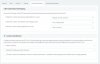
The following screenshot shows this configuration as well:​
3CX-BuK-001_2020-04-07.jpg

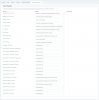
4. Under the tab “Outbound Parameters” we have made the configuration you see on the following screenshot:
3CX-BuK-002_2020-04-07.jpg

Finally, I would like also to thank anyone who answered on this thread and tried to help. Your help is always appreciated and thank you for being part of this community. I hope I will also be able to help someone at some point, as I am now building my knowledge in 3CX PBX systems.
 
  • Like
Reactions: AWS2P and JohnS_3CX
Good work, glad you got it sorted! Careful with the supports-reinvite option, if that was not explicitly asked for by the provider, it may interfere with external calls when put on hold. Since this is a local SBC from the provider though, it may not be so much of an issue if they support it.
 
  • Like
Reactions: apitsos
Hi John!

Thank you very much for the hint. I will ask the technicians from BITel to clarify that.
 
Hi John!

The technician from the provider answered already and advised us to run some tests and try to put a call on hold and take it back, so we will make sure that this option doesn’t interfere with the on hold functionality as explained by you.

I confirm that we have made that test several times and the client makes it all the time the last two weeks or something. So if there was a problem with putting a call on hold and getting it back, we should have already realized, right?
 
Yes, the provider appears to support it and implement it ok if the external caller could hear your music on hold, and if the call can be successfully resumed with two way audio
 
  • Like
Reactions: apitsos
Great! Thank you John! I really appreciate your kind support. Now we should consider the issue completely solved...

Wishing you a great day!
 
Status
Not open for further replies.

Forum statistics

Threads
111,943
Messages
589,861
Members
164,833
Latest member
Edal