Display security video feed on Yealink T58?

Status
Not open for further replies.

ahkim

Joined
Jan 31, 2017
Messages
5
Reaction score
0
I am upgrading some of our phones to the Yealink T58. The specs state that it can display a camera feed on the screen. Could you please let me know where I can get started on making this work? What software and hardware do I need?

The purpose is so a person sitting in the back of the office can keep an eye on the front door.

Thanks!
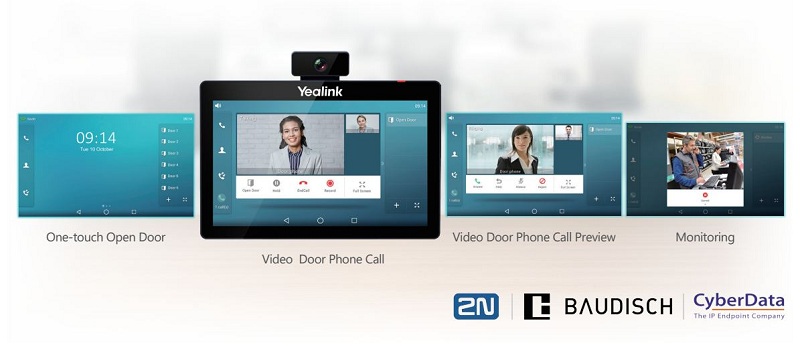
 
You need a door entry system that has the same codex as the yealink phones which I believe is Video codec: H.264 High Profile, H.264, VP8

Note : not all the T5x range allows external video
 
1510653306512.JPG

@teldata1
However, on the T58V I see the video from the 3CX client's webcam, which works fine.
if only there were affordable PoE powered Windows machine:confused:
 
You need a door entry system that has the same codex as the yealink phones which I believe is Video codec: H.264 High Profile, H.264, VP8

Note : not all the T5x range allows external video

Thank you. I checked the specs to confirm the T58 should support video.

Is it possible to display a camera feed without a door entry system? For example, can I purchase a camera that uses one of the supported codecs for the sole purpose of remote viewing?

Can I have the video feed displayed on the phone continuously, or is there a set timeout limit?

1510653306512.JPG

@teldata1
However, on the T58V I see the video from the 3CX client's webcam, which works fine.
if only there were affordable PoE powered Windows machine:confused:

Sopock - sorry I didn't get the joke... are you saying there's a good solution out there?

I'm not the one actually doing the 3CX programming, just the one to point our consultant in the right direction.

Thanks again everyone.
 
Status
Not open for further replies.

Latest Posts

Forum statistics

Threads
111,883
Messages
589,541
Members
164,741
Latest member
Carsonix