Does 3CX support 180 SDP?

Status
Not open for further replies.

Tony_Lin

Platinum Distributor
Advanced Certified
Joined
Mar 16, 2020
Messages
58
Reaction score
49
We have tried connection 3cx to china unicom SIP trunk. It's important to us sale 3CX in china.

imcoming calls works well, but outbound calls sometimes will hung up right now after pick up calls.

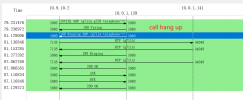
We have compared 2 different wireshark pcap files, normal calls SDP sent with 200OK. When SIP Trunk sent SDP with 180Ringing, 3CX will send BYE message to SIP Trunk immediatly after call pick up.

We want to know why 3CX send BYE message to SIP Trunk hang up calls.

Wireshark pcap file upload to attachment.
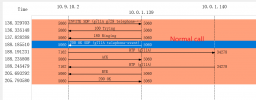
normal.png

hangup.png
 
Hi @tonylin

This is because your provider does not send an SDP in the 200 OK message. This is probably because they are expecting a PRACK response when sending the 180 ringing with SDP.
PRACK however is not mandatory and since 3CX does not support it (there is also no support in the initial INVITE from 3CX) your provider should send 200 OK with SDP. Since the SDP is missing then the call drops.

So please ask your provider to send SDP when PRACK is not available or even better use a 3CX supported provider.
 
Thanks a lot.

We will try.
 
Hi @tonylin

This is because your provider does not send an SDP in the 200 OK message. This is probably because they are expecting a PRACK response when sending the 180 ringing with SDP.
PRACK however is not mandatory and since 3CX does not support it (there is also no support in the initial INVITE from 3CX) your provider should send 200 OK with SDP. Since the SDP is missing then the call drops.

So please ask your provider to send SDP when PRACK is not available or even better use a 3CX supported provider.
Hi Mr.Yiannis,

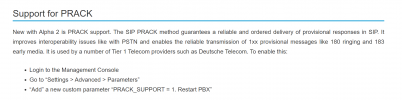
https://www.3cx.com/blog/releases/v18-update-5-alpha2/

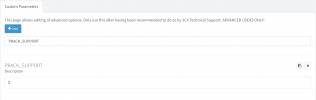
We found there have a blog how to support PRACK in 3CX, Does it still work now?

prack.png

Best Regards
Tony
 
That was an Alpha release and we added the parameter for testing. We had a few issues however and we never included it in the final version.
If you add the parameter manually it will work but that will render your system unsupported and you will not be able to receive any assistance from our support department. You may also face other issues with calls.
 
That was an Alpha release and we added the parameter for testing. We had a few issues however and we never included it in the final version.
If you add the parameter manually it will work but that will render your system unsupported and you will not be able to receive any assistance from our support department. You may also face other issues with calls.
Thanks for your patient explain. We will test it if it's necessary.
 
Hello, can you please tell me if this custom parameter also works in V18 Update 9 Build 20? I can't see any difference. I still don't get a Ringing 180 code, only when I disable P-Early Media. However, even with P-Early Media disabled, I still don't get a Ringing 180 from all participants using an IVR. On V20, I immediately get a Ringing 180.

Bildschirmfoto 2023-12-23 um 01.43.56.png
 
No it doesnt work on v18, if you that you need to use v20.
 
Thank you for your response.

Can you explain how to park a call on an unregistered extension in V20? This didn't work for me in V20, and that's one of the two reasons why V20 is not an option for me. It's missing! Also, the removal of the management console is very inconvenient. Some users are complaining about it because the new interface is confusing and displays errors. For instance, I couldn't remove a trunk in Safari (latest version on Mac M1) because the dropdown was obscured. I could only see edit sbc of the dropdown. After editing the CSS in the source code using the browser console, I was able to delete the SBC.
 
Status
Not open for further replies.

Latest Posts

Forum statistics

Threads
112,324
Messages
591,897
Members
165,475
Latest member
lastshadow