





Following Update 5 Alpha 1 released on July 29th, Alpha 2 delivers important improvements to our WhatsApp integration as well as SMS support for Skyetel SIP trunks.
WhatsApp improvements

In Alpha 1 you had to dedicate a number to the WhatsApp trunk. In Alpha 2 it is possible to re-use a number for WhatsApp that is already in use in another trunk.
WhatsApp integration limitations
- WhatsApp integration is intended to answer inbound messages only. You cannot send an outbound message to a WhatsApp user without them having sent you a message first. You then have 24 hours to respond to the message. After that, you can no longer answer the message!
- You cannot initiate a conversation with a WhatsApp user.
- The number you configure must not be in use on another WhatsApp, for example it cannot be in use on your WhatsApp Business App on your mobile.
Find out more in our WhatsApp integration guide.
Skyetel SMS support
In Alpha 2 we have now added support for sending and receiving of SMS messages via Skyetel SIP trunks.
Manage user & Live Chat settings from Web Client

You can now manage some user settings from the Web Client. In addition, new live chat bubble settings, including styling and privacy options, can only be configured from the Web Client. It is not possible to configure these from the Management Console.
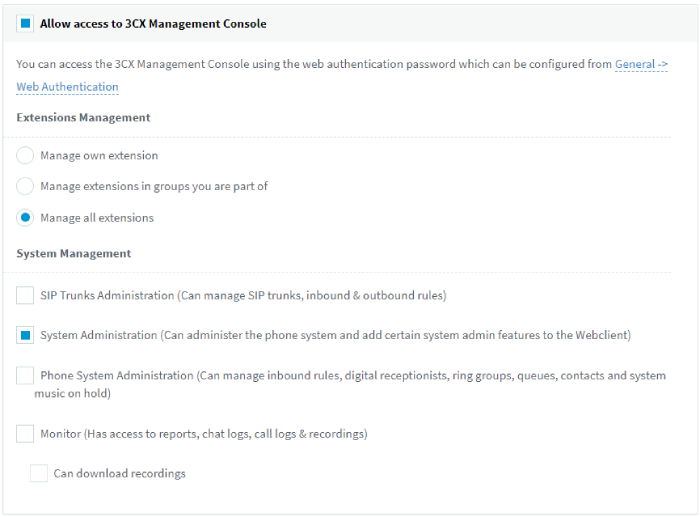
To administer these settings from the Web Client you must have System Administration rights. If you do, an ‘Admin’ icon will be visible on the left hand side. To grant ‘System Administration’ rights:
- Login to the Management Console
- Go to the ‘Users’ section
- Select the user you want to grant admin rights
- Go to the ‘Rights’ tab
- Go to the section “Allow Management Console Access” and ensure its enabled
- In the ‘System Management’ tick “System Administration”
Support for PRACK
New with Alpha 2 is PRACK support. The SIP PRACK method guarantees a reliable and ordered delivery of provisional responses in SIP. It improves interoperability issues like with PSTN and enables the reliable transmission of 1xx provisional messages like 180 ringing and 183 early media. It is used by a number of Tier 1 Telecom providers such as Deutsche Telecom. To enable this:
- Login to the Management Console
- Go to “Settings > Advanced > Parameters”
- “Add” a new custom parameter “PRACK_SUPPORT = 1. Restart PBX”
Other additions and improvements
- Instance Manager has been removed from Update 5 and can no longer be used with 3CX.
- We plan to deprecate Facebook support in favor of WhatsApp. Once Facebook updates their API to work like WhatsApp, we might add it back.
- The old Messaging implementation will be removed in Update 6. When upgrading to Update 5, you will need to delete the old configuration and redo it in the new simplified way. The Messaging Proxy will be deprecated in a future update.
How to get V18 Update 5 Alpha 2
Only recommended for testing: This is an alpha version, not suitable for production systems. If you want to use it for testing purposes, ensure you take a full backup of your system and store it in a separate location (not on the host). If you are running 3CX as a VM, take a snapshot. This upgrade is designed for installs made with the 3CX ISO.
Current V18 Update 4 users running on Linux can try out Update 5 Alpha 2 via Updates in the Management Console.
View the changelog to learn more about this version.









 Copyright © 2026