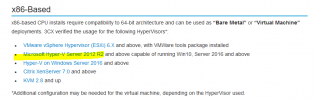
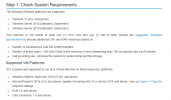
@kieferschild Thank you so much, here is says Server 2016 https://www.3cx.com/docs/manual/phone-system-installation-windows/ that is why i would like to confirm.Yes, it just wont work if you installed 3CX on Windows.
Though not on the support listed I cant see why It wouldnt run.
https://www.3cx.com/docs/recommended-hardware-specifications-for-3cx/
View attachment 25413
https://www.3cx.com/docs/manual/phone-system-installation-windows/
View attachment 25414
@ChrisC_3CX Thank you so much, customer Actually using a Lan 172.16.0.0/16 IP Network, with DHCP AD Authorized. will it still work?As @kieferschild mentioned, as long as you do not run it directly on the OS but instead run it in a VM you should be fine. Just make sure to follow our 3CX/Hyper-V guide found here: https://www.3cx.com/docs/installing-microsoft-hyper-v/
You mean that the Server hosting the 3CX VM will be acting as the DHCP, if yes then this shouldn't be a problem. It is 3CX's actual Host that should be dedicated to 3CX and not the Hypervisor.customer Actually using a Lan 172.16.0.0/16 IP Network, with DHCP AD Authorized. will it still work?
@ChrisC_3CX Thank you so much.You mean that the Server hosting the 3CX VM will be acting as the DHCP, if yes then this shouldn't be a problem. It is 3CX's actual Host that should be dedicated to 3CX and not the Hypervisor.
Founded in 2005, when VoIP was an emerging technology, 3CX has gone on to establish itself as a global leader in business communications.