


- Joined
- May 4, 2023
- Messages
- 30
- Reaction score
- 9
Hi everyone,
One of my customers will be exceptionnaly closed tomorrow and asked me to change the greeting message in order to let people know they're closed.
There is a call flow script on this PBX, which sends incoming calls to Ring Group 800. The greeting message is directly on the Ring Group, not in the CFD, contrary to the messages for Tuesday afternoon and Out of Office Hours.
Here is an overview of the Call Flow...I don't know if making it was relevant, or if this could be done via the Web GUI directly...it was made by another guy who is not here anymore and never documented anything...
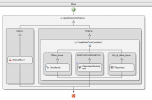
Ring Group 800 is part of the "Secretariat" Department.
If I configure the holiday message in "Office Hours - Secretariat - Office Holidays", will it take over the Call Flow only for tomorrow?
I configured it as such:
If not, I'm open to suggestions as it is the first time I have to do this.
[EDIT]
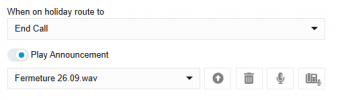
In the meantime, I also found the "When on holiday route to" in the General section of the Ring Group...I guess I also have to select what I want it to do and choose the announcement, like this?
[/EDIT]
Thanks a lot!
One of my customers will be exceptionnaly closed tomorrow and asked me to change the greeting message in order to let people know they're closed.
There is a call flow script on this PBX, which sends incoming calls to Ring Group 800. The greeting message is directly on the Ring Group, not in the CFD, contrary to the messages for Tuesday afternoon and Out of Office Hours.
Here is an overview of the Call Flow...I don't know if making it was relevant, or if this could be done via the Web GUI directly...it was made by another guy who is not here anymore and never documented anything...
Ring Group 800 is part of the "Secretariat" Department.
If I configure the holiday message in "Office Hours - Secretariat - Office Holidays", will it take over the Call Flow only for tomorrow?
I configured it as such:
| Name | Date | Time | Occurs | Prompt | |
|---|---|---|---|---|---|
| Fermeture 26.09 | 26 September 2025 | 12:00 AM - 12:00 AM | Once | Fermeture 26.09.wav |
If not, I'm open to suggestions as it is the first time I have to do this.
[EDIT]
In the meantime, I also found the "When on holiday route to" in the General section of the Ring Group...I guess I also have to select what I want it to do and choose the announcement, like this?
[/EDIT]
Thanks a lot!
Attachments
Last edited:





