Doubt about deploy and firewall

Status
Not open for further replies.

Daniel Sobrinho

Free User
Joined
Aug 13, 2018
Messages
19
Reaction score
0
Hi guys,

A doubt about deployment. We have a PBX 3cx configured in AWS Amazon.
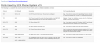
From the perspective of the cloud where my pbx is installed. I must configure these port releases on my office to be allow.
I understand that my office would be a branch office where my softphone and IP phones would have to look for the provisioning in cloud aws. Or this shoud be allowed in Aws configuration as well as webmeeting ports.
9676

A SBC installed in my office should be allow this configuration without allow all ports in the firewall?


Best regards
Daniel
 
The list you have posted is for the firewall in front of the 3CX (protecting the 3cx server)

If you are installing SBC, you just need allow the following ports out - 443 (tcp), 5090 (tcp and udp) from your office.
 
  • Like
Reactions: YiannisH_3CX
When configured SBC, is there away to check in 3cx pbx that sbc is connected and running?
 
Not currently. There is a thread in the ideas section for this.
 
When configured SBC, is there away to check in 3cx pbx that sbc is connected and running?
The easiest way to currently check if the SBC is connected is to factory reset a supported device behind the SBC and see if it appears in the Phones section of the PBX as "New". You can even start a 3CX windows client without configuration and achieve the same thing.
 
I am received this error when tried use my softphone client 3cx.

ERR | 20190306-100738.943 | 3CXTunnel | TUNL | 3828 | Bridge.cpp:773 | Tunnel is not connected! SIP message is not sent: SipReq: SUBSCRIBE MAC%[email protected]:5060 tid=-xxxxxxxxx cseq=1 SUBSCRIBE contact=10.10.sss.sss:60327 / 1 from(wire)
 
Softphones connect directly to 3CX using the tunnel - have you unticked 'Block Remote Tunnel Connections (3CX Client connections with Tunnel enabled & SBC will be blocked)' under Options for each extension.

Under provision , select 3CX Client and check 'Use 3CX Tunnel for remote connections (3CX Client only)' is ticked.

How do you provision the software - via email ?

Also check your blacklist, and remove any entries
 
The problem happens because firewall was block port 5090. After re-check the SBC sync.
Now I would like to use the SBC local IP Address to register the SIP Softphones 3cx?
 
3CX softphones do not use SBC, there communicate directly to 3CX on 3CX tunnel port 5090
 
Let me check if I understood.
The SBC is only used to IP Phones supported by 3cx?
The 3cx Softphone does not use SBC, it will use the tunnel port 5090 directly with public address in the cloud?

Best regards,
Daniel
 
Let me check if I understood.
The SBC is only used to IP Phones supported by 3cx?
The 3cx Softphone does not use SBC, it will use the tunnel port 5090 directly with public address in the cloud?

Best regards,
Daniel

Correct
 
SBC is used only IP phones. It is an alternative a STUN. Now if you want to use hotdesking the SBC is mandatory.
 
Status
Not open for further replies.

Members Online Now

Forum statistics

Threads
111,843
Messages
589,328
Members
164,680
Latest member
JV J