- Joined
- Jun 5, 2019
- Messages
- 29
- Reaction score
- 4
Hi All,
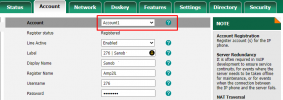
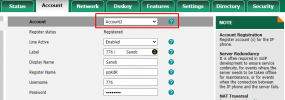
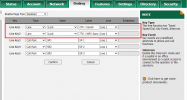
I have two separate accounts/extensions configured on some of my Yearlink T42s phones. I have Dsskeys configured as Line 1 and Line 2 (see the first 3 pictures ).
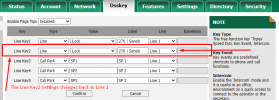
The problem that I'm having is every once in a while ( I have not been able to find the pattern) my Dsskey settings for Line Key 2 reset itself and changes back to Line 1. Therefore, my second account/extension will disappear from my phone and I'm no longer to receive a call from that account /extension until I change the settings back manually(see the last picture).
What's causing this issue. How do I prevent it from happening?
I also submitted a ticket to Yealink and they are asking me to manually upgrade phone firmware to 66.86.0.62.
I'm currently running the latest phone firmware listed on 3cx website (https://www.3cx.com/support/phone-firmwares/). so I'm not sure if upgrading the phone's firmware manually to a newer version than what's listed on 3cx website will be a good idea.
Any help would highly be appreciate.
I have two separate accounts/extensions configured on some of my Yearlink T42s phones. I have Dsskeys configured as Line 1 and Line 2 (see the first 3 pictures ).
The problem that I'm having is every once in a while ( I have not been able to find the pattern) my Dsskey settings for Line Key 2 reset itself and changes back to Line 1. Therefore, my second account/extension will disappear from my phone and I'm no longer to receive a call from that account /extension until I change the settings back manually(see the last picture).
What's causing this issue. How do I prevent it from happening?
I also submitted a ticket to Yealink and they are asking me to manually upgrade phone firmware to 66.86.0.62.
I'm currently running the latest phone firmware listed on 3cx website (https://www.3cx.com/support/phone-firmwares/). so I'm not sure if upgrading the phone's firmware manually to a newer version than what's listed on 3cx website will be a good idea.
Any help would highly be appreciate.