DST Yealink

Status
Not open for further replies.

JacquesMulti

Platinum Partner
Advanced Certified
Joined
Oct 7, 2020
Messages
12
Reaction score
0
Hi there.

I am from South Africa where DST does not get used. On the setup for yealink phone after provisioning all the phone are an hour ahead. On small sites we manualy change the DST setting to disable and that fix last until next firmware or reprovision.

Is there no way this can be done from 3cx console to disable DST when doing a provision?
 
No. This is "hard coded" in the supported template, although you can change it, but it is not supported by 3CX.
Do a search for ... and change it.

#Configure the daylight saving time feature; 0-Disabled, 1-Enabled, 2-Automatic (default);
local_time.summer_time = 2 > 0
 
Or what you could do is update the autodst.xml in the provisioning folder assuming it's an old one.
 
Hello,

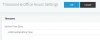
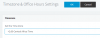
In your phone provisioning page under each extension, have you tried this option?


1602143638188.png
 
Hi Thanks for the reply. Going to try all solutions posted and see if that works
 
In addition, your PBX Settings > Timezone has the option for Central Africa Time if you haven't already selected this. On Windows based servers, you need to select the correct timezone in the Windows OS too.

1602156591248.png
 
In addition, your PBX Settings > Timezone has the option for Central Africa Time if you haven't already selected this. On Windows based servers, you need to select the correct timezone in the Windows OS too.

View attachment 18511
Hi this setting seems to be working. Is there a way to change this on all ext. at once. Have 150 ext to change one by one?
 
If this setting helps, then simply select all your phones in the Phones section and press Reprovision.

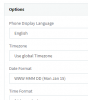
Reason: By default, the phones use the "Global Timezone" (you should see this if you open one extension and look at the provisioning tab of the yealink)
1602161982270.png

So as soon as you reprovision them now that you selected the correct global timezone in the main PBX settings, they should automatically correct their own time.
 
If this setting helps, then simply select all your phones in the Phones section and press Reprovision.

Reason: By default, the phones use the "Global Timezone" (you should see this if you open one extension and look at the provisioning tab of the yealink)
View attachment 18515

So as soon as you reprovision them now that you selected the correct global timezone in the main PBX settings, they should automatically correct their own time.
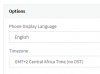
Under my main time setting there is only the +2 Central African time and not one with the no DST option.
 

Attachments

  • Time Zone.PNG
    Time Zone.PNG
    2.8 KB · Views: 7
Are you on a Windows or Debian server?
 
I have checked on 2 pbxs windows and debian , this option doesn't exist John , pbx are .655 release
 
I have checked on 2 pbxs windows and debian , this option doesn't exist John , pbx are .655 release
Under the ext under phone provisioning the option is there but not on PBX timezone settings
 
only unique choice for me pbx and extensions
1602162977615.png
 
is it stupid idea? why not waiting 24h with automatic reprovisioning and do nothing?
 
is it stupid idea? why not waiting 24h with automatic reprovisioning and do nothing?
Sorry not sure if this was meant for me. After 24h all my devices are still one hour ahead
 
Yes to avoid to change this manually, but if you already tried with no success then for sure that idea isn't good. ;)
 
Under my main time setting there is only the +2 Central African time and not one with the no DST option.
Yes which is the same thing that @JohnS_3CX posted. The first screenshot (showing No DST) was from the phone provisioning tab. The second snip he showed was from the main PBX configuration. Not sure if there are parts of South Africa that do observe DST otherwise I would assume they are the same setting.
 
Status
Not open for further replies.

Latest Posts

Forum statistics

Threads
111,964
Messages
590,007
Members
164,870
Latest member
nizammoktar