DTMF Issue with Yealink

Status
Not open for further replies.

Thiek

Premier Customer
Joined
Dec 5, 2017
Messages
134
Reaction score
27
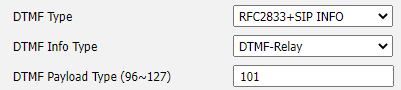
We have a new 3CX installation using a SIP Trunk and recently discovered an issue with our Yealink phones, when we make an outbound call and connect to certain IVRs the DTMF‘s are typically recognized, however, with some IVR’s they do not recognize or “hear” the options we select. When testing from the 3CX Windows soft-phone client I don’t have this issue and the client is using DTMF Mode RFC2833. I checked on the Yealink phones and they too are set to RFC2833. In 3CX admin, if I change the Yealink extension settings to “PBX Delivers Audio” this seems to correct the issue, however, the call quality is now degraded. For giggles I went back to into the phone’s settings and changed DTMF Type to RFC2833 + SIP Info and this works, and yes with PBX Delivers Audio turned off. In 3CX I do not see a way to control the DTMF Type for the Yealink phones which means I’ll have to remote into 55 phones and manually change this setting. Plus, if someone factory resets a phone it will revert back to RFC2833. Is there any way to control the DTMF type from 3CX? Any other recommendations that I might be overlooking within 3CX to get DTMF to work for all IVRs, when using a Yealink phone?
  • 3CX Version - v16
  • Server OS: Win2016
  • Is the 3CX Server Hosted: No
  • IP Phone Make/Model/Firmware: Yealink T42S or T46S Fw. Version 66.86.0.5
  • Provisioning Method: Local / VPN / STUN / SBC
  • Trunk Provider: AT&T
  • Has the Firewall Checker passed: YES
  • Are custom Phone Templates being used: NO


aa.png
 
Hi,

Upgrade to version 18, we have made improvements in the way DTMF is handled so this should cover more scenarios where it used to fail in the past.
 
Thanks JohnS, good to know. I'll have to see what all is involved to upgrade to v18.
 
  • Like
Reactions: JohnS_3CX
If you need any help with that we will be glad to assist!

The gist of it is to get a full backup of your 3CX system, uninstall V16, then install V18 and choose the option to restore your backup during the configuration wizard.
 
Upgraded to v18 and installed any subsequent patches that showed up 60 minutes after the upgrade was completed but this did not help with the issue. It's only a few IVRs that do not recognize DTMF and only from a Yealink phone (T42S and T46S). The default value RFC2833 works the best, although when I set a phone to DTMF type SIP Info it was able to navigate an IVR's menu options but they could not do any system pages in-house, the paging system did not recognize their DTMF.

Before v18, on v16, things were working when I set a few phones to DTMF type RFC2833 + SIP Info but then after installing a 3CX update for a new yealinkT4x.ph.xml template it went back to not working. I recall installing this and the v16 Update 8A FINAL so maybe something in this did it.
 
Hello,

1. Ok when you say some IVRs don't work, do you mean when you call out via your trunk, and you hit an IVR on the other side?

2. And, do all your internal 3CX IVRs work fine?
 
The 3CX IVR works fine when customers are calling in. It's when calling out to other IVRs that we run into issue. Most IVRs work as we can navigate their menu with DTMF but a few do not work. Of course the one place they call the most, for tech support issues, this IVR does not understand the DTMF keys pressed from a Yealink T4x phone. They get to the main menu and it will accept their first key selection but when they get to a sub-menu the IVR no longer understands the keys pressed.
 
Ok, if the phones work fine when calling your internal IVRs (ie dial your own IVR extension and test it) then you do not necessarily have a problem on your end.

DTMF will never be guaranteed to work 100% because it relies on others complying too. It relies on:

  1. your phones
  2. your PBX
  3. your trunk provider
  4. the inbetween-provider (where one applies)
  5. the destination's provider
  6. the destinations trunk
  7. the destination's PBX

  • At this point the correct path to take is to investigate the parts 1-2-3 and confirm that they work ok.
  • If that is confirmed, you need to escalate to your trunk provider for further investigation
  • The provider will either confirm that they are passing on the DTMF as intended, or make corrections to ensure they are passed on
It's a long chain and even if your end is 100% perfect, the other side might not be - hence there will always be at least some destinations that face issues without your side being at fault. We do of course try to control for such variables, and provide you with the most successful scenarios as possible, but if the other side has an issue, there is practically nothing you can do to control how their end behaves.

Contact your 3CX Partner and start the investigation to capture some calls to failed destinations and analyze them. The captures will show whether you are sending the correct signals from your end, and once confirmed you can give the capture to your provider to see if they can also confirm they pass it along correctly.
 
  • Like
Reactions: Thiek
Issue resolved! DTMF was fixed when I pulled the latest firmware from the Yealink site, which I don't like to do, rather go with the firmware pushed by 3CX. BUT... the real fix was getting a Session Boarder Controller from Patton, SN5481, and configuring this to talk to the AT&T SIP Trunk. Patton support was also super helpful with getting the device setup and working, which took minimal effort and this resolved a few other pesky issues - outside callers to voicemail not working, inability to record, and periodic call connectivity issues.
 
Status
Not open for further replies.

Members Online Now

Forum statistics

Threads
111,832
Messages
589,284
Members
164,662
Latest member
DejanMDS