


- Joined
- Dec 5, 2017
- Messages
- 134
- Reaction score
- 27
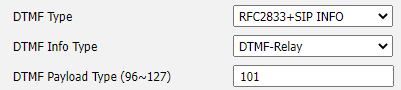
We have a new 3CX installation using a SIP Trunk and recently discovered an issue with our Yealink phones, when we make an outbound call and connect to certain IVRs the DTMF‘s are typically recognized, however, with some IVR’s they do not recognize or “hear” the options we select. When testing from the 3CX Windows soft-phone client I don’t have this issue and the client is using DTMF Mode RFC2833. I checked on the Yealink phones and they too are set to RFC2833. In 3CX admin, if I change the Yealink extension settings to “PBX Delivers Audio” this seems to correct the issue, however, the call quality is now degraded. For giggles I went back to into the phone’s settings and changed DTMF Type to RFC2833 + SIP Info and this works, and yes with PBX Delivers Audio turned off. In 3CX I do not see a way to control the DTMF Type for the Yealink phones which means I’ll have to remote into 55 phones and manually change this setting. Plus, if someone factory resets a phone it will revert back to RFC2833. Is there any way to control the DTMF type from 3CX? Any other recommendations that I might be overlooking within 3CX to get DTMF to work for all IVRs, when using a Yealink phone?
- 3CX Version - v16
- Server OS: Win2016
- Is the 3CX Server Hosted: No
- IP Phone Make/Model/Firmware: Yealink T42S or T46S Fw. Version 66.86.0.5
- Provisioning Method: Local / VPN / STUN / SBC
- Trunk Provider: AT&T
- Has the Firewall Checker passed: YES
- Are custom Phone Templates being used: NO


