Dynamics 365 And 3CX - Token not authorized

Status
Not open for further replies.

FrederikJ

Forum User
Joined
Jun 12, 2019
Messages
8
Reaction score
0
So I have currently been trying to set up 3CX, and Dynamics 365. But I keep stumbling into the same issue over and over.
I have followed your guide with Azure and setting the entities up in the CRM. But when trying to gather a token, so our CRM and 3CX can "talk" together I keep getting the following error (Tenant ID removed):

Code:
Error occured while accessing CRM. Please check log provided.
Started OAuthGetAccessToken
Request text: https://login.microsoftonline.com/[[B]Tenant ID][/B]/oauth2/token 
System.Exception: Unknown expression: code. Part: code.
   at TcxLexicalParser.ValueManager.GetByPath(String[] path)
   at CrmIntegration.EscapedExpressionEvaluator.ParseExpression(String expression, Boolean asExpression, IValueManager customManager)
   at CrmIntegration.CrmIntegrationTemplateExtensions.Evaluate(RequestValue value, ProcessingContext context, IValueManager customManager)
   at CrmIntegration.ScenarioProcessorBase.ProcessRequest(ScenarioRequest request, IValueManager customManager, HttpClient client, CancellationToken token)
   at CrmIntegration.ScenarioProcessorBase.ProcessScenario(ProtocolScenario scenario, IValueManager customManager, CancellationToken token)
   at CrmIntegration.ScenarioProcessorBase.Execute(ProtocolScenario scenario, CancellationToken token)
   at CrmIntegration.CrmProcessor.ExecuteScenarioByName(String scenarioName, IEnumerable`1 parameters, Boolean useNoAuthProvider, CancellationToken token)
   at ManagementConsoleJS.Controllers.OAuth2CrmController.OAuth(String state, CrmProcessorFactoryDelegate crmProcessorFactory, IMemoryCache cache)

I appreciate provided help.
 
Did you press the Authorize button in the 3CX Console > Settings > CRM Integration > Dynamics 365?

Do you see the refresh token when you complete the authorization procedure?
 
I pressed the Authorize button in the 3CX console.
And I do not get a token once I have completed the authorization procedure.

Thank you for your answer.
 
The missing "code" variable is because the authorization flow has not been completed. This code is returned by the Dynamics server when you grant access to the application you create in Azure.

You need to go to the 3CX Console > Settings > CRM Integration > Dynamics. Then complete the configuration settings, and press the Authorize button. This will open a new tab that will show a dialog. In this dialog you need to grant access to the application. Once you do this, the tab is closed, and you should see the "refresh token" under the Authorize button, in the 3CX console.

Please, confirm if you can complete these steps. If you get stuck in any of them, please let me know where, so we can help you out.
 
Thank you again for your prompt reply.

I did what you said, but I do still not get a popup window when trying to authorize. I do get this now however "HTTP Error 404 - Not Found", which seems pretty odd. I have tried to type in the our dynamics url address in both Http and Https.

Your answer is appreciated
 
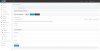
What 3CX version are you using? Can you share a screenshot of the configuration page from the 3CX console > Settings > CRM Integration? Please ensure to remove the client ID and secret.
 
What 3CX version are you using? Can you share a screenshot of the configuration page from the 3CX console > Settings > CRM Integration? Please ensure to remove the client ID and secret.
11015

Is this what you requested?
 
What happens when you fill the fields and press the Authorize button? Do you see the new tab asking you to grant access to the app you just created in Azure?
 
No. The only result I get is blank page with the 404 error:

"HTTP Error 404 - Not Found"
 
When you press the Authorize button, a new browser tab is opened pointing to the following URL:
Code:
https://login.microsoftonline.com/[Tenant]/oauth2/authorize?response_type=code&client_id=[ClientId]&redirect_uri=[RedirectUri]&state=[State]&resource=[Domain]

Where:
  • [Tenant] is the tenant that you configured
  • [ClientId] is the Application ID that you configured
  • [RedirectUri] is automatically generated by 3CX based on the 3CX console URL
  • [State] is a random string used for validation
  • [Domain] is the domain that you configured

The query string is not considered by the server to return a 404 error. So, if you're getting a 404 error in this case, then the Tenant that you're configuring is not correct.

In order to get the Tenant value, please check step 11 here:
https://www.3cx.com/docs/dynamics-crm-integration/#h.fxp9zjuvx10e

When you see the endpoints for the application that you just created, you will see something like this for the authorization endpoint:
https://login.microsoftonline.com/dedc4ebb-183f-42e2-9192-92eb425a027d/oauth2/authorize

In that case, the Tenant is this part:
dedc4ebb-183f-42e2-9192-92eb425a027d

You need to take the value from the app you created, and copy it into the 3CX configuration.
 
Thank you for your response. As mentioned earlier, I have followed the guide.


On the 404 ERROR page i get the following url:
https://[OUR CRM DOMAIN]/[THE TENANT I INSERTED]/?response_type=code&client_id=[THE APPLICATION ID]e8&redirect_uri=https%3A%2F%2F[OUR 3XC PORTAL LOGIN]%3A[PORT]%2Fapi%2Foauth2crm&state=8bb210d9-3dbc-492a-b4f4-72b06ab2f2b7&resource=https%3A%2F%2F[OUR CRM DOMAIN AGAIN]%2F

It seems like the "/oauth2/authorize" is missing from the url.

I used to be able to get the login to CRM working when authorizing, but I do only get the 404 error, which is attached below.
11060
 
Last edited:
Did you make any change to the template provided by us?

Can you paste here the contents of the CRM template?

Also, try deleting the template, and then downloading it again from the 3CX Console > Settings > CRM Integration. This way you ensure that you're on the latest official template we provide.
 
Thank you for your response.

I re-downloaded your template, it seems like there had been a change in the file.

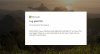
I do now get referred to the crm login page, which looks like this:

11072
 
The message says that the configured tenant can't be found... So check the value provided there.
 
I keep getting the same tenant ID when following the guide. Do you know what might cause this?
 
Have you tried contacting Microsoft support about this?
 
Status
Not open for further replies.

Latest Posts

Forum statistics

Threads
112,324
Messages
591,897
Members
165,475
Latest member
lastshadow