Dynamics 365 CRM - not opening Pop-Up for contact

Status
Not open for further replies.

Luis Eduardo Ballina

Bronze Partner
Joined
Dec 14, 2018
Messages
12
Reaction score
3
Hi,
I have the same problem with Dynamics CRM as in the original post (that was closed), the connection and test works fine, the service logs show the correct information but no pop-up window
I'm not sure where is the mechanism that let the 3cx app tell the Chrome to open the crm link or how to check further. @edossantos can help me with it?

Thanks all !
 
a bit of an update: it works on the web but not on the windows app .. more strange..
 
  • Like
Reactions: Evolute IT
HI,
thanks for answering, i am using 3cx for windows and it still doesn't open the pop-up. (the official 3cx desktop app version 16.3.0.264 and 3cx v18)
 
HI,
thanks for answering, i am using 3cx for windows and it still doesn't open the pop-up. (the official 3cx desktop app version 16.3.0.264 and 3cx v18)
The 3CX client for Windows is something else (and doesn't support the integration), that causes confusion in your original post. Now I can see that you're referring to the Desktop app. Please open the Desktop App > Settings > Integration> and select "Automatically open Contact URL when CRM Integration is Enabled".

If this doesn't make any change, please send a screenshot of what you see when you receive an inbound call from a contact you know is in the CRM.
 
  • Like
Reactions: Evolute IT
The 3CX client for Windows is something else (and doesn't support the integration), that causes confusion in your original post. Now I can see that you're referring to the Desktop app. Please open the Desktop App > Settings > Integration> and select "Automatically open Contact URL when CRM Integration is Enabled".

If this doesn't make any change, please send a screenshot of what you see when you receive an inbound call from a contact you know is in the CRM.
Hi,
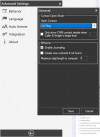
the Desk app does not have that option, at least not in the version i am using, (16.3.0.264), there is settings ->advanced settings ->integration->general
1638180309788.png

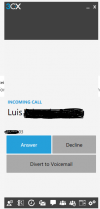
and here is when the incoming call rings
1638180560477.png

Thanks!
 
Hi,
the Desk app does not have that option, at least not in the version i am using, (16.3.0.264), there is settings ->advanced settings ->integration->general
View attachment 26217

and here is when the incoming call rings
View attachment 26218

Thanks!
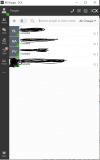
Oks my mistake i was confusing the apps, this is the desktop app and it works with this one
1638184331145.png
and for those that have the same problem, it is downloaded from the webapp and the windows simbol here is the link:
https://www.3cx.com/user-manual/web-client/#h.d3b3lf2mdzdr

The Desktop app for Windows includes all of the features of the web client but provides a more native experience. To download the app:

  1. Click on the Windows icon
    owxyGTu6nfayTAkWZ08v3x1YimbxUfDdYq8ph2hFxD-MriMbvJL5H45iv85u7rAmsSCSAa1rVbROFyit-5_uGPvudpuND-iFUwQ2Lj-67oGwMu-69103W0sclNAQSnw1Jg
    at the top of the side menu in the web client.
  2. Follow the steps to install and provision the app.
Note: You can also use the old 3CX Windows Client.

edossantos, Thanks!!​

 
Status
Not open for further replies.

Latest Posts

Forum statistics

Threads
112,323
Messages
591,896
Members
165,474
Latest member
costionofrei