


- Joined
- Apr 22, 2021
- Messages
- 5
- Reaction score
- 2
Hello,
we have a 3CX onPrem and a Dynamics 365 in the cloud.
I try to integrate these two systems with the follwing manual: https://www.3cx.com/docs/dynamics-crm-integration/
I created an App-Registartion in Azure for 3CX. In this App-Registration it was neccessary to enter the URL to our 3CX-Management-Console as Reply-URI.
The URL to our 3CX-Management-Console is only accessible via VPN. It is not accessible from external.
I'm not able to authorize 3CX in the managemnt console like it is in the manuel described:
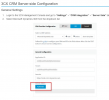
I always get the error message: "AADSTS900971: No reply address provided" after I click on the button and try to authorize me.
But a reply address is provided in the app registration. (The URL to our 3CX-Managment-Console )
Is it neccessary for the integration with Dynamics 365 that the URL to the 3CX-Management-Console is accessible from external?
Best Regards
David
we have a 3CX onPrem and a Dynamics 365 in the cloud.
I try to integrate these two systems with the follwing manual: https://www.3cx.com/docs/dynamics-crm-integration/
I created an App-Registartion in Azure for 3CX. In this App-Registration it was neccessary to enter the URL to our 3CX-Management-Console as Reply-URI.
The URL to our 3CX-Management-Console is only accessible via VPN. It is not accessible from external.
I'm not able to authorize 3CX in the managemnt console like it is in the manuel described:
I always get the error message: "AADSTS900971: No reply address provided" after I click on the button and try to authorize me.
But a reply address is provided in the app registration. (The URL to our 3CX-Managment-Console )
Is it neccessary for the integration with Dynamics 365 that the URL to the 3CX-Management-Console is accessible from external?
Best Regards
David


