E.164 and outbound rules

Status
Not open for further replies.

spreaderman

Customer
Joined
Mar 15, 2021
Messages
15
Reaction score
3
I am based in Tokyo. I am confused about the settings for outbound rules. My trunk provider, Twilio, requires that I send everything in e164 format.

I have one rule outbound rules as follows:

NAME: Domestic Japan Area Code
Calls to numbers starting with prefix: 0-9
ROUTE: TWILIO
Strip digits: 1
Prepend: +81

Above works well. I can can any length number in Japan and it adds the +81 and works fine. Eg 03-5555-5555 (tokyo) 078-555-555 (kobe)

I am trying to get my overseas dialing working. I I dial +49[area-code][phonenumeber] or any country in the world and can't get it working: Here is my outbound rule:


NAME:Overseas
Calls to numbers starting with prefix: +
ROUTE: TWILIO
Strip digits: 0
Prepend: NULL

Do I enable the e164 in the SETTINGS PAGE? How does this work. Any pointers much appreciated.
 
If E164 formatting is required, you must disable E164 processing under Settings as that option will essentially convert E164 formatted numbers to normal ones (e.g: +123456 will be converted to something like 00123456).

The Outbound rule seems correct so as long as it is matched it should be fine. You might want to check if the SIP Provider is responding with a specific error. To do this, go into "Dashboard >> Activity Log >> Settings" and enable Verbose Logging. Make the call again and then go to "Dashboard >> Activity Log" and use the "Filter" options to find the call, review the SIP messages to determine what the SIP Provider sent back when they received the call, this might give you a clue as to what is going on.
 
Could it be that the order, of your rules, might be affecting the calls? Outbound rules are read from top to bottom, with the first match being used. The 3CX Activity log will show if this is the case.
 
  • Like
Reactions: jed
Thank you and I think the e164 is solved, however, I receive a new error to the number I call. The domain and phone number have been revised and are not the actually numbers/domain.

06/04/2021 4:13:47 PM - [CM503016]: Call(C:3): Attempt to reach <sip:[email protected]:0> from Extn:1000 has failed. Reason: Not Registered
06/04/2021 4:13:47 PM - [CM503017]: Call(C:3): Target is not registered: Out#:>>Rule{+}>>+491725555555
 
Is this a second SIP Trunk or is it the same one used for other calls as well? That said, do some calls fail but others don't for the same SIP Trunk?

Have you followed the guide for configuring Twillio to 3CX?
 
Thank you ChrisC_3CX. This is the same SIP Trunk. Yes, some numbers seem to work but others fail but only international numbers (eg one number to Germany works but another one doesnt). Thank you for the twilio setup guide. I shall review and reply after reading. Thank you.
 
  • Like
Reactions: ChrisC_3CX
Great, let us know how it goes!
 
Yes, went through the setup guide and find no discrepancy between my setup and the guide. So I am even more puzzled now as to why it won't work. I re-ask my question, what is the meaning of the below and what are some of the steps I should take to try and solve;

06/04/2021 4:13:47 PM - [CM503016]: Call(C:3): Attempt to reach <sip:[email protected]:0> from Extn:1000 has failed. Reason: Not Registered
06/04/2021 4:13:47 PM - [CM503017]: Call(C:3): Target is not registered: Out#:>>Rule{+}>>+491725555555
 
It means that the trunk, used by the particular outbound rule, is not currently registered.
 
The trunk of the client? What is the :0 at the end? Just asking for any suitable port?
 
I would expect to see something like this example <sip:[email protected]:5060> with the part after the @ being your VoIP provider , then the port the INVITE is sent to, also specified in the settings.

You may want to review your trunk settings. I suspect that some settings may be incorrect.
 
Where can I buy some support hours? Thanks.
 
@spreaderman
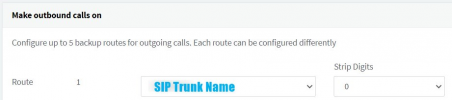
Have you made sure that the new Outbound Rule created has the SIP Trunk configured as the first Route?
1623316948500.png
 
@spreaderman
Have you made sure that the new Outbound Rule created has the SIP Trunk configured as the first Route?
View attachment 22438
Yes. There is only 1 route and 2 outbound rules. The 2 rules have the same outbound route.

This is the problem copy/paste from about;
This is the same SIP Trunk. Yes, some numbers seem to work but others fail but only international numbers (eg one number to Germany works but another one doesnt). Thank you for the twilio setup guide. I shall review and reply after reading. Thank you.
 
@spreaderman
In that case, as suggested previously, you might indeed to to have someone else help you troubleshoot the issue further so contacting a 3CX Partner would be your best bet.
 
Status
Not open for further replies.