editing backup config file

Status
Not open for further replies.

swiftechinc

Free User
Joined
Feb 26, 2022
Messages
28
Reaction score
4
Sanity check... I restored from a very old backup 2 days ago. Doing so deleted some important messages. I have another more recent backup that I could use, but that backup was the reason for the restore. A former employee had whitelisted a single IP range that isn't in a range that anyone I know has access to. I was looking at the config file in the root directory of the backup, 1639340675Db.xml and noticed two places that say "whitelist" and have the IP range. My thought is that repairing this should be as simple as unzipping the file, editing this xml document to set the whitelist to off ("0") and delete the IP range, then zip the file and restore using the zip file. I can't think of any reason this wouldn't do the job but wanted to make sure there isn't anything elsewhere that might keep it from working like another file containing a checksum. causing the restore to fail since the character count is wrong...
 
  • Like
Reactions: Evolute IT
So far this hasn't worked. I can put an unmodified backup into the remote backup folder and it will show up in the list of backups I can restore within 3cx. But if I modify it, it doesn't appear. I can only assume there is some sort of checksum going on somewhere that doesn't match causing it to assume it's corrupt. So extracting the zip file, editing the config to remove the whitelist, and zipping to restore it without the whitelist in place doesn't work.

I do have a more recent backup that would be great to be able to use but before doing so I need to make sure I'm not putting myself in the same place again. The config file on this one backup does have the IP in the whitelist. But the whitelist appears to be turned off. Here is the text as it is in the config file.

<Parameter>
<Description>Restrict access to specific IP whitelist</Description>
<Name>IP_WHITELIST_RESTRICTED</Name>
<Type>String</Type>
<Value>0</Value>
</Parameter>
<Parameter>
<Description>A list of Blacklisted IP's are downloaded and imported to protect your installation from Malicious Attacks. In exchange, any blacklisted ip addresses that this install blocks, are sent to 3CX Global Servers to contribute and share to other 3CX Installs. Available options 0 disabled 1 enabled. </Description>
<Name>SEC_DEFENSE_PROGRAM</Name>
<Type>String</Type>
<Value>1</Value>
</Parameter>
<Parameter>
<Description>Restrict access to specific IP whitelist</Description>
<Name>IP_WHITELIST</Name>
<Type>String</Type>
<Value>["X.X.X.X"]</Value>
</Parameter>

Notice that line 5 has the "WHITELIST_RESTRICTED" attribute with a value of "0". Does this mean that although there is an IP in the IP_WHITELIST attribute, (changed to X by me for this post) that the whitelist is OFF in this backup? If so, is it safe to say that this one would not restrict access to the system? The other backup had this set as "1" which means "ON" from what I can tell.
 
To answer my own question, my assumption above was indeed correct. I had no trouble getting into it.
 
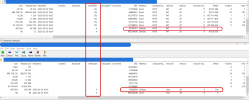
I'm sure this is more interesting to me than anyone else, but I'm not sure that the problem with editing the upload is so much a matter of protection as it is one of me using a windows machine to edit it. Looking at two zip files where the bottom is the original file and the top is with me changing the "1" to "0" in the WHITELIST_RESTRICTED attribute, here's what I see.
3cx.png
Note the change in the CRCon the modified and that the one file with a value in offset on the original backup file, when re-zipped is changed to zero while the remainder that had no offset now are huge. I think Windows is doing a conversion of some type.
I don't know if I'll have more time to mess with this but since I haven't seen any details about this out there, if I do find time I may extract this in a virtual linux box and see if modifying it there makes a difference.
 
Last time I looked at this, indeed the backup checksum being invalid will cause the backup to not be restorable.

Console restrictions don't matter if you are on lan to the PBX (if your IP is inside RFC-1918 space) You can be "on lan" even remotely with SSH tunneling -
Code:
ssh 'your-username' @ 'your-server-ip' -L 5001:localhost:5001
Then navigate to https://localhost:5001
 
Status
Not open for further replies.

Latest Posts

Forum statistics

Threads
111,973
Messages
590,075
Members
164,895
Latest member
jasonkkrause