Empty Voicemails

Status
Not open for further replies.

alkyred

Joined
Aug 17, 2021
Messages
15
Reaction score
3
New installation V18 Latest Stable build.

We have about 170 extensions and we seem to get a fair number of empty voicemails. These range from 1.5 meg to 2 meg in size. When tracking down the logs, these empty VMs seem to have termination by VM in common. Not really sure why but we get 2-3 a week. This is not good since we are in healthcare and need to be available for our patients.

Anyone else seen this? Have any suggestions>

Thanks,

Todd
 
Hi @lakyred,

Can you clarify what you mean by "these empty VMs seem to have termination by VM in common", where are you seeing this?

Also, if you navigate to the Parameters, do you find: ALLOWUSEBUSYOPTFORGROUP and if yes, what value is set?
 
Last edited:
Sure-
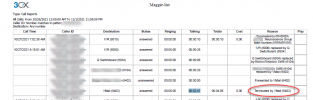
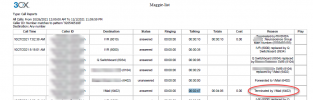
Here is a screenshot of a Call Report showing the lst line of the call where the caller talked for 02:47 minutes leaving a VMail for extension 6402. When we checked that VM, it was completly blank. There was about 2 minutes of silence. I also opened the VM file in audacity and it didn't show any audio as well. We tried to listen on the phone calling into the VM system and we downloaded the file a few times trying to listen to it. All were a silent VM.

1636036675734.png

Thanks,

Todd
 

Attachments

  • 1636036431802.png
    1636036431802.png
    126.9 KB · Views: 5
Chances are it's a robocall.
 
Chances are it's a robocall.
We know it is not. We contacted the patient and verified they left a message.

Also, we have had some robocalls and there is a recording with those.

Todd
 
  • Like
Reactions: Evolute IT
As Dr House says, 'All patients lie' :)

But in all seriousness, I haven't heard of such an issue. Since it seems to be pointing to something environmental, please provide more information about your setup as requested here:

https://www.3cx.com/community/threads/information-to-provide-when-requesting-help.67558/

Also, do you have the parameter set as asked here?

Also, if you navigate to the Parameters, do you find: ALLOWUSEBUSYOPTFORGROUP and if yes, what value is set?
 
  • Like
Reactions: Evolute IT
Hi @alkyred,

Can you let me know what 8104 is?

Also: navigate to the Parameters, do you find: ALLOWUSEBUSYOPTFORGROUP and if yes, what value is set?
 
Also, you mention being on v18 Latest stable build (please use version numbers next time). Does this imply the issue started happening when you upgraded to v18 U1 (18.0.237) or was it happening prior? Were you using v16 before or is this a fresh install?
 
  • 3CX Version,- Professional 10.0.237
  • Server OS, - Debian 10 on VMWARE
  • Is the 3CX Server Hosted and where? Hosted with vender
  • IP Phone Make/Model/Firmware version, Softphone Users
  • Provisioning Method: Local SBC
  • Trunk Provider or VoIP Gateway Make/Model, - Bandwidth
  • Has the Firewall Checker passed: YES
  • Are custom Phone Templates being used: No
New Installation not upgraded from a previous version.
 
Hi @alkyred,

Can you let me know what 8104 is?

Also: navigate to the Parameters, do you find: ALLOWUSEBUSYOPTFORGROUP and if yes, what value is set?
Sorry but do not know where the parameters are located.
 
Sorry but do not know where the parameters are located.
If you're in your Management Console >> Settings >> Parameters.
 
  • Like
Reactions: nub
If you're in your Management Console >> Settings >> Parameters.
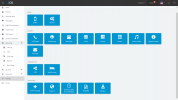
I am sorry but I do not see Parameters. I also looked in the advanced section as well.
1636047675995.png
 
Hi @alkyred,

You're not logging in with the Administrator login (admin). Are you able to login as the admin account?
 
Status
Not open for further replies.

Forum statistics

Threads
111,975
Messages
590,084
Members
164,902
Latest member
OnionITServices