Engage with your Website Visitors with Chat, Talk & Video

  • Thread starter Thread starter Constantinos Constantinou
  • Start date Start date
Status
Not open for further replies.
yes its possible - you need to link in the javascript. We need to make a small description how to do it, we will work on it....

Hi Nick,

Any update on this? I'd love to be able to add a snippet of javascript to my website to allow testing of Click2Call. No, I am not using WordPress.
 
Yes i have 5001 open.
I think I found the issue. when you open the 3cx web manager page on your local network the link it gives you to cut and paste from the click to talk is an ipaddress and not the FQDN. if you open web manger from an external network using the FQDN then the click to talk gives you the correct link to cut and paste in to wordpress with the FQDN. Hopefully this will be fixed in the final release?
 
I do have one other glitch i'm experiencing with this feature. when i place a call though the web page there is no sound until i put the call on hold and then take it off hold then it's fine, or if i transfer the call to another phone then it also starts working?
 
Hello @Phone systems NZ ,

We've tried to reproduce your scenario, but we do not get the same behaviour. On our case, the audio works as it should as soon as you initiate the call from the website. We've tested with chat and elevation to audio or audio directly.

Can you please send me more information in a Personal Message?
 
I think I found the issue. when you open the 3cx web manager page on your local network the link it gives you to cut and paste from the click to talk is an ipaddress and not the FQDN. if you open web manger from an external network using the FQDN then the click to talk gives you the correct link to cut and paste in to wordpress with the FQDN. Hopefully this will be fixed in the final release?

On your local network I suppose that you can open 3CX Management Console again with the public FQDN. With this approach, the generated URL will be always the public one.

What do you think @Phone systems NZ ?
 
On your local network I suppose that you can open 3CX Management Console again with the public FQDN. With this approach, the generated URL will be always the public one.

What do you think @Phone systems NZ ?
I can't use the FQDN inside the local network i have to use the ip address (unless i play around with my DNS server, but i don't have access to this on other peoples sites) It should not matter how you get into the programming the cut and paste link should always display the fqdn and not the ip address
 
I can't use the FQDN inside the local network i have to use the ip address (unless i play around with my DNS server, but i don't have access to this on other peoples sites) It should not matter how you get into the programming the cut and paste link should always display the fqdn and not the ip address

It looks good as it is. We cannot know your FQDN unless you give it to us. This is something you need to either configure and give to 3CX or we default to an IP Address. Both are valid.

If you see the link with an IP Address it means that at installation time, upon the question "Do you have a local Managed DNS?" you answered NO, so we took the local IP. What do you expect the installation to do? It configured what you told it.
 
It looks good as it is. We cannot know your FQDN unless you give it to us. This is something you need to either configure and give to 3CX or we default to an IP Address. Both are valid.

If you see the link with an IP Address it means that at installation time, upon the question "Do you have a local Managed DNS?" you answered NO, so we took the local IP. What do you expect the installation to do? It configured what you told it.
I think you have misunderstood what i meant.

the installed system does know the fqdn as it's listed on the dashboard page under information FQDN. eg. FQDN = example.3cx.co.nz

the issue is if you log into the phone system web manager via the local network using the systems ip address for example lets say 192.168.1.1:5001 then this is what happens.

under the click2talk you get: your click to talk is: https://192.168.1.1:5001/callus#testcallque

BUT if you have logged into the web manager with example.3cx.co.nz:5001 now under the same click to talk you will get the correct item to cut and paste of https://example.3cx.co.nz:5001/callus#testcallque.

So what I am trying to point out to you is it should really be giving you the correct cut and paste link no matter which way you login to the web manager.

does this explanation make things clearer?
 
Last edited:
I think you have misunderstood what i meant.

the installed system does know the fqdn as it's listed on the dashboard page under information FQDN. eg. FQDN = example.3cx.co.nz

the issue is if you log into the phone system via the local network using the systems ip address for example lets say 192.168.1.1:5001 then this is what happens.

under the click2talk you get: your click to talk is: https://192.168.1.1:5001/callus#testcallque

BUT if you have logged into the web manage with example.3cx.co.nz:5001 now under the same click to talk you will get the correct item to cut and paste of https://example.3cx.co.nz:5001/callus#testcallque.

So what I am trying to point out to you is it should really be giving you the correct cut and paste no matter which way you login to the web manager.

does this explanation make things clearer?

I understand better now..
But still, why do you login with the local ip? This is wrong. If you want to login using an IP Address, we assume admins do this to do something temporary - like to make a quick edit and logout.. If you are going to make full scale configuration and work with links that need to be https and that are based on webrtc / ssl technology, then login correctly with the FQDN and everything will show up correctly in the UI.
I do not see why we should change something because it is not used correctly.
Look at it this way - when you login using an ip address, you are using a workaround to access the mc. This is not the right way. If you want to fix this edit your hosts file. Bugs raised when the system is not used correctly will not be addressed.
 
I understand better now..
But still, why do you login with the local ip? This is wrong. If you want to login using an IP Address, we assume admins do this to do something temporary - like to make a quick edit and logout.. If you are going to make full scale configuration and work with links that need to be https and that are based on webrtc / ssl technology, then login correctly with the FQDN and everything will show up correctly in the UI.
I do not see why we should change something because it is not used correctly.
Look at it this way - when you login using an ip address, you are using a workaround to access the mc. This is not the right way. If you want to fix this edit your hosts file. Bugs raised when the system is not used correctly will not be addressed.
I don't see this way of logging in as a work around?
even on the welcome email it has links to a local ip address for when accessing the system from within the office for the webclient (on the same network as the 3cx server)
also i'm not going to edit my hosts file for all my sites and I definitely would not be editing the host file for all the pc's on a customers site for anyone that wants to access the Mc from the local network.
If i was to edit my hosts file on my own PC for all my sites then i will run into issues when 2 sites have the same local ip address for there 3cx server anyway.

Please don't try and say that sites should have there internal DNS sorted out to resolve this as i have a lot of small customers that do not have there own internal DNS server.

I'm just trying to help make things better for the 3cx product, surely i'm not the only one who logs in to the MC this way.
 
I don't see this way of logging in as a work around?
even on the welcome email it has links to a local ip address for when accessing the system from within the office for the webclient (on the same network as the 3cx server)
also i'm not going to edit my hosts file for all my sites and I definitely would not be editing the host file for all the pc's on a customers site for anyone that wants to access the Mc from the local network.
If i was to edit my hosts file on my own PC for all my sites then i will run into issues when 2 sites have the same local ip address for there 3cx server anyway.

Please don't try and say that sites should have there internal DNS sorted out to resolve this as i have a lot of small customers that do not have there own internal DNS server.

I'm just trying to help make things better for the 3cx product, surely i'm not the only one who logs in to the MC this way.
If i was to edit my hosts file on my own PC for all my sites then i will run into issues when 2 sites have the same local ip address for there 3cx server anyway.

ignore this bit as it's not actually an issue "If i was to edit my hosts file on my own PC for all my sites then i will run into issues when 2 sites have the same local ip address for there 3cx server anyway. "
 
Dear experts:
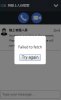
I have install 3cx V16 beta and use my website with wordprss, I also install the wordpress 3cx Click To Talk item . If I connect to my 3cx URL "3CX Click2Talk URL" directly, it can work. But When I connect to my website and it comes out :"Failed to fetch". My website have applied SSL,
 

Attachments

  • 20190112_2619.jpg
    20190112_2619.jpg
    24 KB · Views: 12
Please ensure that:
  1. You have allowed the domain under the PBX Settings -> WordPress
  2. You have added in WordPress the correct Click2Talk URL (Keep in mind that it is not the same as the direct one..). The correct one does not have a "/" between callus and the name of the click2talk. copy it from the extension settings, not from the browser's URL.
 
Please ensure that:
  1. You have allowed the domain under the PBX Settings -> WordPress
  2. You have added in WordPress the correct Click2Talk URL (Keep in mind that it is not the same as the direct one..). The correct one does not have a "/" between callus and the name of the click2talk. copy it from the extension settings, not from the browser's URL.
  1. YES, I have added as https://XXX
  2. YES, I paste and copy from the Click2Talk field not paste from the URL, does not have a "/"
  3. Even the service agent have been available to serve. the agent in the website also show as"No Agents available at the moment. Please leave a message and we will contact you shortly. "
 
  1. YES, I have added as https://XXX
  2. YES, I paste and copy from the Click2Talk field not paste from the URL, does not have a "/"
  3. Even the service agent have been available to serve. the agent in the website also show as"No Agents available at the moment. Please leave a message and we will contact you shortly. "
Do you get any error in the browser's console? (F12)
 
Do you get any error in the browser's console? (F12)
Dear Sir:
Thanks, after I uninstall all 3cx plugin in wordpress, and install it again. Deleting all post about the link. Do all the process again, it can work now. The next step will build build this function in un-wordpress website.
 
I don't see this way of logging in as a work around?
even on the welcome email it has links to a local ip address for when accessing the system from within the office for the webclient (on the same network as the 3cx server)
also i'm not going to edit my hosts file for all my sites and I definitely would not be editing the host file for all the pc's on a customers site for anyone that wants to access the Mc from the local network.
If i was to edit my hosts file on my own PC for all my sites then i will run into issues when 2 sites have the same local ip address for there 3cx server anyway.

Please don't try and say that sites should have there internal DNS sorted out to resolve this as i have a lot of small customers that do not have there own internal DNS server.

I'm just trying to help make things better for the 3cx product, surely i'm not the only one who logs in to the MC this way.

I am also sorry but this is not going to change. You should not be logging in with IP addresses. Main reason is that you are breaking ssl and breaking encryption on all traffic.Yes I perfectly understand a small site with no internal DNS requirements. In that case get them on the cloud how they should be. If the infrastructure does not allow, with < 10$/month you make a feast of a machine.
 
If i was to edit my hosts file on my own PC for all my sites then i will run into issues when 2 sites have the same local ip address for there 3cx server anyway.

ignore this bit as it's not actually an issue "If i was to edit my hosts file on my own PC for all my sites then i will run into issues when 2 sites have the same local ip address for there 3cx server anyway. "

Editing the host file is neither a solution. Personally, I would never edit the host file either. But its the next best advice I could give to someone that wants to keep on connecting with IP addresses to the MC.
 
Dear experts:
I have install 3cx V16 beta and use my website with wordprss, I also install the wordpress 3cx Click To Talk item . If I connect to my 3cx URL "3CX Click2Talk URL" directly, it can work. But When I connect to my website and it comes out :"Failed to fetch". My website have applied SSL,

Hi
I understand that this message is unclear - we are working on the plugin and also working on validation messages.
This means Failed to Fetch means that you entered the url incorrectly.

Specifically this part:
phonesystem-url="https://mypbx.3cx.eu:443"

Put correct port remember
Save file and try again..
 
Should look like this:

phonesystem-url="https://mypbx.3cx.domain:5001/"
minimized="false"
party="newyorkcallcenter"

etc
 
Status
Not open for further replies.

Latest Posts

Forum statistics

Threads
111,991
Messages
590,167
Members
164,929
Latest member
Cloudstar