Error 50014 WMR/Platform Down

Status
Not open for further replies.

brilledlighting

Free User
Joined
Apr 27, 2022
Messages
21
Reaction score
2
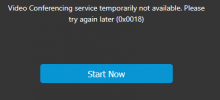
So our 3CX is still working. Able to make and receive calls still. Our 3CX app chat is still working as well. But when we try and make a video call (video conference), we get the below message. We just made video calls a few days ago on our platform, no recent updates run etc. We're V20, Update 1, Build 731 release.
Any ideas?
1719943919824.png
 
Hi there.
So your Web meeting is not working in there?
 
Yes, this is correct. this is the error i see when trying to start a web meeting:
1719951884520.png
 
What is the region you use in your System?
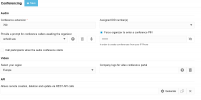
Go to the System > Conferencing
Let us know any try to pick another one
 
I was previously selected on "N. America", i switched it to Europe, same error as noted above,
1719952558831.png
 
I have tried using both in my case and i have no issue.
Is your System able to activate? Are you using own hosting or?
 
"System able to activate", not sure what this is in reference to. I am able to load my web interface, chat, make calls etc....just can't video.
This is self-hosted on our contabo server.
 
Ensure that your firewall is able to reach wmr.3cx.net as well as below links on the outbound TCP 443:
• wm-cdn.3cx.net
• recording.3cx.net
• uploads.3cx.net
• wmr.3cx.net
 
  • Like
Reactions: Evolute IT
Is this something i need to check on my server side or something i can check on m 3CX UI side?
 
it seems that your pbx is not able to connect to wm platform. Be sure that you can reach all the ip list reported by:
nslookup v18-vc-qos.3cx.net

the ip list can change so keep it updated on the firewall
 
  • Like
Reactions: OlegR_3CX
I am not familiar with how to access our firewall on our server. Anyone looking to make a few $ and help us out with this issue?
 
I am having the exact same issue. We're also self-hosted on V20, Update 1, Build 731 release. Everything works except for video conferencing, with the same error messages:
"Video Conferencing service temporarily unavailable. Please try again later (0x0018)"
And in the Event Log: "50014 The WMR/Platform is down."

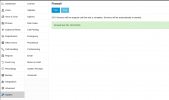
In the admin console dashboard, if you click on "firewall" under troubleshooting, there is a firewall test you can run. We have passed this test successfully; wouldn't this presumably be checking (among other things) if we can connect to wm platform?
Screenshot_2024-07-03_11-09-24.png
 
@mpd hi there.
But are you able to resolve domains and establish the connection to the IPs you find there or they are blocked for you too?
 
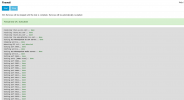
I also received a "pass" when testing using this method. Does anyone know how on contabo.com to access the firewall on the server so i can see if the domain is or is not blocked?
1720028410210.png
 
I observe the same issue on 6 systems out of 7 currently updated to V20.
The ip-address for v18-vc-qos.3cx.net are not all working.
Changing DNS internally to limit on a working ip-address has not solved the issue.
Changing the parameter for available mcu (WEBMEETING_MCU_LIST) to limit to a single working ip-address has not solved the issue.

All systems have the mainly the same configuration and are updated from V18.

Here the results for v18-vc-qos.3cx.net:

Code:
102.130.122.117 Success
102.130.122.164 Success
102.130.122.167 Success
139.59.60.71 Failed
142.93.52.187 Failed
142.93.62.154 Failed
146.190.48.212 Failed
152.89.218.181 Success
157.245.108.209 Failed
158.160.170.22 Success
158.160.173.12 Success
158.160.173.82 Success
161.35.218.54 Failed
164.92.177.252 Failed
167.172.102.66 Failed
170.64.145.108 Failed
170.64.163.104 Failed
170.64.225.88 Failed
188.127.224.128 Success
188.127.231.121 Success
188.166.157.144 Failed
20.233.252.141 Failed
20.233.253.21 Failed
20.233.253.25 Failed
206.189.24.168 Failed
34.176.174.48 Success
34.176.3.76 Success
35.221.175.237 Success
35.247.196.146 Success
46.101.139.138 Failed
68.183.38.148 Failed
 
Last edited:
Hello @Severin Meyer , can you provide privately your PBX IP address(es) ? We will check on our side too.
 
Hello @Severin Meyer,
I checked all your IPs and found nothing wrong on our side.

As first step: check your license status. If your maintenance is expired, WebMeeting feature won't work anymore.
If you recently updated your license, please restart Gateway Service on the PBX to force another status update for WebMeeting reactivation.

Error 0x0018 indicates that the PBX is unable to connect to the MCU server on port 443. The most common issue is connectivity restrictions on the PBX side.

From our records, all the non-working PBXs stopped contacting wmr.3cx.net on 2/7/2024 around 21:00 UTC. The two working ones are operating normally, and I see requests coming in.

Please verify that you can contact wmr.3cx.net from each PBX. You can do this easily by executing the following command on each PBX:

curl -v -4 https://wmr.3cx.net/webmeeting

You should receive a 200 OK reply with some HTML. If you get a timeout here, you are blocking requests to wmr.3cx.net, and WebMeeting will not work for you. Please check your firewall configuration or verify the issue with your PBX server provider.

If you have IPv6 connectivity on your PBX, it could be an IPv6 network issue. To verify this, run the following command:

curl -v -6 https://wmr.3cx.net/webmeeting

If you get a timeout here, it means that your IPv6 connectivity has a problem. In this case, a quick solution is to disable the IPv6 network on your PBX to prevent IPv6 from being used, since it's failing and has priority over IPv4.
 
  • Like
Reactions: OlegR_3CX
- All License (V20) are valid till end of this year 2024.
- The system were rebooted several times.
- All systems has "Automatically bind to IPv6" disabled.

As v18-vc-qos.3cx.net is not returning any IPv6 address, I assume that IPv6 could be an issue.
I will check the connections from the different systems.
 
@brilledlighting @mpd @Severin Meyer the problem has been identified and fixed. License extension from 2/7/2024 to 31/12/2024 was not correctly propagated for some PBXs and the result was WebMeeting feature disabled because the maintenance was expired.

If you still aren't able to use WebMeeting, just restart Gateway Service to force a WebMeeting activation refresh.
 
Status
Not open for further replies.

Latest Posts

Forum statistics

Threads
111,973
Messages
590,075
Members
164,895
Latest member
jasonkkrause