Error during installation of 3CX Plugin

Status
Not open for further replies.

ulasozcelik

Joined
Sep 29, 2009
Messages
4
Reaction score
2
OS: Windows 7 Pro 32bit

I've pre-installed the Microsoft C++ 2010 SP1 + 2015 SP2 + the most recent version of 3CX Windows Client. When I try to install the most recent version of 3CX Plugin, I get the following error:
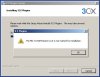
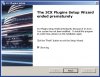
11.jpg 22.jpg

Please advise - thanks!
 
Im using Win 10 64bit ok
 
Hello @ulasozcelik,

TAPI is only available in 64 bits operating systems, that's why you get that error.

Kind regards.
Ernesto.
 
Hello @ulasozcelik,

TAPI is only available in 64 bits operating systems, that's why you get that error.

Kind regards.
Ernesto.

Oh no! Is there anyway to make it work on a 32bit OS? We'll be running it inside a VDI environment and it's impossible to switch the golden image to a 64bit OS just to accommodate this TAPI incompatibility.
 
Last edited:
If you need the single line TAPI, then please send me a private message and I will give you instructions. Multiline TAPI only works in 64 bits operating systems...

The single line TAPI will only let you make outbound calls for a single 3CXPhone instance running in the machine. So if you have many agents in different terminal server sessions running 3CXPhone, then this will not be a solution for you. But if you have a single user, then I can give you a solution.
 
i have a similar Problem on my Win 7 32 bit. The Installation of the Tapi-Driver dosent work. Please send me the solution. We are all Single user.
 
Hello @Alexander Walden,

Please send me a private message with your email address, so I can contact you back.

Kind regards.
 
Status
Not open for further replies.

Latest Posts

Forum statistics

Threads
112,323
Messages
591,896
Members
165,473
Latest member
NathanMitchell