Error updating 3CX client

Status
Not open for further replies.

IBML

Joined
Nov 17, 2017
Messages
8
Reaction score
1
I have an issue, every time we update the 3CX client
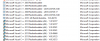
The Clientstart, notifies the user of the update, once you click OK to update we will get the error seen on the attached picture.

this persists since the last 3-4 client updates

On the local network

tried to unload / uninstall Antivirus = no success
tried disable firewall = no success
 

Attachments

  • 3cx error.png
    3cx error.png
    38.2 KB · Views: 67
I have the same issue. It worked once, but it stopped.
I tried to disable as well Antivirus and firewall and excluded as well the 3CX client folder from scanning.

Any suggestions from anyone?

Greets -Nicolas
 
No change on the 15.5 SP3 update
3CX clients still fail to update with the same error.....

This worked one time after we installed 3CX in autum 2017, since then -> failing
 
Hello @IBML

What happens when you un-install a client and re-install the new version? Does that work or do you still get an error?
Please make sure that windows are fully up to date and that C++ redistributables are installed for both x86 and x64.
 
Well i havn't tried to uninstall and reinstall the client, but this does not help now, since i need to wait for the next update.... i'm on the latest version.

This happens on Windows 7 to Windows 10 1709, all fully patched (Feb 2018)
C++ redistributables are installed (see attached)

Where can i download an older version of 3CX client for Windows ?
The verson before 15.5.8801.3
 

Attachments

  • 2018-03-02 09_55_02-Programme und Features.png
    2018-03-02 09_55_02-Programme und Features.png
    23.2 KB · Views: 11
I downloaded the client manually from the website and installed it. This worked. But after a new update, I still get the error.

So the whole update mechanism seems not to work anymore. I have exactly the same: Worked once we installed 3CX in 2017 and after while -> no updates anymore ...
 
Well i havn't tried to uninstall and reinstall the client, but this does not help now, since i need to wait for the next update.... i'm on the latest version.
How did you get to the latest version? Did the update work?
 
So the whole update mechanism seems not to work anymore. I have exactly the same: Worked once we installed 3CX in 2017 and after while -> no updates anymore ...

Do you currently have a client that does not update so we can take a look?
 
Do you currently have a client that does not update so we can take a look?

No, I just updated my client manually. One of my employees was 3 month away and we tested it. He did not get an update notice and the client was not able to connect properly. So we had to install as well a new client manually.
 
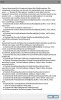
I have the same problem across a dozen clients. I have tried messing with TLS settings in the nginx config, disabling anti virus, to no avail. Not sure what the issue is here. It has been like this since updating to 15.5 (I think). See photo.
 

Attachments

  • broken 3cx client.jpg
    broken 3cx client.jpg
    172.7 KB · Views: 9
I have verified C++ 2015 x86 and x64 was installed, then I installed 2017 x86 and x64 to make sure that wasn't the issue with no success.
 
This is unrelated to pre-requisites.

Please list the following:
  • 3CX PBX Version
  • Current 3CX Client for Windows Version
  • Target 3CX Client for Windows Version (The version of the one you're trying to update to)
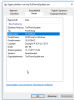
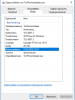
  • Go to %programdata%\3CXPhone for Windows\PhoneApp and let me know whether you have a file called "TcxPhoneUpdater.exe" and a file called "tmpTcxPhoneUpdater.exe"
  • Also let me know of the version of the "TcxPhoneUpdater.exe" and the "tmpTcxPhoneUpdater.exe" files by right clicking them and then selecting properties to see the version.
 
happened from pre (no idea what the number was) 15.5.9348.3 version and the corrosponding 3CX Client for Windows
I bet i have the same isseu on the SP4 update

Happens on fully patched Windows 7 64 bit and on Windows 1703 1709 fully patched

tmpTcxPhoneUpdater.exe version see attachment

To make it clear this happen since version 15 !
 

Attachments

  • 2018-03-29 17_51_26-PhoneApp.png
    2018-03-29 17_51_26-PhoneApp.png
    16.4 KB · Views: 11
  • TcxPhoneUpdater.exe.png
    TcxPhoneUpdater.exe.png
    16.2 KB · Views: 10
  • Like
Reactions: Nathan Boyd
Thanks.
We've found what could be a minor bug in the updater which is also why this isn't something many users experience. We'll let you know once we have more on this.
 
Leonidas,

great news ! thank you and keep us posted
 
To make it clear this happen since version 15 !

I'd like to echo this. I've noticed it at multiple clients now since V15. Glad to see that 3CX is working on the issue.
 
This is related to custom PBX configs on nginx where you've likely manually disallowed TLS 1.0 and only allow TLS 1.2 probably because of some need to be PCI compliant or as extra security.
Due to this custom nginx config by the user himself, the 3CX Client doesn't like it and throws this exception.

Without going into much detail on this, a fix/improvement on this will be available in SP5. If you cannot wait till then, PM me for a new 3CX Client Version. You will have to install/update to this version manually.
 
Leonidas,
thank you for the update.
I would not call this a custom config on ngnix, TLS 1.0-1.1 are dangerous weak and have to be turm off. so this is a mandetory change.
 
Leonidas,
thank you for the update.
I would not call this a custom config on ngnix, TLS 1.0-1.1 are dangerous weak and have to be turm off. so this is a mandetory change.

Of course, i agree with the security aspect of this.
It still is custom config made by the user, this is a fact.

Regardless, you will be seeing something about this in SP5.
 
  • Like
Reactions: craigreilly
A new version of the 3CX Client for Windows is available in your PBX's management console that fixes this issue.

To deploy this you will unfortunately need to revert your Nginx to 1.0 TLS, have everyone update their clients and then switch Nginx back to 1.2 TLS.

If you don't want to do this you will have to download the .msi file from the link below and manually update all 3CX Clients. After this, the exception you're getting should never occur again.
https://www.3cx.com/user-manual/
 
Status
Not open for further replies.

Forum statistics

Threads
111,856
Messages
589,406
Members
164,694
Latest member
Xavierf