Error upgrading firmware using 3CX web portal

lti_2006

Customer
Joined
Aug 15, 2025
Messages
14
Reaction score
6
Hi,

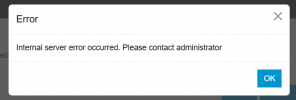
We currently have three Yealink T54Ws, and we are encountering an error when attempting to upgrade the firmware from within the portal. We get the following error message.
1756227844502.png
Any insight on what may be causing this and how we can resolve it?
 
Hi,

You can turn on Debug logging before trying, to see if there is some more detail available.

In general, what version is the PBX, what FW are the phones right now and what are they being updated to?

Best,
KS.
 
  • Like
Reactions: bitn2
The current version of the PBX is Version 20.0 Update 7 (Build 890 Alpha). This is the upgrade message we are getting for the T54Ws 96.85.0.5 (96.87.0.16 is available). When I attempt to manually upgrade the phones using the firmware downloaded from Yealink's website, it indicates an invalid ROM. It does this for all of the T54Ws.
 
  • Like
Reactions: JohnS_3CX
Hi,

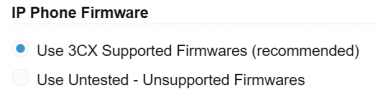
You can clear your firmware by switching to untested under Phones > Options:
1756993432319.png

Then press OK and it will wipe the firmware from your machine.
Change it back to Supported, and press OK again.
Go to the System>Updates tab, you will see the firmware there and you can download it.


Finally, upgrade only 1 phone, confirm it was ok, then upgrade the rest too.
 
Hi,

Thanks for the assistance; it worked.
 

Members Online Now

Forum statistics

Threads
111,831
Messages
589,277
Members
164,660
Latest member
RJenkinsROCK