- Joined
- Oct 15, 2025
- Messages
- 1
- Reaction score
- 0
Hi,
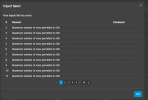
I am unable to import to my personal phone book with a csv file.
I downloaded the sample phonebook CSV. I entered my contacts, a list of 405 Contacts. I already have a couple hundred contacts.
Is there a limit, where if you have 500 contacts already you cannot import anymore, you can only manual add?
It works when I import a file that leaves me with under 500 total contacts in 3cx. Over 500 it gives me error.
My company and I have 3CX SMB FREE. Version 20.0 Update 7 (Build 1057)
I am unable to import to my personal phone book with a csv file.
I downloaded the sample phonebook CSV. I entered my contacts, a list of 405 Contacts. I already have a couple hundred contacts.
Is there a limit, where if you have 500 contacts already you cannot import anymore, you can only manual add?
It works when I import a file that leaves me with under 500 total contacts in 3cx. Over 500 it gives me error.
My company and I have 3CX SMB FREE. Version 20.0 Update 7 (Build 1057)