- Joined
- Feb 11, 2021
- Messages
- 7
- Reaction score
- 0
Hi everyone,
i have tried the Template Generator to create integration with 3CX.
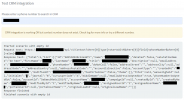
When uploaded and tested in 3CX i got the following error:
I suspect this error comes from the API url that i have to use to search by numer. It uses [x] brackets and thats probebly the 0 in the error that it encounters frst.
My XML is as following:
Can anyone offer some insight?
Best regards.
i have tried the Template Generator to create integration with 3CX.
When uploaded and tested in 3CX i got the following error:
Code:
Started scenario with empty id
System.Exception: Unknown expression: 0. Part: 0.
   at TcxLexicalParser.ValueManager.GetByPath(String[] path)
   at TcxLexicalParser.LexEvaluator.ProcessInt(CodeElement codeElement, IValueManager valueManager)
   at TcxLexicalParser.LexEvaluator.Process(Element element, IValueManager valueManager, Boolean isFunctionArgument)
   at TcxLexicalParser.LexEvaluator.ProcessInt(ConcatElement concatElement, IValueManager valueManager, Boolean isFunctionArgument)
   at TcxLexicalParser.LexEvaluator.Process(Element element, IValueManager valueManager, Boolean isFunctionArgument)
   at TcxLexicalParser.ExpressionEvaluator.ParseExpression(String expression, Boolean asExpression, IValueManager customManager)
   at CrmIntegration.EscapedExpressionEvaluator.ParseExpression(String expression, Boolean asExpression, IValueManager customManager)
   at CrmIntegration.ScenarioProcessorBase.ProcessRequest(ScenarioRequest request, IValueManager customManager, HttpClient client, CancellationToken token)
   at CrmIntegration.ScenarioProcessorBase.ProcessScenario(ProtocolScenario scenario, IValueManager customManager, CancellationToken token)
   at CrmIntegration.ScenarioProcessorBase.Execute(ProtocolScenario scenario, CancellationToken token)
   at CrmIntegration.CrmProcessor.GetContactInfoFromCrm(String contactNumber, String destinationEmail, Boolean createIfNotFound, CancellationToken token)
I suspect this error comes from the API url that i have to use to search by numer. It uses [x] brackets and thats probebly the 0 in the error that it encounters frst.
My XML is as following:
XML:
<?xml version="1.0"?>
<Crm xmlns:xsi="http://www.w3.org/2001/XMLSchema-instance" xmlns:xsd="http://www.w3.org/2001/XMLSchema" Country="NL" Name="WRS" Version="1">
<Number Prefix="Off" MaxLength="[MaxLength]" />
<Connection MaxConcurrentRequests="2" />
<Parameters>
<Parameter Name="APIkey" Type="String" Parent="General Configuration" Editor="String" Title="API Key:" />
</Parameters>
<Authentication Type="Basic">
<Value>[APIkey]:X</Value>
</Authentication>
<Scenarios>
<Scenario Id="" Type="REST">
<Request Url="https://domainhere.net/api/v1/Contact?where[0][type]=startsWith&where[0][attribute]=phoneNumber&where[0][value]=[Number]" MessagePasses="0" RequestEncoding="UrlEncoded" RequestType="Get" ResponseType="Json" />
<Rules>
<Rule Type="Any">id</Rule>
</Rules>
<Variables>
<Variable Name="ContactID" Path="id">
<Filter />
</Variable>
<Variable Name="FirstName" Path="firstName">
<Filter />
</Variable>
<Variable Name="LastName" Path="lastName">
<Filter />
</Variable>
<Variable Name="CompanyName" Path="accountName">
<Filter />
</Variable>
<Variable Name="Email" Path="emailAddress">
<Filter />
</Variable>
<Variable Name="PhoneBusiness" Path="phoneNumber">
<Filter />
</Variable>
</Variables>
<Outputs AllowEmpty="false">
<Output Type="ContactID" Passes="0" Value="[ContactID]" />
<Output Type="FirstName" Passes="0" Value="[FirstName]" />
<Output Type="LastName" Passes="0" Value="[LastName]" />
<Output Type="CompanyName" Passes="0" Value="[CompanyName]" />
<Output Type="Email" Passes="0" Value="[Email]" />
<Output Type="PhoneBusiness" Passes="0" Value="[PhoneBusiness]" />
<Output Type="ContactUrl" Passes="0" Value="https://domainhere.net/#Contact/view/[ContactID]" />
</Outputs>
</Scenario>
</Scenarios>
</Crm>Can anyone offer some insight?
Best regards.