Extension bulk import with router phones

Alphabetic

3CX MVP
Silver Partner
Advanced Certified
Joined
Jul 1, 2016
Messages
6,558
Reaction score
2,571
Hi

first time using CSV to import on a fresh system.

I wanted to set up all phones as router phones.

when I do the import it says something about the mac doesnt exist for the router phone.

is it possible to pre-populate these phones as SBC before importing or is it not possible?


Version 20.0 Update 7 (Build 1057 Beta)
 
Last edited:
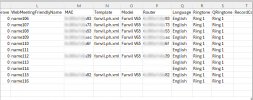
You don't need to prepopulate anything, just specify the router's MAC twice - once as its MAC and second time for the Router column. The SBCs will be created automatically.
 
  • Like
Reactions: Evolute IT
Hi Ivank

Like this?

1761319543233.png

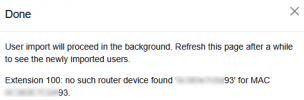
cos when Import this i get:


1761319589730.png
 
Yes, seems right. Are you sure user 100 is in the csv though?
Try leaving only the user who's throwing the error.
 
Hi Ivank,

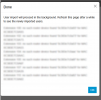
I left out all the other users because i couldnt be bothered blurring the other MACs. but I had a list of all users it failed on.
 
1761319977130.png
 
My point is - try import only one user successfully, not a bunch. You need to find what's wrong first.
 
ah ok ill try monday
 
I've imported a router phone w/o problems and also checked the code.
The message you see is shown when:
- The phone model cannot be a router phone and the Router MAC doesn't reference a valid router phone.
or
- The phone can be a router phone but it's MAC doesn't equal the Router MAC and the latter doesn't reference a valid router phone.

Fanvil V65 can be a router phone (check fanvil.ph.xml: <model ua="V65" canbesbc="true" ...).
So it seems you somehow specified incorrect MAC in Router column.
 
  • Like
Reactions: KyriacosS_3CX
Hi Ivank,

I changed all the MAC addresses to uppercase and it imported successfully, thanks.
 
I agree, it better be automatically normalized during import like the MAC.
 

Forum statistics

Threads
111,954
Messages
589,921
Members
164,852
Latest member
priya