Extension not ringing in call queue

Status
Not open for further replies.

FuTech-Nel

Bronze Partner
Advanced Certified
Joined
May 25, 2020
Messages
82
Reaction score
3
I have a 3CX install on Windows 10 Pro running the most recent version of 3CX.

The phone in question is a Yealink T46G running firmware version 28.83.0.130. When I call the queue, the phone does not ring. However, I can call the extension directly, and I can be transferred to the extension.

I looked into the receptionist view on the 3CX app for windows and I saw that the extension was not ringing. I set up a test queue and added the extension to the queue. I called the queue and the queue played back stating that there were no agents in the queue.

The extension is registered and the queue states is logged in. I logged out then back in again, called the queue again and the same message.

I know that there is something that I am missing but I am not sure that what it is.
 
Have you logged the extension into the queue? Under phones (or extension), click on status and check the extension is logged into queues

Click forwarding rules, as you change log extensions out of queues depending on status
 
Have you logged the extension into the queue? Under phones (or extension), click on status and check the extension is logged into queues

Click forwarding rules, as you change log extensions out of queues depending on status

As per my initial post, I already checked if the extension was logged into the queues and it is.
 
if you call Q number internally is that extension ringing?
Did you try to delete and recreate extension?
Status is clearly like that ?
1600968484264.png
 
if you call Q number internally is that extension ringing?
Did you try to delete and recreate extension?
Status is clearly like that ?
View attachment 18291

As per my original post, I can call the extension directly and be transferred to it from any other extension.

Yes I have checked the status on the extension and it says that it is Available and logged in to the queues.

I added the extension to a test queue and it is the only extension in that queue. I called it and there is a message stating that there are no agents in the queue.
 
you could do a try on this?
 
Last edited:
Just to clarify, is the extension explicitly logged into the queue - or just logged into queues globally?
 
Just to clarify, is the extension explicitly logged into the queue - or just logged into queues globally?

Yes the extension is logged in to the queue globally from the management console.
 

Attachments

  • 2020-09-28_09-59-01.jpg
    2020-09-28_09-59-01.jpg
    35.9 KB · Views: 52
I was referring to explicit login, as in explicitly logged into the very specific queue you were testing with.

By default, the global login will not log you in to the specific queues. This has to be done manually the first time.

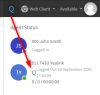
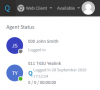
ie. here we see 011 who is logged into Queues globally (capital Q is blue) but in the specific queue we see below, 011 is not logged in. This means only 000 would ring, until I click the smaller Q below which is now gray, and make it blue.
1601302241600.png

1601302363138.png
 
Last edited:
I had an issue where the phone was logged into the queue but wouldn't ring. I was told to remove from the queue, save the queue then add the extensions back in. That fixed the problem for me.
 
I was referring to explicit login, as in explicitly logged into the very specific queue you were testing with.

By default, the global login will not log you in to the specific queues. This has to be done manually the first time.

ie. here we see 011 who is logged into Queues globally (capital Q is blue) but in the specific queue we see below, 011 is not logged in. This means only 000 would ring, until I click the smaller Q below which is now gray, and make it blue.
View attachment 18343

View attachment 18344

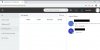
Here is a screen shot of the extension in the web client. the extension is logged into the Q globally but it is some how logged out of the Test queue2020-09-28_18-00-26.jpg
 
Ok, just log it in and it should be able to work normally.

Just click on the grey Q
 
Status
Not open for further replies.

Forum statistics

Threads
111,832
Messages
589,284
Members
164,662
Latest member
DejanMDS