Extension Outbound Caller ID after forwarding

Status
Not open for further replies.

Muhammad Faidhi Faiz

Joined
Sep 29, 2017
Messages
9
Reaction score
0
Hi All,

I have been searching the forum regarding the Outbound Caller ID that we set for the specific extension will show after Forwarding.

I have tested with Forwarding if the Extension set to Do Not Disturb and it will show the Outbound Caller ID that we set to the extension in mobile phone.

But the problem is when the Extension is Busy and the call forward to the mobile it shows our main trunk Caller ID and not showing the Outbound Caller ID that we have set for the extension.

Is there any way to do this?
 
Hello @Muhammad Faidhi Faiz

I have just tried replicating this on a V15.5.6354.2 (SP2) and i can see that the behaviour of the PBX is the same in both scenarios. If i tell the PBX to send the Outbound Caller ID taken from extension settings in the providers outbound parameters then the PBX will use the outbound caller ID found in extension settings.
What version PBX are you running and how is the extension set up? Can you describe the call flow for both scenarios so we can better try and replicate?
 
3cx version 15.5 SP2

Here the Call Flow.

Main Trunk Number: 0380842200
312 Extension Outbound Caller ID : 0338850999
312 Mobile Number : 0184058781
312 Forwarding Rule : To Mobile Number.

Situation 1:

Call from : Extension 406
Call to: Extension 312
Callee Extension State: Busy
Forward to: 0184058781
Number Showing in the Mobile: Main Trunk Number: 0380842200

Situation 2:

Call from : Extension 406
Call to: Extension 312
Callee Extension State: Do Not Disturb
Forward to: 0184058781
Number Showing in the Mobile: 312 Extension Outbound Caller ID : 0338850999
 
What provider are you using? Do you have only one provider? The PBX behaves the same in both scenarios and using the outbound caller ID of the extension in the outbound parameters of the trunk.
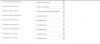
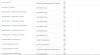
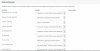
Can you send a screenshot of the Outbound parameters of your sip trunk so we can check the configuration?
 
3cx outbound Parameter 3.JPG 3cx outbound Parameter 2.JPG 3cx outbound Parameter 1.JPG 3cx outbound Parameter 1.JPG 3cx outbound Parameter 2.JPG 3cx outbound Parameter 3.JPG Hi ,

Sorry for the late reply, yup we have that one provider only, we are using aranet.

here are the screenshot.

open


open


open
 

Can you confirm that in "from: User part",

you have OutboundCallerId" Outbound caller id taken from Extension Settings in mgmt console

The screenshot has chopped off most of the field
 
Can you confirm that in "from: User part",
you have OutboundCallerId" Outbound caller id taken from Extension Settings in mgmt console

The screenshot has chopped off most of the field


Hi,

yup same like you mention.
 
Then you would probably need to run wireshark on the server and replicate the issue while capturing. Then you can compare the 2 captures to see what is different.
 
Do you get the same behaviour when extensions other than 406 originate a call? Does the originating extension have a CID number datafilled?
 
Do you get the same behaviour when extensions other than 406 originate a call? Does the originating extension have a CID number datafilled?

Hi,

yup tested with other extension, and 406 dont have outbound CID .
 
Hello @Muhammad Faidhi Faiz

I am on the same version and build as you. I just tried the exact scenario as you. Specifics that may differ are

1. I used the forward to my mobile option, not forward to external number.
3. I used my 3CX for Windows softphone to make my extension busy.

Both calls showed on my mobile as coming from my forwarded extension DID.

Cheers
Mark
 
Status
Not open for further replies.

Latest Posts

Forum statistics

Threads
111,880
Messages
589,533
Members
164,735
Latest member
998742