Solved Extension shows Do Not Disturb

Status
Not open for further replies.

siscom

Customer
Basic Certified
Joined
Jul 14, 2009
Messages
237
Reaction score
37
Good Afternoon Colleagues
I hope you are doing good and safe . I have a customer that has 3CX with below information:
  • Professional Annual 16.0.8.9
  • Installed on Windows.
  • Installed on physical workstation not VMWARE.

The issue that when i tried to call an extension (446) , The call immediately forward to Voice email . Kindly find the below notes:
  • Extension 446 configured on Planet IP Phone . This customer has another 3 Planet IP Phones from the same model (working as expected) in addition to 3CX softphones.
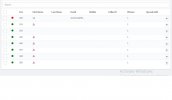
  • The status of the extension (446) is available when checking from 3CX management console as attached.
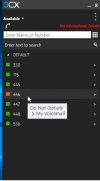
  • The status of the extension (446) is showing as Do Not Disturb (My Voicemail) when checking from another 3CX softphone as attached.
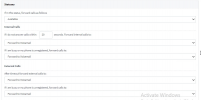
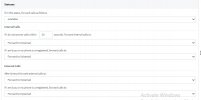
  • Attached also is forwarding rules for extension 446.
  • Attached also activity logs when calling extension 446 from another internal extension and when 446 call another internal extension (successful).

Any thoughts how to solve this issue?

Best Regards
 

Attachments

  • 446 - Forwarding Rules.jpg
    446 - Forwarding Rules.jpg
    48.9 KB · Views: 9
  • All STatus from 3CX.jpg
    All STatus from 3CX.jpg
    41.6 KB · Views: 9
  • Status from another phone.jpg
    Status from another phone.jpg
    23.1 KB · Views: 9
  • Activity Logs.txt
    Activity Logs.txt
    51.7 KB · Views: 3
on the forwarding rules, check the exceptions rules

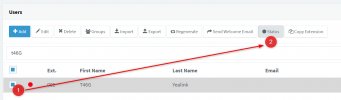
to check the status of the extension , under users select the extension and click status icon along the top. Screenshot in introduction https://www.3cx.com/docs/manual/pbx-extension-management/

the screenshot ‘all status from 3cx’ is showing you phones are registered, not the status on the extension (avavailble, dnd)
 
Last edited:
You were not looking at the current status. In order to check the current status:

1. Select Extension
2. Click Status button

You can now view and change the current status manually.

1654586133699.png


And just for clarification, when you are in this menu below, you are not selecting the current status.

This is only for managing what each status does IF it is selected as the currently active one within your 3CX client, or using the method above.
1654586295380.png
 
  • Like
Reactions: siscom
Good Afternoon Colleagues
Thx for your support . Issue has been solved by changing the status of extension from Do Not Disturb to Available from Web Client.

Best Regards
 
  • Like
Reactions: JohnS_3CX
Status
Not open for further replies.

Forum statistics

Threads
111,974
Messages
590,081
Members
164,899
Latest member
mazet