Extensions not showing on the Management console V16

Status
Not open for further replies.

Pranash

Silver Partner
Advanced Certified
Joined
Jun 27, 2019
Messages
7
Reaction score
0
Good Day all

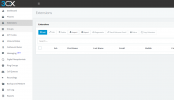
I am unable to see extensions on the 3CX management console.
I am logging in with the PBX admin account that was created when the PBX was set up, I also tested with another extension that has full admin rights to the management console.
If I check the phones tab I can see all the online phones and I can edit the extension from there.
From the extensions tab when I click on export I get the list of extensions on CSV.
3cx PBX is on Prem installed on a windows server 2012 VM.
I did full updates on the VM and rebooted also tried restarted the 3cx services.
3cx V16

Has anyone experienced this issue before and manage to resolve it.
1617258345375.png
 
I saw this exact issue yesterday when using Firefox (the latest version) and created a new extension. When I switch to Chrome everything worked properly. At a guess, I'd say a recent update (probably Firefox rather than 3CX) is causing the problem.

It is a common issue when using Firefox ESR as there is an overlap between ESR versions and some 3CX components don't display properly in the old (but technically still current) version but work fine in the new version.
 
Hi Michael

Thank you for taking the time to respond, I tried Firefox, Chrome, IE, and Edge.
Edge Version 89.0.774.57 is my default browser.
I still get the same issue.
I also tried different network connections and accessing the PBX internally via its internal IP.
 
Hi @Pranash,

Have you tried to give it a hard refresh? If that doesn't work, can you clear the cache and try again?
 
  • Like
Reactions: JohnS_3CX
Hi,
we have encounter the same problem since few month in office only but not from home. Then we are sure its a firewall issue, something in the http or http filter in firewall.
Firewall in office is up to date, we use watchguard here. We saw a report of something like this in logs : http invalid request-line format.

We didn't find which setting to change then we made an exception rule for *.my3cx.fr (France here) in the firewall and everything works now.

Probably the page wich displayed extensions has a problem in configuration as its something others reports too. I suggest you to create a official ticket in 3cx support panel as I will do. If many of us make this maybe 3cx will change what is wrong here.

If someone has a better idea or know exactly wich option we have to change in http/https handling of the firewall, pls share.

regards,
 
Hi,

The issue is confirmed. Temporary solution is to refresh the page when this happens.

Fix coming in V18!
 
thx for your reply but for us, refresh doesn't work and only an exception in firewall rule make everything works
 
thx for your reply but for us, refresh doesn't work and only an exception in firewall rule make everything works
Your case appears to be something different then, the issue that I mentioned will be fixed is unrelated to your case from what I understand.
 
Status
Not open for further replies.