Solved Extensions not visible by the admin account

Status
Not open for further replies.

davide.bonavita

Premier Customer
Joined
Apr 17, 2020
Messages
136
Reaction score
29
Hi there,
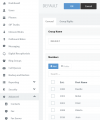
I'm testing the latest v18 version with a 3CX hosted instance. This morning, when I login to the admin console with the admin user, I see the extension section empty. The weird thing is that I do see the extensions in the groups and I can export the CSV with the full list.
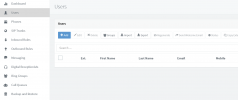
1636028647022.png

1636028675060.png
 
When you say "admin user" you mean the main admin account and not an extension with admin rights correct?

To start off, could you give it a try while running the browser in incognito mode with no browser extensions enabled to eliminate the possibility of this being a browser related issue?
 
Hello Chris, yes I mean the main "admin" account. I have the same behaviour in incognito mode
 
Could you try restarting the Management Console service from "Dashboard >> Services"? Do bear in mind that this will briefly interrupt functionality that depends on the Management Console such as the 3CX Webclients.
 
Hi again Chris, yes I've already tried to restart the services and to reboot the instance from the 3CX Portal without luck.
Everything works perfectly for my production instances (details in signature)
 
When you say 3CX Hosted, do you mean it's hosted by 3CX or with another Hosting provider?

If with another provider, which one and how was the instance deployed (3CX Portal deployment wizard, marketplace, etc)?
 
  • Like
Reactions: davide.bonavita
Hosted by 3CX :)
 
Okay, give this a try and tell me what happens.

Create a new test extension and give it full admin rights. Access the Management Console from a completely different PC and Google Chrome in incognito mode using that test extension.
 
Chris, I can see the list with the admin account from a colleague's computer. Weirdly enough, it happens with any browser on my computer, and only for this instance, but not for the other I manage. If you have any clue about this that would be nice, otherwise we can just close this and give you a thanks anyway
 
Chris, I can see the list with the admin account from a colleague's computer. Weirdly enough, it happens with any browser on my computer, and only for this instance, but not for the other I manage.
I have to say, that is pretty strange. All I can recommend is clearing the cache and offline browser data for that site on one of the affect browsers or all and make sure you're not running any 3rd party browser extensions that may be interfering.

EDIT: As the scope of the issue has been narrowed down to the PC accessing the Management Console, I'll be marking this thread as solved.
 
Last edited:
Status
Not open for further replies.

Forum statistics

Threads
111,974
Messages
590,081
Members
164,899
Latest member
mazet